







Alien Arena 2007
Version: 6.10
Category: Action
Average of 8 Ratings: 

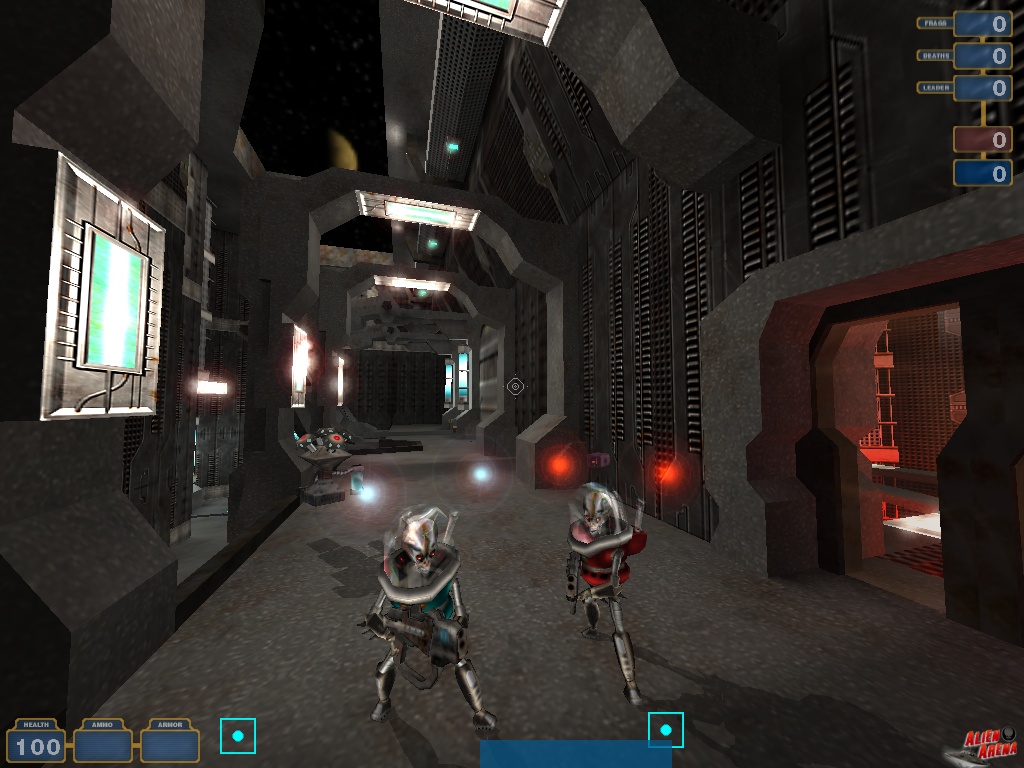 Fast paced freeware deathmatch game!
Alien Arena 2007 is a fast paced, retro sci-fi themed game jam packed with features such as over 40 maps, 7 game modes, game mutators, 11 player characters, 9 weapons (each with an alternate firing mode), and the Galaxy front end that includes a server browser, IRC client, stats lookup, and a buddy list to keep tabs on your favorite players. New for 2007 is Team Core Assault, a team based mode with frantic action and speed, loads of brand new maps rich with color and detail, and enormous enhancements to the codebase that improves speed, security, and stability. Enhancements such as weapons stats and winner's podiums add a little new flavor to the game experience. Now at version 6.10, the CRX engine now includes real-time lighting and shadows, vastly improved dynamic lighting, more efficient particles and weapon effects, improved shaders, lensflares, fog, music control, and optimizations to make it sleeker and smoother than ever before. With so much content and code being revamped, Alien Arena 2007 bears little resemblance to it's predecessor.
Alien Arena also has a large community that has made available a huge amount of add-on resources, such as maps, models, skins, and other nifty enhancements that are easily applied to the game if the user so wishes. The community can be easily accessed through the Galaxy front end, using it's chat interface, and is always eager to help with any questions or problems running the game. Player stats are globally tracked and accessed either through Galaxy or via the Alien Arena homepage. A number of clans are registered, and each week a tournament is held on Sunday, 6pm Eastern time. Players are advised to show up fifteen minutes beforehand to get the server password. Ladders and cups are in the process of being organized, and more information will be made available soon.
License: free
Requirements: 1ghz CPU speed, 256mb ram, 3d video, 450 mb hd space
| Sound: | Play in X: | Play in Console: | Multiplayer: | Network Play: | 3D Acceleration: | Source Available: |
|---|---|---|---|---|---|---|
| yes | yes | yes | yes | yes | yes | yes |
- Alien Arena 2007 home page
- Download Alien Arena 2007
- Fan site with many 3rd party maps, addons
- Tons of useful Alien Arena information!
- Fan site with news, clan matches, tourneys
Submitted by Irritant on 2006-08-31.
---------------------- camila17 visit rss agregate.
For some reason I feel completely different with this release. I played it again and again and while I still think the effects might be a bit too much.
If playing online I would properly turn a lot of the firework off since its starting to affect gameplay.
Still an impressive game that I already have already wasted some hours playing and properly are going to waste many more :-)
I currently have a little difficulties with the sound but I'm certain that it is my computer (actually I'm pretty sure). I therefore cannot fully judge the game yet but so far it looks and feels great!
gedit has not been able to detect the character coding. Please check that you are not trying to open a binary file. Select a character coding from the menu and try again.
I am running Ubuntu. I have no idea what to do. Please tell me :)
But you should not use gedit. You should run "chmod +x filename" on it. Afterwards, you can click it and it should install.
gedit has not been able to detect the character coding. Please check that you are not trying to open a binary file. Select a character coding from the menu and try again.
I am running Ubuntu. I have no idea what to do. Please tell me :)
it says:
Please check that you are not trying to open a binary file.
q: what is a game?
a: a binary file? oops, indeed...*g*
so right-click the game-binary with your mouse and 1. open it with "sh", which treats it as a binary
2. make it executeable in the permissions- or security-options.
q: why didnt it work from start?
a: perhaps your packer isnt configured to preserve file permissions, or the zip was improper packed.
OR
2. make it executeable in the permissions- or security-options.
the "OR" got lost in the previous posting
"gedit has not been able to detect the character coding. Please check that you are not trying to open a binary file. Select a character coding from the menu and try again."
I am running Ubuntu. I have no idea what to do. Please tell me :)
On the line "Owner" check "execute" then close.
I like the graphical quality of this game but if I want something that "just works" I'll stick with Nexuiz.
Now, if you want some possible solutions to the above *very* easy to fix problems:
1. Use the SDL version. Simply edit the AlienArena shell script to use crx.sdl instead of crx. This is VERY BASIC. Most gamers understand what an sdl version is for, and it's well documented.
2. 99.99% of people don't fool with inverting the mouse, but if you are one of those people, and it is not working for you in the menu - note - this does work in MOST systems, btw - then very simply at the console type m_pitch and it will show the value. When you get that value, then just type m_pitch -value (where value is the number you had). If it was negative to begin with, then make it positive. Very simple.
Ok, I hope this clears it up. Nothing is more frustrating then seeing the reputation of a game get ruined because people don't take the two seconds it would take to actually do some research or *ask* someone how to get it working. Of course this is nothing new to Linux gaming, but with Linux becoming more popular than ever, and more new people using it for gaming, these types of things are bound to occur.
Oh, and btw, Nexuiz is a fine game as are many other games, but you know what? I had to do some things to get sound working for that game too. It's just the nature of linux gaming in it's current state. It's unpredictable at best.
Nice, although I did not like the sounds and music.. but anyway it is a cool game whenever I have some time to kill! :)
and then echo 'crx.x86_64 0 0 direct' > /proc/asound/card0/pcm0p/oss
or
echo 'crx.i686 0 0 direct' > /proc/asound/card0/pcm0p/oss
This game reminds me of a level on Timesplitters2 or PerfectDark
The version is reported as "6.04 i386 Apr 5 2007 Linux", and I'm running it on gentoo linux (kernel 2.6.19). The USB mouse and glidepoint otherwise work elsewhere without exhibiting this behavior. (I've also tried other mice with the same result.)
I can definitely give more information, but nothing in the output or log files appears to be representative at all. Thanks in advance.
-bill
cd ~ svn co svn://svn.icculus.org/alienarena2007/ alienarena2007 cd alienarena2007/trunk make; make install ./crx.sdl
These would be the steps to get the latest, compile, and run it. Of course, you can use svn update to update from subversion, and you may want to symlink crx.sdl to /usr/games/bin/alienarena or something.
./crx.sdl.$acmd +set game arena $*
Currently the AlienArenaSDL script is written the same as the AlienArena script.
/usr/games/games/alien$ ./crx ./crx: error while loading shared libraries: libXxf86dga.so.1: cannot open shared object file: No such file or directory
is this an AMD64 issue? suggestions are appreciated.