







Ankh
Version: 1.1
Category: Rpg
Average of 4 Ratings: 

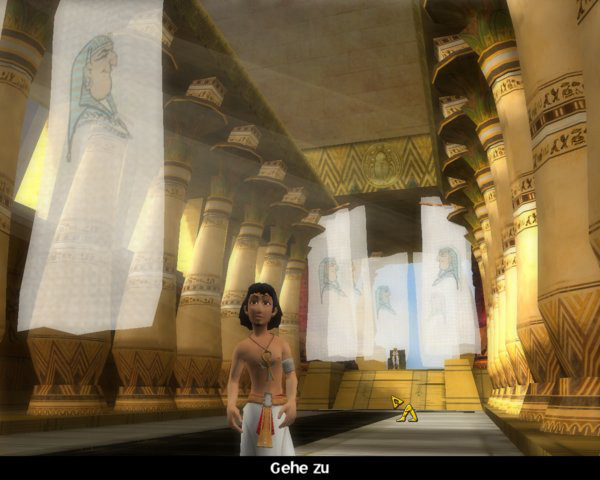 Adventure in ancient Egypt
In Ankh, you take the role of Assil, a youngster with a problem. He has been cursed by the gods for desecrating a pyramid (but it was a great party!), and needs to find a way to break the curse.
Take Assil through ancient Egypt in a quest to restore his fortunes and regain the favour of the gods.
License: commercial
Cost: 35$
Requirements:
- Operating System 2.2.x or better Linux kernel with glibc-2.2 or later and X-Windows (XFree86 3.3.5 or later)
- Processor 1.0 GHz x86 Processor
- Memory 256 MB
- Disc Space 900 MB
- CD Rom 4 x CD Rom
- Graphics Card Hardware Accelerated 3D Graphics card with 64 MB video memory
- Sound Card OSS or ALSA Compatible
| Sound: | Play in X: | Play in Console: | Multiplayer: | Network Play: | 3D Acceleration: | Source Available: |
|---|---|---|---|---|---|---|
| yes | yes | no | no | no | yes | no |
Submitted by nath on 2007-01-13.
http://www.rune-soft.com/article.php?action=view&article_id=35
I'm using FC6, 768 MB, GeForce 6200.
It seems, this is a fedora core 6 problem, because under (eg.) SuSE the game runs well.
Has anybody a solution for this?`
Greeting from Germany
You have to install the latest nvidia driver from nvidia.com because yum does not know about this driver in the repos. So you need to install the driver (version 1.0-9746) from nvidia manually. Do the following:
First, Download NVIDIA-Linux-x86-1.0-9746-pkg1.run from the Nvidia.com webpage,
then remove the old driver:
rpm -e kmod-nvidia xorg-x11-drv-nvidia
then install the X11-SDK (important!)
yum install xorg-x11-server-sdk
then start the installation of the 1.0-9746 driver
./NVIDIA-Linux-x86-1.0-9746-pkg1.run (follow instructions)
reboot
Make sure that you have "driver nvidia" in your xorg.conf. Not "nv".
Have fun with the game. It is amazing!
An adventure like the good old ones (like Monkey Island and so on). I really like it - though i'm searching for a point release, too (i own the windows version)
i love to see this game ported over to linux
with a nice installer only the linux-version is on the cd. but it wont run on gentoo amd64, even not in 32bit chroot. i dont know what i miss, because you can read everywhere in forums that many ppl play the linux-version without problems. i will try again now to get this started. perhaps i have to install kubuntu or something like that for ankh...
The installer unfortunately is quite buggy. I managed the installation by copying the CD and changing the installer so that it thinks it's being installed on a x86 box. (You have to change somewhere x86_64 to x86 or something alike.)
Then you also should install it in your home directory and not as root (I know it's ugly), because it tries to store some settings in the game directory (ouch!) and doesn't set the rights correctly.
Apart from that, it's a fine game and I really enjoyed playing it.
if ankh crashes after the intro,
if nothing works,
then...:
1. "cd" to your Ankh-folder (e.g. "cd Ankh/")
2. unzip the file "common.zip" from the directory "ANKH-CD://media/"
3. "chmod -R 766 folder-to-Ankh/"
play:D
for amd64:
start the installer with linux32 before the command!
go to your ANKH-CD-directory (e.g. "cd /media/cdrom" or "cd /mnt/cdrom") and type "linux32 sh setup.sh"
then follow steps 1-3
greetz
cari
----------------------------
zur sonne, zur freiheit!
Athlon XP 2400+, nVidia FX 5700LE, SuSE 10.2. The system runs fine 3D wise (Quake 1-4, Doom3, sauerbraten etc...) but this is (in default installation) at 0.5fps or less at the lowest quality settings. I managed to tune this up by using my systems SDL libs (see the FAQ linked in another comment here), now I'm at ~2-3fps - still not usable.
Yeah, graphics errors, too. In german I'd say 'Setzen, sechs' (teacher giving the worst possible mark to a pupil and demand him to sit down again...)
Pit
I only played a few minutes so far, but definitely my first rating had to be corrected. Still one star off for the nasty has-to-run-as-root business.
Pit
For those of you with troubles on Fedora Core 5/6 I have the solution.
First make sure you have the Nvidia 9746 or 9755 drivers installed from livna or freshrpms.net (I prefer the ones from freshrpms.net, uses DKMS and fiddling around when a new kernel comes out)
Then install chrpath (You'll find it in Fedora Extras).
Next go into the Ankh installation directory and run the following
This will remove the "rpath" off of all the executables which says to "look in /usr/lib for libGL.so instead of /usr/lib/nvidia" In other words, we've all been using the software Mesa GL renderer not the nvidia hardware renderer, hence the 0.5 FPS.
I have been communicating back and forth with one of the linux developers at runesoft for the past week debugging this issue. And I have notified him of the solution, so hopefully there will be an update with this fix.
Installed Ankh as normal user. Ran Ankh from konsole and it errors out during splash screen startup with "symbol lookup error: /usr/local/lib/libvorbisfile.so.3: undefined symbol: vorbis_synthesis_idheader".
Original version was libvorbis-1.2.0-11. Ankh failed with error above. I upgraded to libvorbis-1.2.0-18 from pbone.net. Ankh failed with same error.
Any advice would be appreciated.
Julie and Steve