







Billiards
Version: 0.4.1
Category: Simulation
Average of 1 Ratings: 

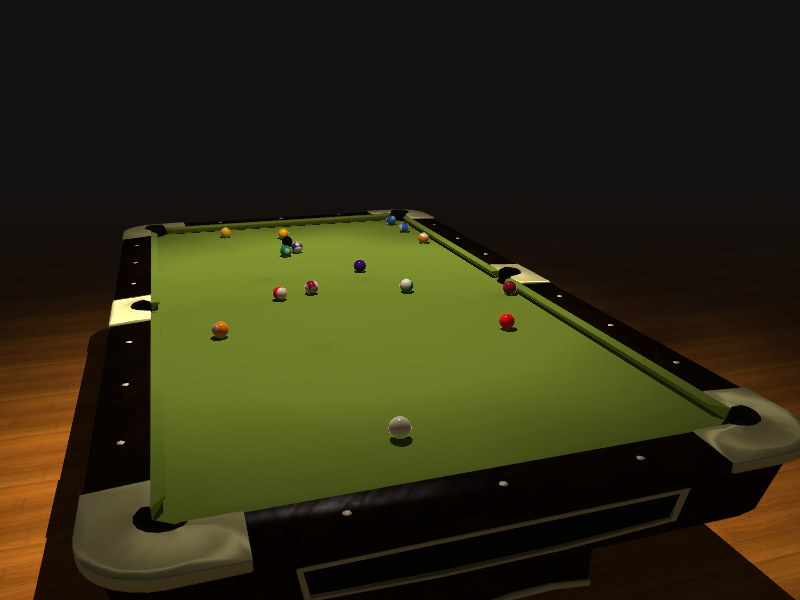 Billiards is a free cue sports simulator.
 It aims for physical accuracy and simplicity and should hopefully be useful for practising billiards on your own and against your friends when a real pool table is not available. Currently both a pool table and a billiards table (that is with and without pockets) are implemented allowing you to play eightball, nineball and carom billiards games.
License: free
Requirements:
- Techne, available for download at http://savannah.nongnu.org/projects/techne/
- The Lua 5.1 stand-alone compiler (to compile the textures and geometry resources).
| Sound: | Play in X: | Play in Console: | Multiplayer: | Network Play: | 3D Acceleration: | Source Available: |
|---|---|---|---|---|---|---|
| no | yes | no | yes | no | yes | yes |
Submitted by dpapavas on 2009-01-12.
A pity - it looks quite promising.
Pit
Thanks for the answer. This is an openSUSE 11.0, where I installed the latest ode myself. I tried recompiling ode with
So it's probably me lacking a suitable graphics card?--disable-asserts, but that didn't help :(However, I found that there is an error before that I didn't realize so far:
Pit
But when running it, I got:
ODE INTERNAL ERROR 2: geom must be placeable in dGeomSetBody()
It seems the normalization issues where my fault after all although I can't understand why this didn't come up with the debian packaged version of ODE. Anyway the fix is simple so you can either download and compile the current cvs version or, because then you'll need to use autoconf and automake to create the configuration script and makefiles which are not provided with the cvs version, you also have the option of making the necessary changes yourself for now. Just do:
grep Normalize *.c
inside src and change all instances of dNormalize3 to dSafeNormalize3. That should take care of the asserts. You'll also have to compile ODE like this:
./configure --enable-shared --enable-release --disable-asserts --with-trimesh=opcode
to get rid of the INTERNAL ERROR messages farvardin mentions below.
This gets Billiards to run with ODE 0.10.1 for me but it behaves pretty strangely. The cue goes through the cueball and you can't move the balls around. Can you confirm that you get the same behavior as well. I find it a little weird as according to the Changelog version 0.10.1 doesn't have important differences with respect to 0.10 which I am using right now.
Also regarding your graphics card issues: the truth is I haven't had a chance to run Billiards on many graphics cards. If you have an GeForce you should be able to run it with full shading. If you have an Radeon (or any ATI card) the boot script will currently automatically switch to simple toon shading. This may not be a good idea but the simple integrated Radeons I have tried couldn't handle full shading. Anyway if you have trouble running Billiards due to your graphics card try running it like this:
billiards -Otoon
otherwise if you can run it but it defaults to toon shading and you want to try the full shading codepath try this:
billiards -Onotoon
In any case let me know how it goes. I'm particularly interested in how billiards runs on different hardware.
PS: I'll make a new release with the necessary changes as soon as all this is sorted out.
Pit
I doubt your graphics card is too weak for toon shading mode. This might be yet another problem I'm trying to solve. In the opening position in the game of pool the balls are close together so that too many contacts exist at the same time slowing the game down. To check whether this is true start it like this:
billiards -Otoon -Ocarom
this will start a carom game where the situation is much better. If it runs ok then let me know and I'll send you a patch to try out. By the way, what graphics card do you have? Can you run it in full shading mode?
farvardin, have you had any luck running it?
Uhhh, the manual you say... That's sort of outdated to say the truth. A sad consequence of lack of time caused by wage slavery. Anyway you should read it but provided that the game runs correctly (as I've said I coudn't get it to behave well with ODE 0.10.1) you only need the mouse to play it. Just click and drag with each mouse button on the cue, balls and rest of the screen and you'll figure it out. There's nothing much to it. Don't forget to use the webgui though.
What sort of graphics card do you have though? I think that if you can actually run the game in full shading, you should be able to get a more or less decent framerate as well. Try to run in full shading carom mode like this:
billiards -Ocarom -Obilliards -Oframerate
If that's better then the problem lies elsewhere and hopefully I'll have a patch soon.
About the game, I could select balls and have several options for playing, but couldn't strike them.
That said it would make sense to include some options to switch quality based on your computer but I thought that, given that I could get a decent framerate on my relatively cheap laptop this wouldn't be necessary(don't quite remember the GPU now but it gets me 40-50fps with 4x FSAA and then there's always simple toon shading). I'll look into the matter once the more critical problems have been resolved. You might want to fiddle with the options in the webgui or in ~/.billiards to see if you can get it to speed up a little.
Now speaking of more critical problems, I'll have to look into resolving this issue with ODE 0.10.1 but this will probably take a few days due to the aforementioned wage slavery issue. In the meantime you could try to build against a previous ODE version. In fact it would be probably best to use the source that was used to build the debian package I'm using (but without the changes made by the Debian maintainer). You can get this here:
http://ftp.de.debian.org/debian/pool/main/o/ode/ode_0.9.orig.tar.gz
The latest experimental debian ODE package uses version 0.10.1 so I'll install that and try to figure out the necessary changes.
Could you also post framerates with these configurations by the way:
billiards -Oframerate billiards -Onineball -Oframerate
That's all for now. Stay tuned and let me know how you all do with ODE 0.9 and the provided compile options.
Dimitris.
I compiled the 0.9 version of ode and now I'm able to hit the ball :)
Looks like in toon mode there is no display of framerates? At least I couldn't see anything, neither on screen nor on the console output.
Standard pool is unplayable even in toon mode - a frame update every few seconds. The nineball version is very sluggish (~2-4 fps), carom mode is fine - the CPU runs at ~95%. From that it looks like a very nice implementation of the game physics.
As I said, it's only my (very old) laptop with Intel 855GM. Looking forward to test it on a better hardware :)
Pit
If you get better framerates as ball count decreases the slowdown might be caused by physics, not graphics. Try changing the simulation stepsize and tolerance. The current stepsize is 0.001 and is probably too low (I set it as low as I could get it to run on my setup) and you might want to raise it to say 0.005 or even 0.01. The change can be made through the webgui under the dynamics section in settings. The parameter is 'stepsize'. Also change the solver tolerance which is parameter 'softness' in the same section. The current value (1e-7 or a tenth of a micrometer) might be ridiculously low. Try setting it to 1e-6 or something like that. Maybe even higher.
Experiment, and let me know how the new settings work.
PS: No framerates in toon mode eh? I'll look into it.
Sorry if I was unclear - no, no way to run other than toon mode. The fps I gave were estimated from the jumping image when (trying to) rotate the FOV.
When I try to run with -Onotoon, the game segfaults (billiards: line 7: 9420 Segmentation fault). Probably this is related to the Mesa error message I mentione earlier? (This error is continuously reported in the console where I started the game is running). Or is it just too little memory?
Ha, the web interface is fun ;^> Guess I can also change things in the config file.... Increasing time step slightly reduced CPU load, but still not enough to play nineball. With carom I get some 40% CPU both from billards and the X server.
Pit
I can only play it with the -Ocarom option, otherwise it's much too slow.
Looks like it could be a great game!
"ODE INTERNAL ERROR 2: geom must be placeable in dGeomSetBody() /usr/bin/billiards: line 7: 28277 Abandon ./billiards.bin $*"
and the game crashes.
./configure --enable-shared --disable-asserts --with-trimesh=opcode --enable-double-precision
You'll need double precision or you'll get funny instabilities otherwise. Also make sure you 'make uninstall' the previous version before running 'make install' on the new one and that you reconfigure and remake Billiards itself after recompiling ODE. You can also make sure that billiards uses the correct ODE version by looking at the messages output by ./configure:
checking for ode-config... -I/usr/local/include -DdDOUBLE
checking for ode-config... -L/usr/local/lib -lode
These should point to the place where you installed ODE.
ODE 0.11 also works but they seem to have reversed something in the slider joint so the cue now moves back instead of forth and vice-versa.
Let me know if you can't get it to work.
Just a note. It doesn't seem to work with any version of ODE past 0.9.
I have it running full featured. The web interface is a really cool idea.
You can actually see the weave of the playing surface (what is that simonis 860 ?;))
This is the first pool game that I have played on a pc since virtual pool that actually has the right feel. The physics from ODE are nice !
Things still needed : Jump ball... the ability to position your view when lining up a shot. It can be done but it moves so slow. Sound.
Awesome job! you have a fan :)
Now as for adjusting your view while aiming, the action is deliberately so slow. The idea is that you more or less line up the shot while looking around and once you set up your cue and start aiming you'll only want to fine-tune. It takes some getting used to I suppose. That being said you can configure the sensitivity when looking around zooming or stroking using variables inside ~/.billiards altghough I've just noticed that i haven't included those in the GUI settings page. I've done this now and also added a variable to control fine-tuning sensitivity (it was hard-coded up until now). The changes have been checked into CVS and will be included in the next release.
Sound is actually supported code-wise but I'll have to somehow get my hands on decent royalty-free samples. If someone out there has access to a pool table and a good microphone let me know.
What do you need as far as sound it concerned ? I would think you need maybe 5 different sounds : ball to ball, cue to ball(good hit, and miscue), ball to rail, ball to pocket. The intensity of the sound would then depend on the physics involved...
Regarding sound the nice thing is that spheres, being perfectly symmetric, sound the same no matter how they're struck, except for the volume of course. But still to avoid regularity it would be nice to have two or three samples of each sound (that is, ball-to-ball, ball-to-cushion, ball-to-table, ball-to-cue) and then there's the rolling of balls inside the table before ending up in the collector.
By the way, there's a mailing list on the project home page which would be more suitable for this kind of discussion (that goes for all threads of course). it's also currently quite empty causing me some embarassment... :)
In a jump shot, the cue ball jumps simply because that is the only way it can go. The cue basically pinches the ball with the table. First, picture what you do with a draw shot... you hit low on the cue ball. When you jump, your view of where the cue hits the cue ball should be relatively the same, except for the fact that the angle of your cue over the table is bigger.
The physics engine, calculating on "instant of contact" shouldn't be the problem. In the real world, it has been measured, that the time a cue tip is in contact with the cue ball is ~1/10000th of a sec... virtually instantaneous.
Well, that is after rebuilding ode. For other FC10 users, its really not that difficult. You can get the source RPM of ode here
Make sure you have the rpm-build package installed ("rpm -q rpm-build")
If you do not, then install it (as root, "yum install rpm-build")
Then download the source RPM from one of the mirrors above and install ("rpm -Uvh ode-0.10.1-1.fc10.src.rpm")
Then edit the spec file (should be ~/rpmbuild/SPECS/ode.spec)
Find this line:
"%configure --enable-shared --disable-static"
Change it to the line below and save it:
"%configure --enable-shared --disable-static --disable-asserts --with-trimesh=opcode --enable-double-precision"
Then rebuild the RPMs ("rpmbuild -bb ode.spec")
Look in ~/rpmbuild/RPMS/i386 for the shiny new RPMs
Install using "rpm -Uvh ode-0.10.1-1.fc10.i386.rpm ode-devel-0.10.1-1.fc10.i386.rpm"
If they are already installed, you can do (as root again) "rpm -e ode ode-devel" prior to the above command to uninstall, or use the "--force" command-line switch to override the existing ones.
Now recompile/reinstall billiards, and it should work great.
Good luck!