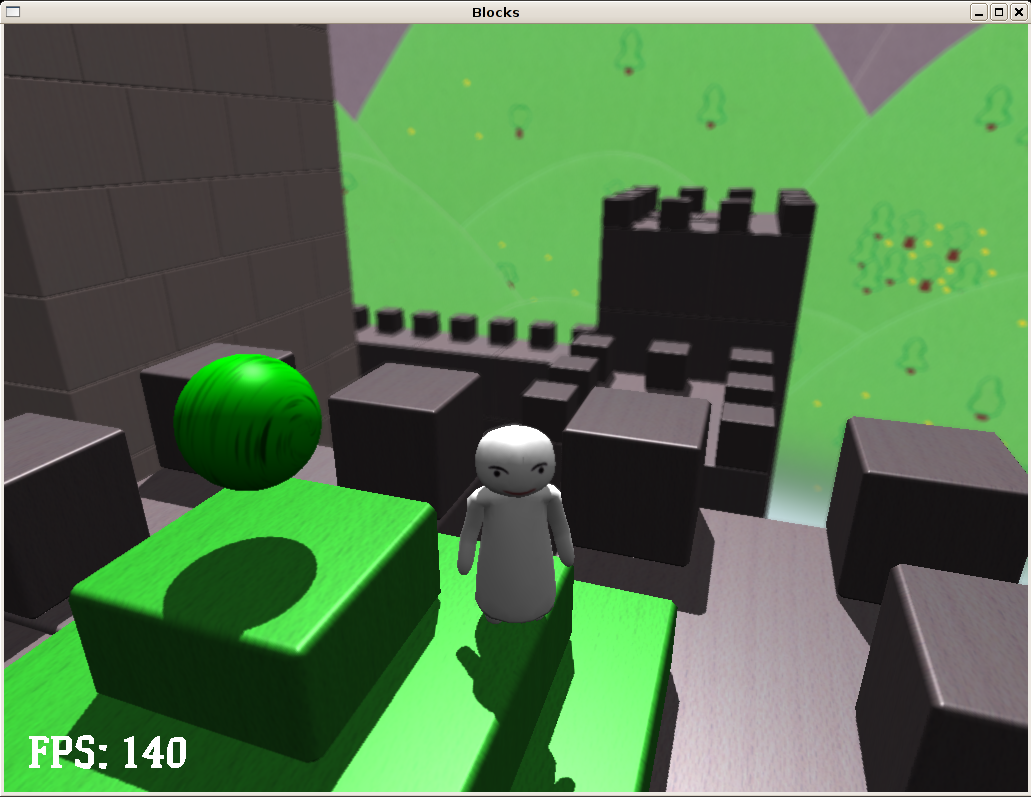


Blocks-Game Screenshot A 3D Jump & Run set in a small world of wood-blocks.

Blocks is a 3D Jump n' Run. The game is set in a small world, that is completely made out of blocks of wood, where you can move around freely.

To complete a level, you have to find enough marbles and reach the goal. To do this, you will sometimes need to move blocks by pulling and pushing and perform wall-jumps.

Blocks has some nice graphical effects like Per Pixel Lighting, Depth of Field or advanced global Shadow Mapping.

The best method to play Blocks, is by using an analog gamepad. There is a Mouse+Keyboard mode, but it is nowhere near as good as playing with a controller.

You will need a modern nVidia GPU to play Blocks. (>= geForce 6800) This is because I never had the opportunity to test the game on a Radeon. I removed all obvious nVidia-Only features, but I did not have any success on Ati/AMD accelerators.

Post a comment if you need help with anything or if you have found a bug.

License: free
Requirements: OpenGL, OpenEXR, OpenAL, freeALUT, freetype2, FTGL, Ogg/Vorbis

Sound:Play in X:Play in Console:Multiplayer:Network Play:3D Acceleration:Source Available:
yesyesnononoyesyes
Suggest an update

Comments

Looks cool! Good job!
I can't wait to test it with my new laptop i am planning to buy...
Re: Blocks-Game posted by anonymous on Oct 25 2007 6:23 PM
Hi, I was the one with the scons errors. Its built now, but when I run it I just get black window. Terminal output:
$ ./Blocks config.xml
parse XML - complete
calculate vertices - complete
GL_FRAMEBUFFER_UNSUPPORTED_EXT
Created Texture.
Segmentation fault
Re: Blocks-Game posted by Ginkgo on Oct 25 2007 8:53 PM
What graphics card do you have?
Blocks needs a geForce 6800 or greater. Ati-cards are not supported at the moment. Do you have the most recent driver installed?

I know, that the hardware requirements are very high, but they are needed by some effects. We hope, that we have support for Ati-cards in the next version. Then, we will think about somehow reducing the hardware requirements. (e.g. by removing deferred shading)
Re: Blocks-Game posted by anonymous on Nov 1 2007 9:29 PM
no, its a 6100. didnt think this would cause such build errors, just thought it would run crappily. never mind. when i have more money maybe...
Re: Blocks-Game posted by anonymous on Oct 25 2007 6:28 PM
Hi, I was the one with the scons errors. Its built now, but when I run it I just get black window. Terminal output:
$ ./Blocks config.xml
parse XML - complete
calculate vertices - complete
GL_FRAMEBUFFER_UNSUPPORTED_EXT
Created Texture.
Segmentation fault
A 6800 for running that?
I had to download and compile glfw (not listed as a dependency); the included version is 32-bit only.

When I jump by clicking the left mouse button, I seem to keep going up and up. How do I get back down?

Re: How do I come down from a jump? posted by Ginkgo on Oct 13 2007 11:25 PM
Thank you for your feedback. :) About the missing 64bit glfw lib: You are right, I should have mentioned that. The general setup of the source directory will probably change in the future. I hope this will solve several problems with building Blocks.

It's strange, that you do not come down again after a jump. I never had anything like that. You use a 64 bit system, right?

Hmm.. I will try to set up something to debug this in a 64 bit distro, but this may take some time.

Re: How do I come down from a jump? posted by Ginkgo on Oct 15 2007 12:27 AM
Ok, I could reproduce the bug on a x64 linux box. I will try to find the source in the next days.
Re: How do I come down from a jump? posted by Ginkgo on Oct 19 2007 11:12 PM
Ok, I have fixed the bug. Blocks should now build and run fine with 64 bit Linux. You can check out the Subversion repository, or you can wait until tomorrow or the day after tomorrow, when we will release the 1.1 package of Blocks on Sourceforge.
I get the following errors when trying to build with scons:
scons: Reading SConscript files ...
scons: done reading SConscript files.
scons: Building targets ...
g++ -I/usr/include -I/usr/include/OpenEXR -I/usr/include/freetype2 -Isource -Isource/external/GLee -Isource/external/glfw/include -Isource/external/tinyxml -c -o source/base/BlkLoop.o source/base/BlkLoop.cpp
In file included from source/base/BlkLoop.h:23,
from source/base/BlkLoop.cpp:20:
source/base/../BlkCommon.h:28:22: error: ImathVec.h: No such file or directory
source/base/../BlkCommon.h:29:24: error: ImathColor.h: No such file or directory
source/base/../BlkCommon.h:30:25: error: ImathMatrix.h: No such file or directory
source/base/../BlkCommon.h:31:23: error: ImathQuat.h: No such file or directory
source/base/../BlkCommon.h:32:23: error: ImathMath.h: No such file or directory
source/base/../BlkCommon.h:33:21: error: ImathGL.h: No such file or directory
source/base/../BlkCommon.h:34:22: error: ImathGLU.h: No such file or directory
source/base/../BlkCommon.h:36: error: 'Imath' is not a namespace-name
source/base/../BlkCommon.h:36: error: expected namespace-name before ';' token
source/base/../BlkCommon.h:38: error: expected initializer before '<' token
source/base/../BlkCommon.h:39: error: expected initializer before '<' token
scons: *** [source/base/BlkLoop.o] Error 1
scons: building terminated because of errors.


any suggestions please?
Re: scons errors posted by Ginkgo on Oct 15 2007 2:00 PM
You seem to be missing Imath. Imath is a 3D geometry library, which is part of OpenEXR. OpenEXR itself should need it, so it should come with the package. Do you have OpenEXR installed? If so, could you check, if you can find any Imath*.h files in you /usr/include?
Re: scons errors posted by anonymous on Oct 15 2007 3:01 PM
Thanks, I needed OpenEXR-devel. However, now I get the following (tailend of scons output)
In file included from source/font/BlkFtglOutlineFont.cpp:20:
source/font/BlkFtglOutlineFont.h:24:25: error: FTGL/FTFont.h: No such file or directory
source/font/BlkFtglOutlineFont.cpp:21:34: error: FTGL/FTGLPolygonFont.h: No such file or directory
source/font/BlkFtglOutlineFont.h:30: error: ISO C++ forbids declaration of 'FTFont' with no type
source/font/BlkFtglOutlineFont.h:30: error: expected ';' before '*' token
source/font/BlkFtglOutlineFont.cpp: In constructor 'Blk::FtglOutlineFont::FtglOutlineFont(std::string)':
source/font/BlkFtglOutlineFont.cpp:28: error: 'font' was not declared in this scope
source/font/BlkFtglOutlineFont.cpp:28: error: expected type-specifier before 'FTGLPolygonFont'
source/font/BlkFtglOutlineFont.cpp:28: error: expected `;' before 'FTGLPolygonFont'
source/font/BlkFtglOutlineFont.cpp: In destructor 'virtual Blk::FtglOutlineFont::~FtglOutlineFont()':
source/font/BlkFtglOutlineFont.cpp:35: error: 'font' was not declared in this scope
source/font/BlkFtglOutlineFont.cpp: In member function 'virtual Blk::Drawable*
Blk::FtglOutlineFont::use(std::string, Imath::V3f, float, float, Imath::Color4f, Imath::V2f)':
source/font/BlkFtglOutlineFont.cpp:45: error: 'font' was not declared in this scope
scons: *** [source/font/BlkFtglOutlineFont.o] Error 1
scons: building terminated because of errors.
Re: scons errors posted by Ginkgo on Oct 15 2007 4:38 PM
You will need the *-devel packages of all dependencies that I have listed.
Re: scons errors posted by anonymous on Oct 24 2007 4:15 PM
This is an example of uninformative error messages that you get when you have a badly written build script that doesn't check for dependencies.
Re: scons errors posted by Ginkgo on Oct 24 2007 5:28 PM
You are right. I will try to improve this in coming versions.
I'm puzzled by the fact that you created XBox 360 controller support before 'native' controller support... o_O

I won't bother downloading, because... nVidia video card? Aw.

Re: Blocks-Game posted by Ginkgo on Oct 21 2007 8:08 PM
We ARE using the native joystick API.The only problem was that different controllers place and orient the different axes of control-sticks differently. Until now, we could only test with the XBox 360 controller and just hardcoded the axis and button numbers. This has now changed with the current 1.1 version that is already online. Blocks was created under extreme time pressure over a semester in our CG lab at university. So, our approach often was "If it ain't broken, don't fix it.".
slop@slopbuntu:~/Downloads/blocks/Blocks-1.1$ scons scons: Reading SConscript files ... scons: done reading SConscript files. scons: Building targets ... g++ -o Blocks source/base/BlkLoop.o source/base/BlkScene.o source/base/BlkScreen.o source/blocks/BlkActionBlock.o source/blocks/BlkFixedBlock.o source/blocks/BlkNormalBlock.o source/cameras/BlkDirectionalLightCamera.o source/cameras/BlkPlayerCamera.o source/cameras/BlkSpotLightCamera.o source/cameras/BlkTitleCamera.o source/effects/BlkDepthOfField.o source/fbo/BlkDeferredFBO.o source/fbo/BlkDepthFBO.o source/fbo/BlkTexture2DFBO.o source/font/BlkFtglOutlineFont.o source/game/BlkFailOSD.o source/game/BlkGame.o source/game/BlkGameFail.o source/game/BlkGameMain.o source/game/BlkGamePause.o source/game/BlkGameSetup.o source/game/BlkGameTitle.o source/game/BlkGoal.o source/game/BlkMarble.o source/game/BlkOnScreenDisplay.o source/game/BlkPauseOSD.o source/game/BlkSetupOSD.o source/game/BlkTitleOSD.o source/geometry/BlkCPolyhedron.o source/geometry/BlkMesh.o source/input/BlkControllerInput.o source/input/BlkControllerInputConf.o source/input/BlkQuakeInput.o source/lights/BlkDirectionalLight.o source/lights/BlkEmission.o source/lights/BlkShadowlessPointLight.o source/lights/BlkSpotLight.o source/octree/BlkLeaf.o source/octree/BlkOctree.o source/openglTests/BlkOpenGLTests.o source/player/BlkPlayer.o source/player/BlkPlayerFalling.o source/player/BlkPlayerHoldingBlock.o source/player/BlkPlayerIdle.o source/player/BlkPlayerOnWall.o source/player/BlkPlayerRunning.o source/player/BlkPlayerState.o source/renderer/BlkNewRenderer.o source/renderer/BlkRenderActionBlock.o source/renderer/BlkRenderController.o source/renderer/BlkRenderFixedBlock.o source/renderer/BlkRenderNormalBlock.o source/shader/BlkShader.o source/skybox/BlkSkybox.o source/sound/BlkSoundController.o source/tests/Game-Test.o source/texture/BlkDepthTexture.o source/texture/BlkTexture2D.o source/xml/BlkAnimatedMesh.o source/xml/BlkXmlConfig.o source/xml/BlkXmlLevel.o source/xml/BlkXmlObject.o external/GLee/GLee.o external/tinyxml/tinystr.o external/tinyxml/tinyxml.o external/tinyxml/tinyxmlerror.o external/tinyxml/tinyxmlparser.o -Lexternal/glfw/lib/x11 -L/usr/lib -lGL -lGLU -lX11 -lpthread -lXxf86vm -lm -lImath -lIlmImf -lIex -lHalf -lopenal -lalut -logg -lvorbis -lvorbisfile -lfreetype -lftgl -lglfw32 /usr/bin/ld: cannot find -lXxf86vm collect2: ld returned 1 exit status scons: *** [Blocks] Error 1 scons: building terminated because of errors. slop@slopbuntu:~/Downloads/blocks/Blocks-1.1$
Re: what am missing? posted by Ginkgo on Oct 25 2007 2:03 AM
You seem to be missing libxxf86vm.
This is a dependency of xorg on my system(Arch Linux), so I expected this to come with any X-Server.
Please try 'slocate libXxf86vm.lib', to check, if you have this library installed. If not, your distribution will probably have a package for it, which you would have to install.
Re: what am missing? posted by anonymous on Oct 25 2007 2:25 AM
Yeah, he must have the library installed. BUT what he's missing are the header files, which will be in a "-dev" or "-devel" package, name depending on his distro.
Re: what am missing? posted by Ginkgo on Oct 25 2007 2:33 AM
It's a linker error, so I don't think that the problem is missing header files.
I searched a bit, and there seems to be a problem with ubuntu not creating a symlink from libXxf86vm.so.1 to libXxf86vm.so
Re: what am missing? posted by anonymous on Oct 25 2007 2:04 AM
cannot find -lXxf86vm

You see that bit right there? The only thing that looks like an error? Instead of dumping that entire blob of text here, why not search your distro's package manager for "Xxf86vm" and add the dev package for it? Or google for "cannot find -lXxf86vm"? Or at least crop out the hundred lines of "libfoo.o" crap that is of no use!
Re: what am missing? posted by lopzided on Oct 25 2007 10:45 PM
i did google it...couldn't find anything of use.
i also searched for a package containing that, and didn't find anything
however, I did find the package libxxf86vm-dev in the repos, as suggested...it built with scons after that.
however, when running it, i just get a black screen. The output in terminal is as follows:
slop@slopbuntu:~/Downloads/blocks/Blocks-1.1$ ./Blocks
parse XML - complete
calculate vertices - complete
GL_FRAMEBUFFER_UNSUPPORTED_EXT
slop@slopbuntu:~/Downloads/blocks/Blocks-1.1$

sorry about the extensive first post, i just thought all the info would be useful.
Re: what am missing? posted by lopzided on Oct 25 2007 10:48 PM
and when i say i searched for the package, i searched for lXxf86vm. i didn't know you had to omit the 'L'.
you don't have to be so harsh, not all of us are gurus.
Re: what am missing? posted by anonymous on Oct 26 2007 7:44 PM
Yeah, sorry about that. I was in a bit of a grouchy mood, but I shouldn't have been rude like that.
It's becoming commonplace for people to dump huge walls of text in the comment threads here on Happypenguin when they're asking for compilation help. It gets tiring to ask people over and over to just look for the first error message and post that, and well... Sorry, again.
Re: what am missing? posted by lopzided on Oct 26 2007 10:54 PM
No problem. Forgiven :)
Re: what am missing? posted by Ginkgo on Oct 25 2007 11:24 PM
You seem to have the same problem as the user on the bottom of the page.
What graphics card do you have?
Re: what am missing? posted by lopzided on Oct 26 2007 10:55 PM
From lspci:
01:00.0 VGA compatible controller: nVidia Corporation GeForce 6200 A-LE (rev a1)
Re: what am missing? posted by lopzided on Oct 26 2007 10:57 PM
Btw, Ubuntu 7.10 here...if that helps :)
I compiled it, but when I started it, my screen went black and the system became almost unresponsive (I switched to a text-console to kill the application). I'm using ubuntu 7.04.
Re: Blocks-Game posted by anonymous on Oct 26 2007 6:34 PM
That was yesterday, I just tried it again today. It turn out that, after being patient, the parts of my screen that get redrawed sometimes (like the clock) are visible again (the rest stays black). After waiting a bit longer, I can see the window of the game, showing a 3D world. But a bit later, I always get a "Segmentation fault (core dumped)".

Maybe it's just the version of the libraries that are shipped with Ubuntu 7.04 o (?). I'm running everything 32-bit and I have a working NVidia card (geforce go 7300).

But don't worry about it, I'm probably going to change distro soon anyway, so I'll try again than.

Re: Blocks-Game posted by Ginkgo on Oct 26 2007 8:33 PM
This sounds very similar to this problem.
Especially, since you have very similar graphics cards.
Please, also create a stacktrace and post a description of your system in the Sourceforge-Thread.

Log in or register to rate this game or post a comment.