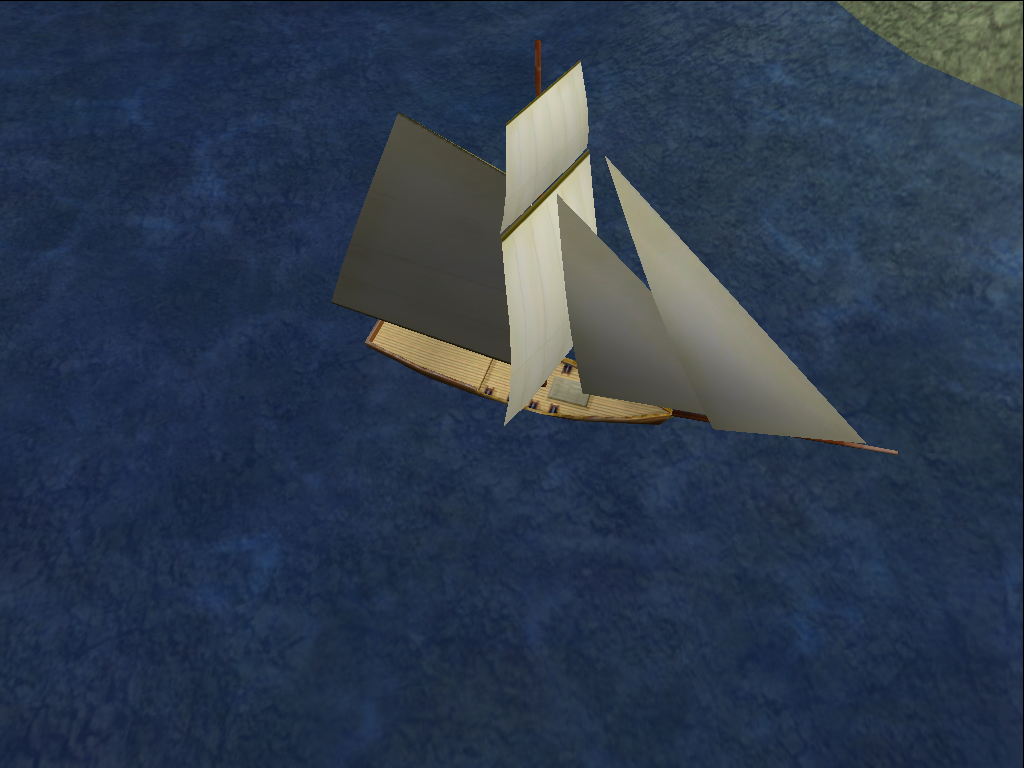


Crown & Cutlass Screenshot A open source, cross-platform clone of Pirates!

Crown and Cutlass is a 3d pirate action/adventure game in the spirit of the old Pirates! game. It is simultaneously being developed in Linux and Windows, with a strong emphasis on cross-platform compatibility. The project is still early on in development, although it is just beginning to look like an actual game.

License: free
Requirements:
SDL library
SDL_image library
Videocard capable of multi-texturing
OpenAL
Guichan (http://guichan.sourceforge.net/)

Sound:Play in X:Play in Console:Multiplayer:Network Play:3D Acceleration:Source Available:
yesyesnononoyesyes
Suggest an update

Comments

A good Idea, I hope to see updates and new features now, because this could be a really good game!
Re: Good Idea! posted by anonymous on Oct 4 2004 9:08 PM
indeed
Hello. i personally played pirates! on c64 for over 2 years and i remember it was leading the c64 top 10 for a few years either.

great idea! hope it works out! ;)

the screen shots look really nice.....i like the detail with the waves on the water
I had a few compilation issues with the OpenGL headers, but sorted them out quickly. Once built the visuals look very nice indeed. Not much gameplay in there yet, and the framerate in naval battle mode was terrible. I have just spent 3 days solid playing the new Sid Meier's Pirates, and the look of Cown & Cutlass compares very well.
Re: Looking very nice posted by raiskis on Dec 15 2004 11:15 AM
Would you share what you did?
I get " error: `glDeleteBuffers' undeclared"
Using NVIDIA OGL 1.5. Is it too old?
Re: Looking very nice posted by anonymous on Dec 15 2004 11:40 AM
I get the same thing... :-/
Re: Looking very nice posted by dthulson on Dec 15 2004 4:40 PM
Hi, I'm a developer for Crown and Cutlass (I'll refrain from rating my own game). If you have an nvidia drivers, it should compile out of the box as long as you have nvidia's opengl headers installed. They are provided with the driver. If you run the installer with the flag "--opengl-headers" it will install them automatically. Otherwise, it saves them to /usr/share/doc/NVIDIA_GLX-1.0/include/GL/ and you'll have to copy them to your GL directory manually.

If you either don't have an nvidia card or you don't want to use their headers for some reason, let me know. You'll have to change a few #ifdef's in extensions.cpp and extensions.h. I just haven't gotten around to getting that to work on non-nvidia machines out of the box yet.

Hope this helps, let me know if you have more problems.
Re: Looking very nice posted by anonymous on Dec 15 2004 8:43 PM
It will be nice if you can remove Nvidia dependency and replace to something that is more portable. Not all of us are using Nvidia.
Re: Looking very nice posted by dthulson on May 19 2005 3:01 PM
Agreed. I attempted to make it easier to deal with the extensions for Alpha 1.3, although the nvidia 7174 headers have some problems (see this thread for a work around: http://sourceforge.net/forum/forum.php?thread_id=1265801&forum_id=379056). My plan for 1.4 is to move away from nvidia's headers, since I'm tired of trying to keep up with them.
Re: Looking very nice posted by raiskis on Dec 17 2004 11:22 AM
It persists...
[quote ="man gcc"]
Directories named by -I are searched before the
standard system include directories.
[/quote]
and
[quote ="my x-term"]
g++ -ansi -Wall -Werror -g -I/opt/sdl-1.2.7/include/SDL -D_REENTRANT -DNO_SDL_GLEXT
-DTIXML_USE_STL -I/usr/share/doc/NVIDIA_GLX-1.0/include/ -o src/Terrain.o -c src/Terrain.cpp
src/Terrain.cpp: In destructor `Terrain::~Terrain()':
src/Terrain.cpp:220: error: `glDeleteBuffers' undeclared (first use this
function)
[/quote]
Sigh. I really liked Pirates :(
Re: Looking very nice posted by raiskis on Dec 18 2004 11:10 AM
Ok, the game seems to need the 1.0-6106 driver from NVIDIA and vorbisfile from last spring seems to bee too old...
But the demo looks nice, I really hope the development will continue. It is going to be great!
Re: Looking very nice posted by anonymous on May 11 2005 1:39 PM
If someone wants to help with some 3d models, what format should it use? You prefer blender models? wings3d? Should i export everything to obj? And the textures, should they be in PNG? What about sizes? Maximum allowed is what, 1024x1024, 512x512? Does it uses some sort of LOD for actual geometry and/or texture data? Does it have to be compressed already? Some sort of "artwork collaboration FAQ" in the website would be welcome ;)
Re: Looking very nice posted by dthulson on May 19 2005 2:56 PM
Good call, I'm working on adding something now. I'll post back with the link when it's up. Thanks!
Re: Looking very nice posted by dthulson on May 23 2005 2:55 PM
We have added a "How to contribute artwork" page. I noticed that it doesn't answer all of your questions, though. I'll see about adding more info about poly count and our (lack of) LOD.
Its lookin great so far! I'm running windows98 and ran the windows installer version. It installed great! When I ran the game it changed the display mode from 1024x768 to 800x600. Might not be the game though because I've been having problems with my graphics card in windows lately anyway. It would be cool to have different values at different towns.
Re: Crown & Cutlass posted by dthulson on Feb 28 2005 3:17 PM
Thanks for the feedback! There is a file in the same directory as the executable ("Config.xml") that will let you change the resolution and whether it is fullscreen or windowed. We are working on getting a dynamic economy. I admit, it's dull right now, since all the prices are the same everywhere. However, hopefully for our next release, we'll have some moving prices.
Re: Crown & Cutlass posted by anonymous on Mar 1 2005 3:19 AM
What about the Governor's daughter? ;-)
Just so you know, we are having some issues with the fonts in Alpha 1.3. The font image is over 2400 pixels wide, so many people's video cards can't handle it (max texture size of 2048). The GUI library we are using released a new version a few days ago that will allow us to rework the images to be smaller. I'll have to release a patch once I get that settled. Sorry for the trouble!
Re: Fonts in Alpha 1.3 posted by dthulson on May 23 2005 2:54 PM
Like the notes say, this should be fixed in 1.31...
Re: Fonts in Alpha 1.3 posted by dthulson on May 23 2005 6:13 PM
I had some problems with the exe I compiled for the windows .zip file, so I had to rerelease it. If you compile from source, it doesn't affect you. If anyone here uses the windows installer and already downloaded the 1.31 zip, please redownload it.

To clarify the patch: If you downloaded the Alpha 1.3 tar.gz source file, then you need the Alpha 1.31 tar.gz file. If you downloaded the Alpha 1.3 msi installer, then you need the Alpha 1.31 .zip file.

Re: Fonts in Alpha 1.3 posted by anonymous on May 24 2005 1:47 AM
Please remove Pentium 4 optimization, I always get invalid instruction signal on Athlon XP.
Re: Fonts in Alpha 1.3 posted by dthulson on May 24 2005 10:41 AM
Are you building from the source? If so, just change the flag in the makefile... I built the windows exe using the i686 flag, but I thought Athlons could run those. Are you using the precompiled windows exe, or building it yourself?
Re: Fonts in Alpha 1.3 posted by anonymous on May 26 2005 7:28 AM
I am using Linux and build from sources. After I : 1) Resolved GL header issue 2) Resolved Font issue 3) Removed P4 arch compile option Everything start running fine. I only wanted to report about "arch" problem, thanks.

p.s The game looks promising, and sources are clear enough to read.

I'm a developer for Crown and Cutlass. As the 1.4 change notes say, we have switched to using GLee (by Ben Woodhouse, http://elf-stone.com/glee.php) to handle opengl extensions. That should make it work out of the box for non-nvidia users. I'm really curious to know how it's working, especially for anyone who reported having problems earlier. Thanks.
Re: New OpenGL extension handling code posted by Yurand on Aug 19 2005 2:20 PM
On Windows all I get: The instruction at 0x77f52a72 referenced memory at 0x00000000. The memory could not be "read"
Re: New OpenGL extension handling code posted by dthulson on Aug 22 2005 5:01 AM
Sorry you're having trouble. Would it be possible for you to post a message in our troubleshooting forum? Please let us know what kind of processor you have. Also, what version of windows? What kind of video card do you use? What version of your drivers are you running? If you'd rather, just post that back here and we'll see if we can figure it out...
Re: New OpenGL extension handling code posted by dthulson on Aug 22 2005 12:09 PM
I should have asked you to post your log (that's what I get for answering posts too early in the morning). That will probably be the most helpful at this point. Can you post that in our forums? Thanks.

Log in or register to rate this game or post a comment.