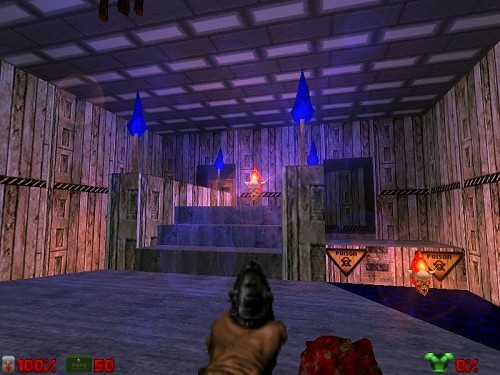


Doomsday Engine Screenshot A 3D-graphics enhanced game engine for Doom, Heretic, and Hexen.

The Doomsday Engine is an enhanced Doom source port, based on the source code of id Software's Doom and Raven Software's Heretic and Hexen. The purpose of the project is to create versions of Doom, Heretic and Hexen that feel the same as the original games but are implemented using modern techniques such as 3D graphics and client/server networking. A lot of emphasis is placed on good-looking graphics.

License: free
Requirements: FreeDoom or a commercial or shareware
Doom/Heretic/Hexen wadfile.
A graphics card with hardware accelerated OpenGL support.
SDL, SDL-mixer, and SDL-net (svga-lib for console).
Soundpacks from Sycraft.org (for background music) if your system does not support MIDI.
Also see the links and futhermore take a look at jDUI (UI enhancement)

Sound:Play in X:Play in Console:Multiplayer:Network Play:3D Acceleration:Source Available:
yesyesyesyesyesyesyes
Suggest an update

Comments

hello,

where to get the glu library ?

Re: lglu ? posted by anonymous on Jul 29 2004 12:03 PM
It's usually packaged as libGLU, libMesaGLU1, or some variation of such... Check your distro's package manager.. Under mandrake, you can pop open a console, su to root, and type "urpmi libMesaGLU1" and you'll have a copy in a couple of minutes. "urpmq GLU" would tell you the name of any packages that contain GLU, incidentally.
Other distros may vary in ease-of-use, package names, or sheer bloody-mindedness.
Re: lglu ? posted by anonymous on Aug 1 2004 10:12 PM
I had to add the -lz flag to compile it on Slackware current.
i think this is the best looking doom engine mod for linux, and i dont really care fo the 3D monters i like the original sprites :)

--rafaMEX

Re: the best looking on linux posted by anonymous on Jul 30 2004 10:20 AM
For those who want 3D environments but the original sprites, there's always my personal favorite Doom engine port, Legacy Doom.

http://legacy.newdoom.com/

There are Win32, Linux, and Mac OS X ports, and it works just fine. I've used it for years and see no reason to try anything different.

Re: the best looking on linux posted by anonymous on Jul 31 2004 3:28 AM
why do all you legacy/zdoom/etc people, say 'if you want doom with the original sprites then use [insert fav doom engine here] instead of doomsday!'? the modelpack is a optional download, you are not forced to download/use it at all, there are quite a few reasons why try out doomsday, first of all, it supports all opensourced doom engine games, second the 35 frames per second limit is gone, it caps the frames at 200 fps now... the list goes on, and btw skyjake is currently porting doomsday to the mac
Re: the best looking on linux posted by anonymous on Jul 31 2004 9:53 PM
nope, legacy doesnt look as good --rafaMEX (try both to see the big difference)
Re: the best looking on linux posted by anonymous on Aug 31 2004 9:50 AM
Well, my curiosity got the best of me and I did indeed try both. Aside from the really pretty settings screen I saw little or no difference in the way either engine rendered DOOM. I suppose there's only so much you can do to a game that old. The little "show the title and author of the level at the beginning" feature was cute, but again, nothing spectacular. They're both good projects; I just lean toward Legacy myself.
Re: the best looking on linux posted by anonymous on Aug 31 2004 4:52 PM
Your game is definately configured incorrectly....
Re: the best looking on linux posted by anonymous on Sep 26 2005 5:44 PM
I've played Doom Legacy for quite some time now, and it is very nice.

However after installing Doomsday I see little reason to go back.

This is so far what I've found Doomsday has over Legacy:
  1. More stable - I've found Doom Legacy much more prone to segfaults than Doomsday.
  2. Fewer rendering bugs - Especially in Final Doom, Legacy randomly omits walls so you often find yourself able to see half of the level before you get to it. Very distracting. This is the single biggest reason I'm leaving Doom Legacy behind.
  3. Interpolated movement - mouse and character movement is *much* more smooth.
  4. Dynamic lights affect surrounding objects. Creates a real mood when for example you come across 10 +1health powerups illuminating a now blue Baron of Hell. The Invisibility powerup in a dark room is particularly nice, as it fades between red and blue lights as the powerup animates.
  5. Secondary lens flares - eye candy I'll admit, but nice to have the option.
  6. Better rocket smoke, explosion, texture animation effects
  7. More control over every aspect of the game through a control panel.
  8. Status bar can be scaled incrementally
  9. Map is overlayed over the game screen
  10. It just looks nicer :)


Legacy has one clear advantage:
  1. Better and persistent blood splats, bullet holes and scorch marks. - This really adds to the gameplay in my opinion. When you're backtracking through a level and walk into a room full of bodies, bulletholes and splats on the walls you get a real "Heh, I've been here" feeling.
I've been playing with this for a few weeks now. Doom + hi-res textures + 3d models == Good.
3D models... posted by tjwhaynes on Jul 30 2004 9:04 PM
so where did you get your Linux-friendly 3d models. Detail textues and high res I can find in Linux friendly formats but the 3d models are escaping my grasp (I have jDRP 1.0.1 in some Windows exe resisting my attempts to unpack it...)

Ta muchly!

Re: 3D models... posted by anonymous on Jul 31 2004 3:36 AM
zedd form the newdoom.com forums put up some of the extracted addon packs:

ftp://wintermute.bounceme.net/jdoom/

Re: 3D models... posted by anonymous on Aug 30 2004 9:30 AM
if you have jdrp.exe or something just rename to jdrp.rar (then unpack) and place files jDRP.pk3 to something/deng/Data/jDoom/Auto/jDRP.pk3 jDRP.ded to something/deng/Defs/jDoom/jDRP.ded in file jdoom.ded after include "User.ded";

add line

include "jDRP.ded";

and just have a fun

pozdrowionka

Re: 3D models... posted by anonymous on Sep 11 2004 12:38 PM
Instead of looking for 3D models, make them yourself with Blender. http://blender.org Then you will have exactly what it is that you want, and there shouldn't be any arguements over copyright of who created what, later.
where does the porgame look for the Wad file at?
Read the README posted by tjwhaynes on Jul 30 2004 2:40 PM
especially the bit where it says:
I recommend creating your own startup scripts for jDoom, jHeretic and
jHexen.  In them, you can specify any command line options you wish to
use.  Below is a simple example.

#!/bin/sh /usr/local/bin/doomsday -game jdoom -file ~/wads/doom.wad \ -userdir ~/doomsday/jdoom

Before running this script you will need to create the runtime directory ~/doomsday/jdoom. All savegame files, message logs and other such files will be stored in this directory.

Re: Read the README posted by anonymous on Jul 31 2004 1:48 AM
I use this script, it creates the directories if they don't exist. Paths of course should be modified to reflect preferences and/or reality.

#!/bin/bash
if [ -f ~/doomsday ];
then    /bin/true;
else    mkdir ~/doomsday;
fi

if [ -f ~/doomsday/jdoom ]; then /bin/true; else mkdir ~/doomsday/jdoom; fi

/usr/games/jdoom/bin/doomsday -game jdoom -userdir ~/doomsday/jdoom -file /usr/games/jdoom/share/deng/Data/jDoom/doom.wad $@

Re: Read the README posted by anonymous on Aug 2 2004 3:47 AM
Hi,

Can someone with a completely working linux version (with the 3D models) post here the correct directory structure ? I can't get the doomsday engine to load the 3D models.

Thanks,

EiZ

Re:Got It To Read The Wad posted by anonymous on Aug 3 2004 8:56 PM
But it ran so slow It want to the ultamate doom screen looked like it froze. After a bit the minute came up but it was hard to even get it to quit
Re: Re:Got It To Read The Wad posted by anonymous on Aug 31 2004 4:50 PM
Sounds like you are using MesaGL which is software rendered. Do you have nvidia card? Their drivers are easy to install.
Re: Re:Got It To Read The Wad posted by anonymous on Sep 1 2004 1:00 PM
Figure That, But stuck With An Built in sis video card till i can buy a new mainboard
Re: Re:Got It To Read The Wad posted by anonymous on Sep 11 2004 1:17 AM
Tell me about it, It only took me 3 hours to install the NVIDIA drivers. :)
Re: Read the README posted by inva on Aug 31 2004 5:19 PM
Jepp, got it running after about an hour of trial-and-error and several strace runs. It's pretty nasty because Unix filesystems, unlike FAT/NTFS, are case sensitive. Some of the files have to be converted to lower-case, others must not.
  • Download jdoom_mpack.exe from the Doomsday HQ page.
  • Go to /usr/local/share/deng.
  • Unpack the data files with "unrar x -cl jdoom_mpack.exe md2".
  • Unpack the definitions with "unrar x jdoom_mpack.exe defs".
  • Move the contents from the newly created defs/jdoom to Defs/jDoom.
  • Go to Defs/jDoom and create a file User.def that contains the line 'Include "Models.ded"'.
  • Rename Fx.ded to FX.ded.
  • Rename Hudweapons.ded to HUDWeapons.ded.
  • If you want 3D missiles and fireballs uncomment the 'Include "Missiles.ded"' in FX.ded.
  • Enjoy.
  • Re: Read the README posted by anonymous on Sep 1 2004 6:28 AM
    do not use the old modelpack! you won't be able to get rid of it, and the new pack is incompatible to it, you should use the new modelpack aka jDoom Resource Pack (jDRP)
    I've been waiting for a Linux Port of the Doomsday engine for quiet a while now. Finally it's there. Combined with freedoom and the new Monster models it's just great :-)
    Wow, this is awsome, i only tried jdoom, very cool
    I've compiled doomsday in my linux fedora core 1.

    When I started, I have a few SDL errors. you have to visit http://www.libsdl.org/index.php and download the following packages:

    SDL-1.2.7-1.i386.rpm SDL_net-1.2.5-1.i386.rpm SDL-1.2.7-1.src.rpm SDL_net-devel-1.2.5-1.i386.rpm SDL-devel-1.2.7-1.i386.rpm SDL_sound-1.0.0-1.i686.rpm SDL_image-1.2.3-1.i386.rpm SDL_sound-devel-1.0.0-1.i686.rpm SDL_image-devel-1.2.3-1.i386.rpm SDL_ttf-2.0.6-1.i386.rpm SDL_mixer-1.2.5-1.i386.rpm SDL_ttf-devel-2.0.6-1.i386.rpm SDL_mixer-devel-1.2.5-1.i386.rpm

    Also, you need de gcc-devel package. I have compiled it with "./configure --whitout-opengl" (I want my linux doomsday as a dedicated server) Then "make" Then "make install"

    After the game is compiled, installed and whatever I have made this little script (you need the doom2.wad file, I only play doom2 right now)

    #!/bin/sh /usr/local/bin/doomsday -game jdoom -file /wad/directory/DOOM2.WAD \ -nomouse -nojoy -dedicated -server

    Just like that!!!

    Hi! I was wondering, has anyone compiled successfully "Doomsday" on Solaris Sparc? perhaps any pointers? =)
    Re: Dommsday engine on Solaris??? posted by mickthebike on Jan 26 2010 4:26 PM
    Could I get downloadlinks for the needed files. Hexen, doom whatever. Only free, thanks.
    It makes fine but when I do a make install I get this:

    /usr/bin/install -c .libs/libdropengl.lai /usr/local/lib/libdropengl.la /usr/bin/install: cannot stat `.libs/libdropengl.lai': No such file or directory

    can't find any reference to '.libs/libdropengl.lai' on the net.

    Any ideas where I go from here?

    Sfx_Init: Initializing SDL_mixer... DS_Load: Loading of libdssdlmixer failed. Sfx_Init: Driver init failed. Sfx is disabled. Fatal signal: Segmentation Fault (SDL Parachute Deployed)

    Get this error when trying to run after install. Anyone know how to fix or what package is needed? Using kubuntu 5.04

    Re: help libdssdlmixer? posted by anonymous on Apr 8 2006 11:09 AM
    Same problem here: "Fatal signal: Segmentation Fault (SDL Parachute Deployed)". Installed everything related to SDL and all it managed to do was get rid of the SFX error. The fatal error stayed the same. Documentation is for MS Windows, which is strange because you can already play Heretic and Hexen in DOS. This appears to be about a 0.10 version alpha attempt for Linux. Not much use unless you're a programmer.
    Very recommendable. Once the 3D-models and the high-resolution textures are installed, this engine really makes a great impression with the original DOOM 1/2 (TNT, ...)-feeling. Even high-quality sound is available. I really like it as an old-fashioned DOOM-fan.
    I eventually got this compiled OK, but on running it complains of missing libdropengl.so

    I can't find any useful references to this library anywhere online. It looks like it's supposed to be provided as part of doomsday, but certainly isn't when I compiled it.

    Anyone got any pointers?

    I'm still using 1.8.6 since all of the 1.9.0 betas have been really unstable and glitchy. Plus last one I used, one of the Final Doom games didn't work at all. I've told people to use the old version because of all this.
    Downloaded the "source" tarball-practically no instructions and the "compile in build sub-dir using cmake" produces an immediate error......where is the source and how to compile with cmake.All the instructions in the readme and compiling text make no sense......is this some kind of dummy or joke download?.
    Re: Compiling this game.....? posted by anonymous on Feb 4 2008 9:07 AM
    Well back again after trying to compile the tarball source tree for 1.8.6.....configures fine-no errors that halt the process.Then shortly into the compile(make) it ends with error 1 and this text; gcc -DUNIX -DGNU_X86_FIXED_ASM -D__JDOOM__ -I. -I. -I../.. -I../../Include/jDoom -I../../Include/Common -I../../Include -Wunused-variable -Wunused-function -g -O2 -MT p_setup.lo -MD -MP -MF .deps/p_setup.Tpo -c p_setup.c -fPIC -DPIC -o .libs/p_setup.o p_setup.c: In function 'P_LoadVertexes': p_setup.c:87: error: invalid lvalue in assignment p_setup.c: In function 'P_LoadSegs': p_setup.c:135: error: invalid lvalue in assignment p_setup.c: In function 'P_LoadSegsGL': p_setup.c:176: error: invalid lvalue in assignment p_setup.c: In function 'P_LoadSubsectors': p_setup.c:242: error: invalid lvalue in assignment p_setup.c: In function 'P_LoadSectors': p_setup.c:269: error: invalid lvalue in assignment p_setup.c: In function 'P_LoadNodes': p_setup.c:304: error: invalid lvalue in assignment p_setup.c: In function 'P_LoadLineDefs': p_setup.c:395: error: invalid lvalue in assignment p_setup.c: In function 'P_LoadSideDefs': p_setup.c:473: error: invalid lvalue in assignment make[3]: *** [p_setup.lo] Error 1 make[3]: Leaving directory `/home/harmonic33/test/freedoom/Src/jDoom' make[2]: *** [all-recursive] Error 1 make[2]: Leaving directory `/home/harmonic33/test/freedoom/Src' make[1]: *** [all-recursive] Error 1 make[1]: Leaving directory `/home/harmonic33/test/freedoom' make: *** [all] Error 2

    Anyone have an idea.......?

    Re: Compiling this game.....? posted by anonymous on Feb 5 2008 10:22 AM

    The only thing I can tell you is this:

    I also had compiling problems with 1.9.0-beta5.1 - even after pulling the CMakeLists.txt from their svn directory of: /tags/1.9.0-beta5.1/doomsday.

    After this I tried to compile the stable version, 1.8.6, but was unsuccessful with that as well. So I after searching the net for some answers I learned that the best version to compile was 1.9.0_beta1 (the reason being due to some gcc advancements).

    The trick is this though (and I'm sure you've done this, but this is just a general thing most people forget - the unexperienced as well as the experienced) is to install (or try to install) every thing that that comes back labeled as a no after you issue ./configure.

    Doing this led to installing many programs or development files for Fortran (as well as addition to others), however, it also allowed me to successfully compile 1.9.0_beta1. And let me tell you: It's worth the hassle to get this doom engine up and running, for it breeds some serious new life into this old relic of a game. A game I might add that changed gaming history! And this become especially true after one gets all the add-on packs (such as the ogg versions of the original music, environmental packs, hi-rez texture pack and the ui pack). The link to the add-ons can be found on the main page of doomsday towards the bottom.

    Also while we're on the subject of add-ons the way to use them is to enter this command: doomsday -game jdoom -file ~/doom/doom.wad -file ~/doom/jdui.pk3 -file ~/doom/jdtp.pk3 -file ~/doom/jdep.pk3 -file ~/doom/music.pk3. Please note that the name of the files as well as their location maybe different than what you have.

    I wish I was able to help you more, but I didn't document all the programs and their development files I installed. Anyways hopes this helps.

    Re: Compiling this game.....? posted by anonymous on Feb 7 2008 4:50 AM
    Thanks for your post....yes what you say makes complete sense.It had occured to me(and not just with this compile) that many of the ./configure queries resulting in no(not installed....) can be important. But with a lot of source developed by *nix programmers those " no's" most of the time do not matter.This project has been pre-dominantly a windows platform,and l have found issues with compiling source from such projects. l remember one game some years ago l think l ended up installing over 2 hundred megs of obscure librarys and dev's to compile and run a 10 meg game!!!...... l know how much easier it is to code a multimedia project when using third party lib's. Anyway have way too many games to play and oh so little time! Waiting for the binaries to UT3.....the drool pooling at my feet!
    Re: Compiling this game.....? posted by anonymous on Feb 5 2008 4:52 PM
    It's worth it to compile 1.8.6, 1.9.0 is just too unstable and problematic.
     
    Basically, you need an older version of GCC - if you have Ubuntu or Debian, do apt-get install gcc-3.4 g++-3.4. Then before you do ./configure, type:
     
    export CC=gcc-3.4
    export CXX=g++-3.4
     
    This should remove all the silly lvalue errors.
    Re: Compiling this game.....? posted by anonymous on Feb 5 2008 4:56 PM
    Oh, and if you don't have Debian/Ubuntu/some distro that allows you to install an older version of GCC (and it'll exist side by side with the latest version in the repository, so don't worry), you can go get and build the old version yourself and it'll exist along with your installed version, as long as you use the -3.4 suffix (check the configure options).
    Re: Compiling this game.....? posted by anonymous on Feb 5 2008 9:07 PM

    When you say "... 1.9.0 is just too unstable and problematic." I guess I haven't experienced it when using 1.9.0_beta1. And that is even going through 32 levels of final doom: evilution in one session with god mode and nocliping enabled.

    Even on the doomsday forums they state those using ubuntu to use 1.9.0_beta1.

    Anyways I haven't experienced unstableness from beta version 1.9.0_beta1, though that might not mean others haven't.

    Re: Compiling this game.....? posted by anonymous on Feb 6 2008 11:29 AM
    Final Doom does not work in any recent version of Doomsday because some levels are using a trick called "sidedef packaging" that is unsupported in these versions of the engine. The 1.9.0 beta 2 simply refuses to load a level when it detects the trick. This problem has been fixed in the svn but the current svn version is really unstable (unusable) at the moment due to other major changes (input system, code abstraction engine vs. game, etc).
    Re: Compiling this game.....? posted by anonymous on Feb 11 2008 7:01 AM
    Thanks for the advice-compiling worked and l set doomsday up with 3d GL .pk3 s etc......starts up good but only runs for a minute or two then locks;have to restart the x-server. Locks reliably after 60-70 secounds into game.Oh well! have jhave itś newer offspring to play..... Doom 3 which runs beautifully.Have Ubuntu 7.04 and an nvidia card;repo drivers. Everything else runs cool.
    Thanks for your work!
    This is definitely the prettiest I have ever seen doom :D Such an awesome engine for such an awesome game!

    Log in or register to rate this game or post a comment.