







Duke Nukem 3d
Version: CVS
Category: Action
Average of 4 Ratings: 

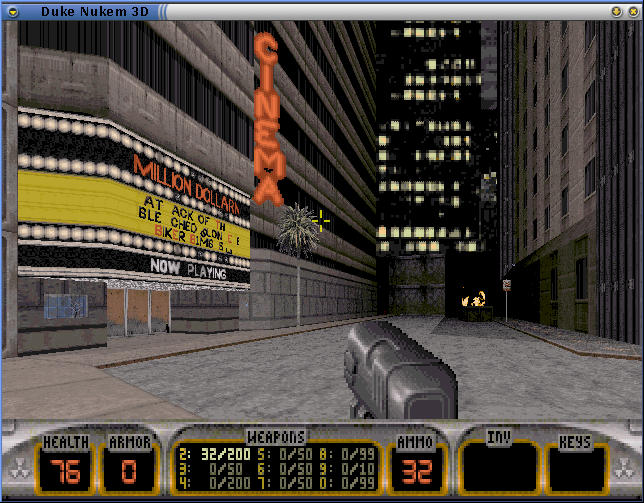 Duke3d ported to linux
Yet an other port by icculus... Duke Nukem 3D is now playable under our favorite OS. ( Does this game really need a presentation anymore ;) ). Search for your old cd, download and enjoy!
"Hail to the King, baby!"
Thanks to all who submitted it, there were quite a few.
License: unknown
Requirements:
| Sound: | Play in X: | Play in Console: | Multiplayer: | Network Play: | 3D Acceleration: | Source Available: |
|---|---|---|---|---|---|---|
| yes | yes | no | yes | yes | no | yes |
Submitted by stpere on 2003-04-04.
And anot*@#$ --
22b6938fe767e5cc57d1fe13080cd522 duke3d.grp
and the size is 44356548 bytes. I don't know if it's the same as the original one, but maybe we'll be lucky ;).
Oh, and the game is working for me.
hmm I got it to compile on my slackware 9
I had to remove the newest gcc (gcc-3.2) and install the gcc of slackware 8 (gcc-2.9)
It compiled fine after I did that.
I removed gcc-2.9, and installed 3.2 again.
Oterwise it doesn't compile with gcc-3.2
It probably works now, I don't have the duke data cd near...
I got it working without using dosemu because I had a duke3d.cfg on my Pentium90 which is my $10 Ebay DOS game special computer! Here are my instructions, also posted on Linuxgames, and a link to download my duke3d.cfg
# mkdir /usr/local/games/duke3d# mount /cdrom
# cd /cdrom/atominst
# cp -a * /usr/local/games/duke3d
# cd /usr/local/games/duke3d
# rm *.exe ten/*.exe ten/_*
# chown -R root.games *
# chmod -R ugo-x *
# chmod -R ug+rw *
# chmod ugo+x ten
Then drop in the duke3d.cfg and set it -rw-rw-r--
http://www.gyrodynamic.net/misc/duke3d.cfg
Checking music inits. Checking sound inits. RTS Manager Started. Adding DUKE.RTS. Using .RTS file:DUKE.RTS Loading palette/lookups. STUB: CONTROL_Shutdown (CONTROL_Shutdown, control.c:251)
Any more idea?
I had the _exact_ same problem with (except the .CON trouble) earlier. Here is how I got it working:
I downloaded the source from CVS (_today_) and followed the instructions at icculus. At that point, the game still didn't work, it complained about not finding 'LOOKUP.DAT'. But when I changed the name on DUKE3D.GRP to duke3d.grp the complaint disappeared and the game works!
Now on to make sound working...
Checking music inits.
Checking sound inits.
Another thing: whatever I set in the .cfg file about mouse (mouse-aiming and so one), not only the game doesn't take it, but it's overwriting the config-file with the old settings.
An idea, someone? ;p
But the mouse problem is still open...
[seva@krait duke3d]$ rpm -qa | grep SDL
SDL_image-devel-1.2.2-5
SDL-devel-1.2.5-3
SDL_mixer-1.2.4-7
SDL_mixer-devel-1.2.4-7
SDL_net-1.2.4-5
SDL_image-1.2.2-5
SDL-1.2.5-3
SDL_net-devel-1.2.4-5
config:
ScreenMode=1
ScreenWidth=640
ScreenHeight=480
Anyone else with same problems?
But I get a blank bright colored screen, which colorcycles to black, I hit enter and the game starts, I can play BLIND, hear all the sound, but I can't see a damn thing except for weapon numbers! HELP!
Tanker
[root@krait root]# ls -lag /usr/local/games/duke3d/
total 50500
drwxr-xr-x 4 seva 4096 Apr 9 15:06 .
drwxr-xr-x 6 root 4096 Apr 9 23:10 ..
-rw-r--r-- 1 seva 738 Dec 17 1998 COMMIT.DAT
-rw-rw-r-- 1 seva 35596 Apr 2 03:39 DEFS.CON
-rwxrwxr-x 1 seva 1470625 Apr 9 14:39 duke3d
-rw-rw-rw- 1 seva 5157 Apr 10 17:14 duke3d.cfg
-rw-r--r-- 1 seva 49381007 Apr 26 1997 duke3d.grp
lrwxrwxrwx 1 root 10 Apr 9 00:37 DUKE3D.GRP -> duke3d.grp
-rw-r--r-- 1 seva 188954 Apr 26 1997 DUKE.RTS
-rw-rw-r-- 1 seva 277348 Apr 9 15:03 game0.sav
-rw-rw-r-- 1 seva 143504 Apr 2 03:39 GAME.CON
-rw-rw-r-- 1 seva 14882 Apr 2 03:39 gnu.txt
-rw-rw-r-- 1 seva 10174 Apr 2 03:39 LOOKUP.DAT
-rw-r--r-- 1 seva 2642 Jul 2 1998 modem.pck
-rw-r--r-- 1 seva 208 Sep 8 2001 Readme.txt
-rw------- 1 seva 7185 Apr 10 17:08 TMPSONG.MID
-rw-r--r-- 1 seva 6188 Jul 2 1998 ULTRAMID.INI
-rw-rw-r-- 1 seva 45409 Apr 8 11:54 USER.CON
By the way, midi never works for me, as my card is onboard nforce i810 thingie. Perhaps timidity will be implemented one day in CVS :)
Works fine now, after lowercasing all files and modifying duke.cfg a lot.
By the way, 640x480 is not the correct aspect for the game. It should be 640x400 as the origianl res. is 320x200.
Question, has anyone gotten it to run in a higher resolution other than the default?
[Screen Setup]
ScreenWidth=1024
ScreenHeight=768
it's very slow though (athlong1666(2ghz) with 512mb ddr and compiling wine :)
Has anyone made free levels, gfx, sounds, so that we can play this without the need for the
proprietary CD or shareware files? The Freedoom project has the right idea. A similar venture for
Duke3D would kick ass. The original Duke3D had amazing gameplay, even when Quake1/2 had
better gfx, Duke3D had awesome arcade-ish gameplay!
The thing is:
Most images,sounds and stuff are in the .grp file.
The original contains a lot more data (images,sound) than the shareware one.
So you'll have to edit the sharware or redraw every gfx (which is lots, lots of work)
You can find lots of levels on the internet
Search in google (duke3d levels) or create with the program called "build"
(it's in the duke3d/buildengine dir)
The "-net" parameter needs a text file as an argument, which contains the following information:
INTERFACE [IP address] (probably yours, I don't know.)
MODE [SERVER or CLIENT or PEER] (at the moment, only "PEER" works so at this time, the whole line is optional)
ALLOW [IP address] -OR-
BROADCAST [number]
"Allow" will send a greeting message to [IP address] and try to connect to that computer. For more than two players, use more "Allow"-lines and IP addresses.
"Broadcast" will try to find the given number of players, and then (hopefully) start the game.
I couldn't try it out because at the moment I don't have Duke3D installed on another computer and I couldn't get the "fake deathmatch" (with bots) working. If anyone finds out more about this, please post it here.
I hope this information is correct and helpful.
Wansti
It was a bit slower than single player mode but it was playable. A few things to watch:
In the net config file, at least one of the computers had to use the "Allow" command. It worked with both computers using "Allow" plus the IP address of the other one, or with one using "Allow" plus IP and the other using "BROADCAST 1".
On one computer I experienced a bug which prevented the port from being freed, so for the second game I had to change the port number to get a connection. You can use another port number by adding ":[port]" to the IP addresses.
Hope it works for you! Happy dukematching!
Wansti
I also see that multiplayer games should be possible now it's going up from GOOD to GREAT :-))
edition, and the .CON files from CVS, with SDL-1.2.7, and gcc 3.3.2...but the game gives my a SDL parachute...It's noted that
icculus believes that duke3d might work on Solaris Sparc, though he explicitly says on the website that the game works on
Solaris x86...!
Any ideas how to get duke3d working on Solaris Sparc???
Thanks!
sparc% ldd DUKE3D
libSDL-1.2.so.0 => /usr/local/lib/libSDL-1.2.so.0
libpthread.so.1 => /usr/lib/libpthread.so.1
librt.so.1 => /usr/lib/librt.so.1
libSDL_mixer-1.2.so.0 => /usr/local/lib/libSDL_mixer-1.2.so.0
libsocket.so.1 => /usr/lib/libsocket.so.1
libnsl.so.1 => /usr/lib/libnsl.so.1
libc.so.1 => /usr/lib/libc.so.1
libstdc++.so.5 => /usr/local/lib/libstdc++.so.5
libm.so.1 => /usr/lib/libm.so.1
libdl.so.1 => /usr/lib/libdl.so.1
libX11.so.4 => /usr/lib/libX11.so.4
libXext.so.0 => /usr/lib/libXext.so.0
libgcc_s.so.1 => /usr/local/lib/libgcc_s.so.1
libaio.so.1 => /usr/lib/libaio.so.1
libmd5.so.1 => /usr/lib/libmd5.so.1
libvorbisfile.so.3 => /opt/sfw/lib/libvorbisfile.so.3
libvorbis.so.0 => /opt/sfw/lib/libvorbis.so.0
libogg.so.0 => /opt/sfw/lib/libogg.so.0
libsmpeg-0.4.so.0 => /usr/local/lib/libsmpeg-0.4.so.0
libmp.so.2 => /usr/lib/libmp.so.2
libthread.so.1 => /usr/lib/libthread.so.1
/usr/platform/SUNW,Ultra-2/lib/libc_psr.so.1
/usr/platform/SUNW,Ultra-2/lib/libmd5_psr.so.1
sparc% ./DUKE3D
Duke Nukem 3D v1.4 - Atomic Edition
Copyright (c) 1996 3D Realms Entertainment
Using Setup file: 'DUKE3D.CFG'
STUB: CONTROL_ClearAssignments (CONTROL_ClearAssignments, control.c:209)
Compiling: 'GAME.CON'.
Including: 'DEFS.CON'.
Fatal signal: Bus Error (SDL Parachute Deployed)
sparc%
sparc% ls
CDROM.INI DEFS.CON.ORG DEMO3.DMO DUKE3D DUKE3D.GRP LICENSE.DOC SETMAIN.EXE TENGAME.INI USER.CON.ORG
COMMIT.EXE DEMO1.DMO DN3DHELP.EXE DUKE3D.CFG GAME.CON LOOKUP.DAT SETUP.EXE ULTRAMID.INI
DEFS.CON DEMO2.DMO DUKE.RTS DUKE3D.EXE GAME.CON.ORG MODEM.PCK TEN USER.CON
It looks like the duke3d binary looks for "lookup.dat" in lowercase...even though it complains for the uppercase one...
sparc% ./DUKE3D
Duke Nukem 3D v1.4 - Atomic Edition
Copyright (c) 1996 3D Realms Entertainment
Using Setup file: 'DUKE3D.CFG'
STUB: CONTROL_ClearAssignments (CONTROL_ClearAssignments, control.c:209)
Compiling: 'GAME.CON'.
Including: 'DEFS.CON'.
Including: 'USER.CON'.
Code Size:64832 bytes(1795 labels).
* Hold Esc to Abort. *
Loading art header.
Checking sound inits.
Checking music inits.
RTS Manager Started.
Adding DUKE.RTS.
Using .RTS file:DUKE.RTS
Loading palette/lookups.
ERROR: File 'LOOKUP.DAT' not found.sparc%
After renaming "LOOKUP.DAT" to "lookup.dat" and running the binary, the screen blanks, and after pressing the ENTER key a couple time, and back to my screen, and the terminal shows the following output:
sparc% ./DUKE3D
Duke Nukem 3D v1.4 - Atomic Edition
Copyright (c) 1996 3D Realms Entertainment
Using Setup file: 'DUKE3D.CFG'
STUB: CONTROL_ClearAssignments (CONTROL_ClearAssignments, control.c:209)
Compiling: 'GAME.CON'.
Including: 'DEFS.CON'.
Including: 'USER.CON'.
Code Size:64832 bytes(1795 labels).
* Hold Esc to Abort. *
Loading art header.
Checking sound inits.
Checking music inits.
RTS Manager Started.
Adding DUKE.RTS.
Using .RTS file:DUKE.RTS
Loading palette/lookups.
Map E1L1.map not found!sparc%
I'm using the PC's Atomic edition, and here's my directory...
sparc% ls
CDROM.INI DEMO3.DMO DUKE3D.EXE LOOKUP.DAT TENGAME.INI
COMMIT.EXE DN3DHELP.EXE DUKE3D.GRP MODEM.PCK ULTRAMID.INI
DEFS.CON DUKE.RTS DUKE3D.OLD SETMAIN.EXE USER.CON
DEMO1.DMO DUKE3D GAME.CON SETUP.EXE lookup.dat
DEMO2.DMO DUKE3D.CFG LICENSE.DOC TEN
sparc%
Am I missing anything? I'm using Icculus' DEFS.COM, GAME.COM, USER.COM, and lowercase lookup.dat... =(
Thanks!