







ezQuake
Version: 2.1
Category: Action
Average of 4 Ratings: 

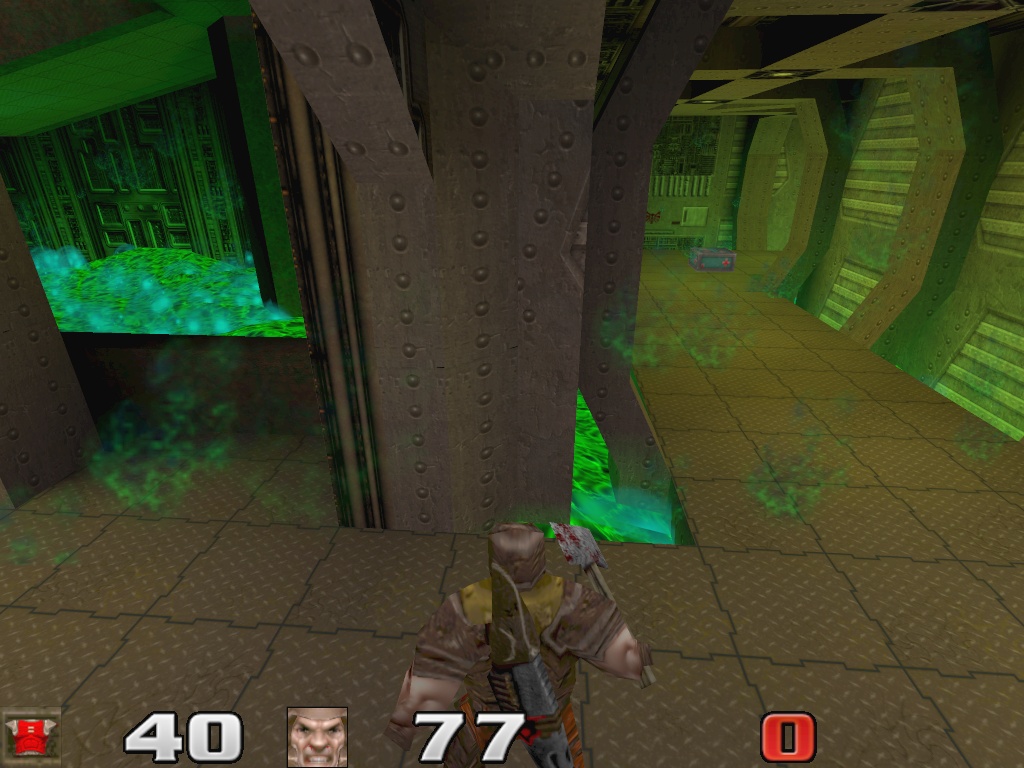 A QuakeWorld source port
ezQuake is a modified QuakeWorld engine continuing from FuhQuake.
Major features include new graphic effects, support for QuakeTV with MultiView, rendering physics independent from game server, demo/server browser, video capturing, customization of HUD and in-game graphics, mp3player and scripting with TCL.
License: free
Requirements: Quake
| Sound: | Play in X: | Play in Console: | Multiplayer: | Network Play: | 3D Acceleration: | Source Available: |
|---|---|---|---|---|---|---|
| yes | yes | no | yes | yes | yes | yes |
Submitted by Lightkey on 2008-02-19.
Untarring something should NEVER put more than one folder/file in your current dir.
I couldn't set my mouseleft as jump from the menu.
Even though i put everything to max i never got the cool effects as seen in the screenshot.
When i exited, config were not saved.
Weird bug that made the game feel sluggish and lagish when strafing around corners.
using sdl or openal for sound would be great.
low starting res + no fps limit + suicidal 8800UE = 2 minutes to meltdown :P
That being said, I did like the menu's very much (except for the right mouse can't be bound bug), and if the issues get fixed, and it saves the config, I'll try it again :)
You are misunderstanding:
fQuake never was anything else but a preconfigured QuakeWorld package featuring exactly THIS engine: ezQuake.
Same for eQuake (which is discontinued just like fQuake) and the modern nQuake: nquake.com
The config is only saved if you say so in Options -> Config -> Save Settings.
"Untarring something should NEVER put more than one folder/file in your current dir." - Why not? The binaries go into your Quake folder and the ezquake folder goes there too. Can you suggest a better way to pack it?"I couldn't set my mouseleft as jump from the menu." - You mean the right button right? I just filed a bug report for you. http://sourceforge.net/tracker/index.php?func=detail&aid=1985424&group_id=117445&atid=678559 ;)
"Weird bug that made the game feel sluggish and lagish when strafing around corners." - Please be more elaborate.
That screenshot is extremly ugly. :( The only "fancy" engine settings seem to be the water waves and those weird splashes. Both I have no idea how to enable, sorry.
One thing I fully agree with you is the sound issue. :) PS: I am not a developer, just a fan.The textures are not an engine thing, you can download them from http://facelift.quakedev.com/
If you are archiving only one file, the folder is not necessary, but then neither is the tar and you should just gzip or bzip the file.
No lasting harm done, I'm sure!
I couldn't set my mouseleft as jump from the menu.
Even though i put everything to max i never got the cool effects as seen in the screenshot.
When i exited, config were not saved.
Weird bug that made the game feel sluggish and lagish when strafing around corners.
using sdl or openal for sound would be great.
low starting res + no fps limit + suicidal 8800UE = 2 minutes to meltdown :P
I agree about the tarball although it could have been a lot worse than 6 files.
To set mouse buttons as controls, move the mouse pointer to the top right of the screen away from anything as the mouse is live. Now use the cursor keys to navigate to the control that you want to set and press DEL to erase the current control. Press ENTER and then click the mouse button. If the mouse button was the right mouse button then you will exit options because the mouse is live, but the control will have been accepted.
In-game, pull down the console by pressing the key to the left of the 1 on your keyboard. Now type in these :-
GL_SURFACE_SLIME 1
GL_SURFACE_LAVA 1
Once you've entered the first one, use the up key to edit it, saving you effort. All the information you need is accessible via the Help section or within the console by typing /help. Also you can type /describe gl_surface_lava to get command specific help.
Once you've changed any options including the console commands above, go to OPTIONS->CONFIG and then navigate down to SAVE SETTINGS and press ENTER.
I use ezquake-gl.glx on a PIII 866MHz and I don't suffer any lag so I can't help you there.
OpenAL for 3D sound if you can make use of it, SDL for?
Even DOS Quake started low res, so that users can increase it if they have the hardware to accommodate it; still seems relevant to me. OPTIONS->VIDEO->ADVANCED OPTIONS ON, then down to MISCELLANEOUS->FRAME LIMIT, press ENTER to change it and don't forget to OPTIONS->CONFIG->SAVE SETTINGS. Alternatively bring down the console and type SHOW_FPS 1 and press ENTER, then CL_MAXFPS n where n is the fps you want.
The problem with the lagginess occurs even though I'm sure the game is at max_fps all the time (my gfx card makes a high pitch noise when it draw over 1500 fps, which it does when this game is running with no limit).
System is a 3 ghz core2, and gfx is a xfx8800UE, so I'm pretty sure it's not a performance issue.
hope this help.
--Tei