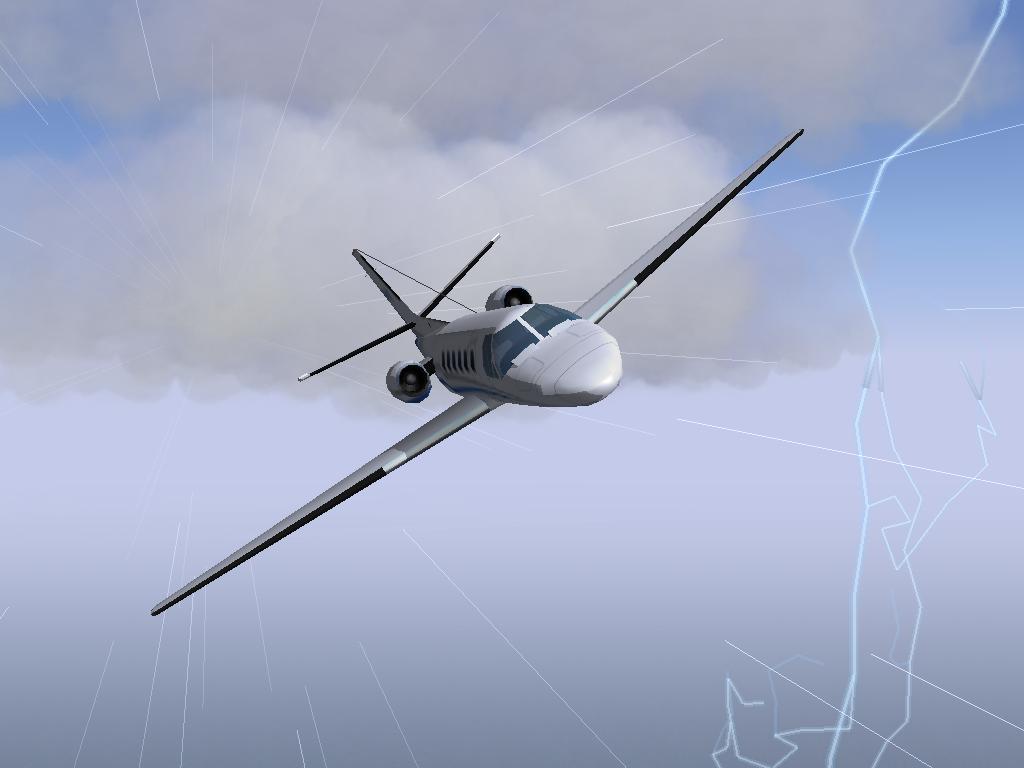


Flight Gear Flight Sim Screenshot General Aviation Flight Simulator

The FlightGear Flight Simulator project is a free, open-source (GPL), multi-platform, cooperative flight sim development project.

Current features include:

  • Scenery for the entire world
  • Accurate sun/moon/star ephemera
  • Several flight dynamics models
  • Operational radio stack
  • Sound support
  • Weather support
  • Runway support
  • Aircraft 3D model support
  • Satellite imagery support
  • Many features are configurable via XML files (HUD, instrument panel, keyboard, joystick, etc)
  • Distributed, network support

License: free
Requirements:

  • OpenAL (latest CVS version)

  • Sound:Play in X:Play in Console:Multiplayer:Network Play:3D Acceleration:Source Available:
    yesyesnoyesyesyesyes
    Suggest an update

    Comments

    I don't know why the 'Tome' put this into the 'TOY' catagory. What it is is a *very* unfinished 'SIMULATION'.

    As such, it's not even really a game at all. Right now, you can fly around (in only one kind of aircraft) and admire the scenery - that's about it. Unless you plan on being a developer then you should probably wait a while before downloading it all.

    Anyway, that much said, since I'm also contributor to FlightGear, it would be improper of me to do anything other than give it an 'average' rating.

    Nice, more or less realistic game. 5 stars, IMHO. Can't wait to see next release.
    It's pretty unfinished. But it deserves five stars even now, though.
    The graphics are exceptional and up to par with today's technology, the coding and design lives up to it. This great work of art deserves no less than 5 stars in my opinion. The only noticable downsides are the lack of reliable communications with the other developers and poor natural conceptualness of the dynamic layout for the use of its scenery (installation and management wise).
    Re: Flight Gear Flight S posted by anonymous on Sep 9 2002 4:34 PM
    It's about time they added guns though.
    It will be the BEST ...

    Flight gear has really grown up over the last two years. Check the project web site for up to date screen shots.

    Among the features that have been added since I first submitted the link are:

    • Aircraft bodies
    • More aircraft types
    • Terrain types from the USGS databases each have their own scenery graphics
    • Greatly improved altitude mesh (no more holes)
    • Runways
    • World wide data (only the US data is available in the highest resolution though)
    • Satellite bitmap support (this is impressively photorealistic for areas that you can find an image for)
    • Multi-screen flight (set up two extra machines with their monitors to either side and you really get a sense of 3d)
    • Working control panel
    • Clouds/weather

    It is a bit of a pain to compile so you'll be happiest if you use Debian. Otherwise follow the build instructions carefully and you should be able to get through it.

    Contributed binaries are also available for MacOS and Windows in theory.

    FlightGear is great. It's going to be one of those projects that every open source supporter can hang their hat on and brag about. It's already that cool to me, and it's just at version 0.7.7. I can't wait to see what the future brings.
    Re: Flight Gear Flight S posted by anonymous on Jul 19 2004 8:34 AM
    I agree that it is all ready cool I cant wait to see what the future brings eather
    Graphics wise It's Greater Than FS2000!!!
    RedHat Linux 7.0. Compiled FlightGear version 0.7.8. -> fgfs gives a segmentation fault.

    Help, anyone?

    I would say that the special version of the gcc that comes with RH 7.0 produces weird code.
    Try using another official version from the gcc-Crew.

    GMS
    Re: Flight Gear Flight S posted by anonymous on Sep 9 2002 4:48 AM
    quero jogar
    it's boring!
    ha! posted by anonymous on Jun 8 2003 10:18 AM
    It will not be boring after they release the UFO mod...a UFO chases you, firing lasers, and you must somehow...I'll shutup.
    this is a REAL flight simulator, and competes with FS2000. Only misses a fast nice UI...
    The newest version 8.0 is great. They have several 3d cockpits, and have also added objects on the ground. This is anything but boring, escpecially if you like aviation. There are some geat mountain airports that you can sqeeze the cub into in the northwest scenry.

    If you have trouble installing subscribe to the mailing list and they will help you out. You do need 3d card though.

    Paul

    I really love this 'game'. Great work! I can now throw away my FS2000 CD's :-).

    I found a very good rpm file of this game somewhere on the net. It prevented me from a lot of troubles that I use to have with files that I have to compile. Why not include such files on the homepage?

    Another thing is that my joystick works well, but that I want to configure things a bit. I am using a sidewinder and the gear is now on the z-axes. This I want to change to the power-lever. Anyone here who knows how to do this?

    ciao

    Re: RPM / joystick posted by anonymous on Oct 29 2003 11:03 AM
    Your best bet is to read the rather expansive documentation that comes with the package. Also, see the README.Joystick file located in the FlightGear/docs-mini/ directory of the source distribution. This document can be found online at http://rockfish.net/fg/README.Joystick

    In particular, look for the joystick.xml file and learn how to make changes to it. Also look for the joystick specific files that can be customized.

    It took me just 2 hours to totally customize my joystick, which was not in the list at all. The topic is too detailed to desribe here.

    FlightGear works so very well under my Linux Suse 8.0. The function is perfect and no problems with faulty code. Instrument flying ? No broblem, everything works, ADF...VOR.
    malakia
    Re: lk posted by anonymous on Oct 26 2003 2:30 PM
    Wash your mouth out Kostas!
    is network play possible?
    Re: i'm curious posted by ksmathers on Jun 7 2003 11:16 PM
    multiplayer network code is at an alpha level according to the release notes.
    Re: i'm curious posted by anonymous on Jun 8 2003 6:29 AM
    thx! It's nice to hear that. I'm going to have a look at the cvs version.
    when i install the plib-1.7.0-1.i386.rpm ,it remind me that the "opengl is needed for ...........",could someone tell me what package should be installed first before i install the plib-1.7.0-1.i386.rpm ???
    Re: help me !!! posted by anonymous on Aug 7 2004 6:44 AM
    Uh, a graphics driver?
    how can i set game options like resolution or bpp?
    I'm an MSFS fan but I'll definitly try this out. I really hope that someday it could be flown on online network like VATSIM and IVAO.
    Re: x posted by anonymous on Oct 25 2003 11:12 PM
    The previous poster gives a link to a MSFS2000 discussion board. Nice, but very little in the way of comparison points.

    FlightGear is most comparable to the last generation of flight simulators. If you happen to have satellite photos and time to spare then you can get photorealistic scenery out of FlightGear, but for the most part you'll be using the scenery provided with the program. Land use databases combined with good tiles makes most scenery look similar to FS98. Cities, fields, and forests are populated with random structures when you are close enough to the ground; otherwise you'll only get the landmass and any fixed buildings, which for now is limited to scenery around San Francisco plus a few other sites that happened to be of interest to one or another developer.

    Most of the aircraft are simulated in the table driven model, which means that the aircraft behave very realistically as long as they are flying under control. An air-flow simulator also exists which can simulate aircraft behavior even when the aircraft are in unusual attitudes. If you want to practice stall recovery you should probably choose one of the aircraft that are modelled using that simulation core.

    The most complete 3d cockpit is probably the Cessna 172. Most other aircraft have flat panel cockpits, but this is an area of active development. In the 3d cockpit of the 172, all of the instruments are live in the 3d view.

    Part of being an open source project is that certain features of the program are (perhaps unreasonably) highly realistic. The sun-moon angles, moon phase, and visible star constellations are all correct, so you really can fly by star reference if that is your thing. Weather and time are set correctly assuming you are online and have your clock set respectively. And the developers are in the process of updating all of the game terrain using the newly available 1 arc-second grid surveyed by radar ranging from a recent shuttle flight which should result in much higher resoluton terrain than any current commercial simulation.

    Re: x posted by anonymous on Oct 26 2003 2:22 AM
    Hug!
    Re: x posted by anonymous on Oct 26 2003 2:37 PM
    Does FGFS scenary look as detailed as this?
    Re: x posted by anonymous on Oct 26 2003 6:35 PM
    How's this?
    Re: x posted by anonymous on Oct 28 2003 7:01 PM
    Very nice, but i hear that company's going under in a couple of years.. LOL.
    Re: x posted by anonymous on Oct 29 2003 5:18 AM
    Actually, the DC-3 screen shot was taken from FlightGear. Here's a nice FlightGear movie:

    click here for the FlightGear movie

    Plays well with xine and xanim ...

    Re: x posted by anonymous on Mar 31 2004 10:01 AM
    Great flat texture there
    Re: x posted by anonymous on Oct 26 2003 3:35 PM
    Let me reply to a couple points:

      FlightGear is most comparable to the last generation of flight simulators. If you happen to have satellite photos and time to spare then you can get photorealistic scenery out of FlightGear, but for the most part you'll be using the scenery provided with the program. Land use databases combined with good tiles makes most scenery look similar to FS98. Cities, fields, and forests are populated with random structures when you are close enough to the ground; otherwise you'll only get the landmass and any fixed buildings, which for now is limited to scenery around San Francisco plus a few other sites that happened to be of interest to one or another developer.

    Right now with the default installation you get just the San Francisco area, but similar scenery is available for the entire world from the FlightGear web site. Terrain is built from 3 arc second SRTM data for North and South America. For the rest of the world scenery is based on 30 arc second SRTM data (which is the best that is currently available.) Taking the whole world into consideration, FlightGear probably has the best overall terrain accuracy, detail, and quality of any PC simulator out there. Other sims do have more detailed areas, but these are pretty localized. Also consider that the FlightGear scenery approach let's us model the intire world at a reasonable detail level in about 7Gb of space. If we used satellite photos (which have their own set of draw backs) we'd be talking about multiple terrabytes at least.

      Part of being an open source project is that certain features of the program are (perhaps unreasonably) highly realistic. The sun-moon angles, moon phase, and visible star constellations are all correct, so you really can fly by star reference if that is your thing. Weather and time are set correctly assuming you are online and have your clock set respectively. And the developers are in the process of updating all of the game terrain using the newly available 1 arc-second grid surveyed by radar ranging from a recent shuttle flight which should result in much higher resoluton terrain than any current commercial simulation.

    As I mentioned above, we currently have available scenery based on the 3 arc second (90m spacing) SRTM data for North and South America. SRTM terrain data has not been released at this resolution for the rest of the world, but someone did release a 30 arc second (1km spacing) "summary" version of the world. This is much better qaulity than the previously available 30 arcsec data. As far as I know we are using the highest resolution/quality free data available for the entire world.

    And for the record, FlightGear is not necessarily intended to be a game, and not necessarily intended to be a direct competitor to MSFS, and visual eye candy is not necessarily the primary focus of most of the developers.

    Having said that, check out the AN-225, check out the animated gear compression on the YF-23 and the TSR2, take a long flight over complex terrain like the Rocky Mtns in the USA. The infrastructure and code is there to do some amazing stuff. The main limitation at the moment is getting the modelers and artists to start using the full capabilities of the FlightGear "engine" to produce "complete" aircraft. This will come in time, but to be fair, creating quality "content" takes a lot more skill and time than creating the code to render it.

    Re: x posted by anonymous on Oct 29 2003 7:45 AM
    It seems like you're only taking geography data as scenery. Scenery is also airport terminals, water textures, clouds, bridges, power lines, roads, trees, buildings, and many more. FS2004 beats Flightgear on everything, except maybe the actual textures for the ground.
    Re: x posted by anonymous on Apr 3 2004 6:30 PM
    How about the price?
    Re: x posted by anonymous on Apr 12 2004 11:04 AM
    Suck it up and pay some money, it's well worth it if you have windows and you're into flight simulation. The joystick will probably cost you as much as the game. Is there an open source cardboard cutout joystick yet for cheap bastards?
    Re: x posted by anonymous on Apr 18 2004 6:01 AM
    The joystick costs as much as the game?! Hey, I have an idea, instead of buying the game, I'll buy the joystick and use flightgear, on linux OR windows, if I want. Half the price, twice the compatibility.
    Re: x posted by anonymous on Jul 21 2004 12:27 AM
    it's not that we're cheap and if you don't get the goodness of open source I would wondr what you're doing browsing this site
    Re: x posted by anonymous on Aug 9 2004 8:25 PM
    i don't think we need another 'free as in freedom' speech. just go fall down a well or something, maybe you'll find some gold at the bottom in which to invest in future copies of soul-binding proprietary software. provided you somehow use that gold to make a ladder and get yourself out of the well
    Re: x posted by anonymous on Oct 22 2004 12:04 PM
    Astoundingly, there are some places in the world (mainly outside the parental home) where the money doesn't flow like water, and there are some people in the world who are capable of liking more than one thing at once.

    There's a whole swathe of humanity that's perfectly capable of enjoying Microsoft Flight Simulator and Flight Gear, but who also enjoy using open source software, and frankly, admire people for making things free, that are of quality.

    When the ratio of money:sense hits or passes 10:1, we get ill-considered and hostile behaviour. That's a blight on the world at the moment, but in the other half of the universe *outside* your ego, we here could do worse than stay on topic - thanks. :-)

    I've got to say, this piece of software is very pleasant to use. It does suffer from having less graphical polish than commercial offerings, but we all know about that - until we have a greater influx of designers and so on with financial muscle into the open source world, we can't magically expect OSS products to have the backed production values you get in the commercial world (buying resources from OUTSIDE our communities we can sometimes only do with money).

    It is, that said, well worth playing with - something that could easily be turned into an MSFS-style end-user package by anyone with the time and inclination. What a very well accomplished piece of software this promises to be.

    I really like it and found it relaxing, and I hardly ever touch flight sims.

    As for GUIS and graphics, I'm sure they'll be gratefully recieved by the creators of FGFS :-)

    Re: x posted by anonymous on Jul 19 2004 8:36 AM
    Iydftcx3wz
    Re: x posted by anonymous on Sep 16 2004 12:52 PM
    I disagree. FlightGear has the better Terrain Data Elevation Model (DEM) than Flight Simulator 2004. In this aspect FS2004 does suck.
    I just wish they would re-work the GUI. Its just plain awful. The game itself is very nice, once you figure out all the commandline options.

    The game is near impossible for a newbie to play - there is no Quick Start option that give the user a decent plane, start location, scenary and time of day. There needs to be a decent graphical manual that is accessible through the GUI, instead of relying on 3rd party guides and HOWTOs.

    I was disappointed with much of the scenary (or the lack of even when downloaded separately), and the many planes with unfinished/multiple cockpits. For such a massive download, one would expect some eye candy and polish.

    Yet another unfinished game.
    Re: FGFS - some points of critism posted by anonymous on Oct 26 2003 3:39 PM
      Yet another unfinished game.

    FlightGear is not intended as a game. It is designed to be a serious simulation of civilian flight. And you are right, it is not finished ... we have a long way to go before we overflow the FlghtGear version number scheme. :-) Until then, I expect we will continue to develop and continue to roll out new versions.

    Re: FGFS - some points of critism posted by anonymous on Oct 27 2003 12:22 PM
    Isn't this the "Linux Game Tome"? ;-)
    Re: FGFS - some points of critism posted by anonymous on Oct 27 2003 1:59 PM
    What are these penguins doing? Trying to fly???
    Re: FGFS - some points of critism posted by anonymous on Oct 28 2003 9:04 AM
    Re: FGFS - some points of critism posted by anonymous on Mar 31 2004 8:20 AM
    Haven't played flight gear, but when I was on one of my browsing for software trips I found this. It's a graphical front-end for starting flightgear: selecting airport.... Hopes this helps some:

    http://users.pandora.be/ceppe/linux/fgkicker.htm

    Re: FGFS - some points of critism posted by anonymous on Jul 1 2005 5:54 PM

    fgrun is nicer.. uses fltk, shows nice 3d views of the aircraft to select from, shows all available airports (depends what scenery you've got installed).. and allow to configure almost all available options (mostly through it's advanced section). If you can handle a ./configure, make, make install, it beats messing with strings of parameters as long as your arm :)

    Here: http://sourceforge.net/project/showfiles.php?group_id=65363

    Atlas is kinda interesting too.. especially if you're not so keen on navigating by latitude & longitude :) It's a moving map display that can generate it's maps from the flightgear scenery. Try messing with your window manager to get it always-on-top with no border (or if you've got a multi-head setup, you could have it fullscreen on the 2nd monitor.. that'd be cool)

    Here: http://atlas.sourceforge.net/ (you probably want the CVS version)

    flightgear rocks :)

    Re: FGFS - some points of critism posted by anonymous on Jul 29 2005 12:20 PM
    How tha fu** do you change airplane/aircraft or i mean i know how but when i do it nothing happens maybee i do something wrong i dunno:(

    need help with changing airplane/aircraft:)

    Re: FGFS - Changing Aircraft posted by anonymous on Aug 18 2005 9:14 AM
    You have to exit the simulator to change aircraft. To see which planes are available, use fgfs --show-aircraft . To use any of those planes, use fgfs --aircraft=aircraftname

    fgfs --help will enlighten you no end...

    soon with multiplayer support
    Re: heavy devel posted by anonymous on Sep 14 2005 10:06 PM
    Yep, Flightgear now has multiplayer support.

    The current release has some issues in the multiplayer code. If you want to take a look grab the cvs code and compile it yourself. The revised multiplayer code will the next offical release.

    From the changelog:
    o Fixed a subtle problem with our star database that has been lurking for many years, but it took an astronomy expert to spot the subtle misalignments.

    Gee, I wonder if the MSFS team would have taken the time to do anything like that?
    Re: This is funny.. posted by anonymous on Apr 3 2004 6:31 PM
    I recall in an earlier version of FGFS they actually made a correction to the sky to more accurately represent the curvature of the Earth. How about that one? :-D
    Re: Flight Gear Flight Sim posted by rusolis on May 4 2004 7:34 AM
    Re: Flight Gear Flight Sim posted by scytheman on Apr 19 2006 8:40 AM
    The simulation is very good and realistic. Some things I would like to see in an ideal world would be:
    - Menu: to configure it, play it, select location, airport, plane, etc.; easily without using a gazillion and cryptic command line options.
    - Learning mode: yes, learn to flight and travel interactively.
    - Tour mode: after you learn you could visit some cool scenarios guided with some sort of tutor telling you where to head, etc..
    - Battle campaign: yes! shoot the bastards!, achieve mission objectives (bomb something, destroy some special airplane, rescue someone, drop soldiers in parachute in the proper location, etc.) to advance in some kind of story, could be some simulation of WWI or WWII or more modern wars.
    - Multiplayer: I think this is already being worked on?
    That things would make it lots of fun.
    Re: Its only a simulation but its great! posted by anonymous on Mar 5 2006 8:15 AM
    This is actually damn fine simulator, I tested it out doing a few circuits, and I would give it a 90% reality factor, nice job. It's not a game, I'm not sure if it's even fun.

    The downside is most people probably won't get the best out of it without a tutor but as someone here said, it's not a toy, it's a simulator.

    If you haven't actually flown a real plane the casual downloader probably won't get the point of this program.

    And if you can do a few circuits _safely_, then you can probably fly a real plane :-)

    /David

    I like it. It's wonderfull.
    This flight simulator rocks. But there are some features missing that really should be in there
    1. It's great that the stars are accurately mapped and the curvature of the earth is taken into account, but the atmosphere doesn't seem to change with altitude; it's still the same shade of blue, until a point (I forget the exact altitude) when it suddenly goes black (or is it white, I forget). Even in some really old DOS flightsims, you could fly your F16 to 50,000 ft and enjoy the stars against the deep blue sky.
    2. A blade-element flight model might work a bit better for uncontrolled flight
    3. The shading code really needs to be reworked - the planes still look like they're make of paper.
    4. Texture maps for the planes are *WAY* too low resolution. I can understand textures for massive objects (say the ground) looking blocky, but there's really no excuse for low resolution decals on aircraft.
    Hi,

    This "game" seems great. I have an older version on my Debian woody and I like to fly.

    Does somebody know a project of live-cd for FlightGears? The need is to put the CD on the computer and play with the up-to-date version.

    Any help is welcome.

    The screenshot for FlightGear on the Happypenguin website is heavly outdated.

    It is time for a new screenshot.

    how do u play
    Re: Flight Gear Flight Sim posted by anonymous on Aug 17 2005 11:58 PM
    And i dont understand how to change airplane i have read the how to change aircraft fag at there website but still i dont understand:(
    Re: Flight Gear Flight Sim posted by anonymous on Sep 14 2005 11:24 PM
    The authorative list of parameters can be obtained by running flightgear with fgfs --help --verbose

    You might like to save the output as a text file as it is more than a few screens worth. However you will find yourself only using about 6-10 of the parameters

    Re: Flight Gear Flight Sim posted by anonymous on Sep 15 2005 11:46 AM
    I vaguely recall seeing a frontend as well that would handle all these things for you. Any one know what it was called?
    Re: Flight Gear Flight Sim posted by anonymous on Sep 15 2005 6:26 PM
    fgrun? I believe that it's included in recent versions of FlightGear.
    Re: Flight Gear Flight Sim posted by anonymous on Jun 23 2006 9:33 PM
    Well, I just grabbed the latest (0.9.10) and fgrun is still a separate package. What's worse, it wouldn't compile against the Fltk in Ubuntu 6.06. I got around that by grabbing a binary package off some weird distro (thanks, google) and converting the redhat .rpm to a slackware .tgz package (thanks, devteam for alien) and using tar (thanks, gnu) to extract the fgrun executable from that. It works great, even though it's an older fgrun. Of course, all this would be unnecessary if some lazy sod would package the new Flightgear for Ubuntu 6.06, but I'm too much of a lazy sod to figure out how to do it, so there you are then.
    I do think fgrun (or something like it) should be an official part of flightgear, though.
    I have almost never before played a flight simulator. I tried once many years ago at a friend, but faild to eaven got the plane off the ground.

    FlightGear did require me to read some stuff to get off the ground. Which buttons do what etc. As a newbe it is nice that you can pause the game and check the keys-list if you need, or look around the plane if you like without risking that you'll loose the controle of the plane.

    I don't like that one have to login as root to add maps or change a key. The keys file is not that easy to edit. It is an xml file where keys are selected by an index number instead of a name.

    Overall I like it.

    Re: It's not a game! posted by anonymous on Nov 18 2005 6:11 PM
    FlightGear is not a game, it is a simulation.
    The old screenshot is 7 years old!
    Re: A new screenshot would make sense! posted by nath on Nov 19 2005 12:46 AM
    Just submit one (the URL to one that is) in the changes field of "submit an update".
    Re: A new screenshot would make sense! posted by anonymous on Nov 19 2005 9:02 AM
    I allready looked for such a field. But there is no option to upload a new screenshot. At least, i didn't found one.
    Re: A new screenshot would make sense! posted by nath on Nov 19 2005 11:16 AM
    Yes, that's a problem. Therefore just put the url in the "changes" field and I'll do it by hand.
    The latest version, 0.9.9, is MUCH improved visually over previous versions. My first reaction when seeing the latest version was "Wow!" FlightGear is simply FUN. A big thanks to everyone involved, especially Jon Stockill for promptly updating the Slackware package.
    Hi all,

    it's a very nice game... except that i had to downgrade the freeglut libratry to get it working.. Stupid Faild to Set Cursor error..... except from this.. very nice..

    Keep on working.. and implement soon more details on the maps.. i.E. Citys (City names) Streets Rivers and buildings.. And maybe write somewhere a manual how other people can help you with that..

    bye bye Steffen

    Re: Ver nice game.. posted by anonymous on Nov 23 2005 4:44 AM
    It's not very realistic, but what you can do now is switching on city names in the scenery: http://members.aon.at/mfranz/flightgear/signs.html
    [email protected] posted by anonymous on Dec 17 2006 3:14 AM
    Casa bunqo inqubitum lorem!
    http://www.flightgear.org/announce.html#v0.9.10
    A nice update to an already good sim. The scenery has also been updated to improve the look of the sim, with higher res and more accurate elevation data, better textures, and improved airports. Many aircraft are updated and improved for this new version too.

    The Flightgear team can pat themselves on the back for this one...may it continue to improve! * * * * *

    Chris W, Brisbane.

    I recommend this game to all people.

    I started playing flight simulators with a Sinclair Spectrum 48K and from then I have tested all simulators I have seen, in MSX, Amiga, PC, etc.

    This is the best simulator I have played in my life, not only by its probed excellent functionality that includes real time weather, multiplayer, online scenery downloading, navigation helpers and a really realistic simulation, including trully 3d cockpits, but for its fully freedom that offers for the player and developer.

    I will buy pedals and a joke for a more reallistic experience and I am happy from the day I discovered this excellent game. And I can play it in my Gentoo Linux!

    Congratulations to all the developers team. Thank you for the game I was waiting for almost all of my life.

    Does anybody in here able to modify a HUD for flightgear? I want to add a few things if possible
    Re: HUD posted by anonymous on Dec 28 2007 10:10 PM
    # Many features are configurable via XML files (HUD, instrument panel, keyboard, joystick, etc)
    Sometimes the simulation is a little too realistic for me - I have the hardest time just getting off the ground - but there simply is no better free flight simulator around. I'm no pilot so I can't speak for the accuracy of the physics. All I know is that it offers some very impressive views from the cockpit.
    How do u play and wat are the controls??
    Re: Flight Gear Flight Sim posted by anonymous on Oct 29 2007 4:17 AM
    If the menubar isn't there at the top, press F10 to bring it up. Then look under help. There are the basic keys for flightgear, and then the aircraft control keys.
    You can also right-click your mouse to toggle between a pointer, control of the flightstick, and a freelook that lets you turn your head and look out the windows.
    A quickstart: load up flightgear, press 9 on the keypad (or page up) to increase throttle. Right click once to get the stick, and when your speed seems fast enough, pull down on the mouse to take off. Press G to bring up your landing gear, and away you go. You'll still need to use the 0 and . keys on your keypad to control the rudder when turning, but otherwise you're set to fly around for a while. :)
    Re: Flight Gear Flight Sim posted by anonymous on Dec 28 2007 10:07 PM
    This is probably not the place to ask.

    Not to be hostile, but judging from your style a flight simulator might be a bit much for you to handle.
    Re: Flight Gear Flight Sim posted by anonymous on Dec 29 2007 4:41 AM
    A bit too much for him to handle? He asked how to play! Judging from YOUR style, I'd say you might be a bit much of an idiot.
    Re: Flight Gear Flight Sim posted by anonymous on Dec 29 2007 7:18 AM
    h prbly a wmn. I dnt tnk h a grl thgh. Btch!
    Re: Flight Gear Flight Sim posted by anonymous on Dec 29 2007 6:15 PM
    Fix your keyboard!
    Re: Flight Gear Flight Sim posted by anonymous on Dec 29 2007 6:19 PM
    "How do u play and wat are the controls??" certainly looks like someone just launching it without reading an iota of documentation. Then, they go and post a question to some random website that talks about it, rather than somewhere more apropos, like the damn simulators website... which incidentally has all the documentation you would need without asking a question.

    It certainly doesn't help that the poster's choice to use "u" and "wat" make him/her look like an AOL-grade user.

    </asshole-mode>
    This is a good overview of the main Flightgear features:
    http://freegamer.blogspot.com/2007/12/flightgear-100-released.html

    Yes, I did write it. ;-)

    No, this is not spam / advertising - I believe it's a useful introduction and the hp.org entry is light on info.
    TOPIC!
    is running.

    And this for a 1.0 version.
    This is bad.

    Because of that, they should have named it better 0.9.11 or 0.10.0 instead of 1.0.

    Because of this, i give it only 3 stars, not 5.
    Re: Still no way to change airplane when posted by anonymous on Dec 29 2007 9:18 AM
    Additional Comment from me:

    Without this feature, it just feels unfinished.
    This is much better done in X-Plane or even MS Flight Simulator. They can be called flight simulators with a real in simulation menu.
    Re: Still no way to change airplane when posted by anonymous on Dec 29 2007 12:09 PM
    How is it a simulation if you can change vehicles mid-flight?

    Sure, it'd be a nice feature, but it's not realistic, so not an important part of a simulation. Great game anyway.
    Re: Still no way to change airplane when posted by anonymous on Dec 30 2007 7:03 PM
    I change planes in mid-flight all the time in real life, but that's because I'M EXTREEEEEME!
    Re: Still no way to change airplane when posted by anonymous on Dec 29 2007 6:14 PM
    No, looks like you don't give it any rating at all. You have to log in...
    Doesn't work with fglrx drivers:( Anyway, my aeronautically crazy friend says it's a nice game:P I can't verify it:(
    Re: fglrx posted by anonymous on Dec 29 2007 6:13 PM
    More details rather than a simple whine might help.

    Also realize that, currently, ATI's linux drivers are crap, and the problem may be with the drivers themselves.
    Re: fglrx posted by anonymous on Dec 29 2007 8:41 PM
    I don't blame the game for that, of course the ati drivers are to blame.
    Re: fglrx posted by anonymous on Dec 29 2007 10:20 PM
    ATI's windows drivers are also crap. They cause a BSOD on XP and dual core CPUs with various applications.
    This is by far my favorite game under Linux, I regularly play it.

    The only thing I'd love to see in it would be some sort of combat mode - especially considering the number of military / WWII aircraft available .. however as that's not a focal point of this development I don't deduct any points for it.. ;-)

    Re: My favorite linux game posted by anonymous on Jan 1 2008 9:23 PM
    I want that too. I do deduct.
    After finding a distro that plays Flightgear without a problem (Slackware, of course), I noticed how much improved the scenery has become. The urban scenery is actually BETTER than X-Plane version 8. If you've dismissed this sim before, and like cruising new picturesque places, try it again.
    i checked cd ltr an the airplane thingy and it told me i had a bunch of lanes now i dont know how to change airplane can anyone relpy and tell me how? by the way i use the joystick but i am free to use the keyboard...
    Is there anyway to make this game work on an ATI card. There is just crazy looking textures all over the place. Is there a setting I need to turn off or what. I know to make the GLSL shader dissbaled in another game I have to run it with PLODE_NO_SHADOWS=1 is there something in flight gear that I can do to make it work with the fglrx driver.
    If you're having trouble with textures on ATi cards, particularly under Linux, take a look at the 'Troubleshooting problems' page on the FlightGear Wiki.
    A Googleearth plug-in would be a good idea.
    Flightgear 2.00 rc2 is out for linux (via cvs), mac and windows. Check forum for more info.

    Log in or register to rate this game or post a comment.