







Freespace 2
Version: Retail = 1
Category: Simulation
Average of 7 Ratings: 

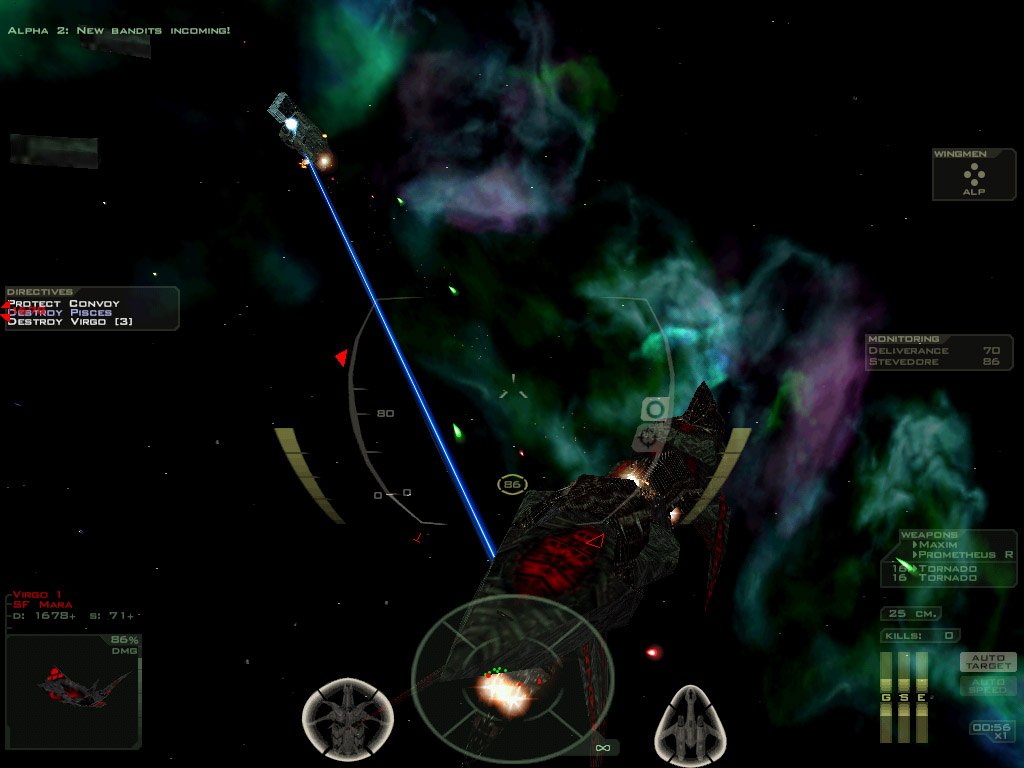 Linux port of the Freespace 2 code released by Volition Inc
This is a port of the Freespace 2 code that was released by Volition Inc in April 2002. From the project web page at Icculus.org:
There is still a lot of work to do, but both the demo and full game run great. If you don't already own the full game, you may have a hard time finding it for sale, as copies of the game are pretty scarce these days. Be sure to apply the 1.2 patch for the full version, if you have not already.
If you don't have the full game, you can download a demo version from the Volition page listed below.
There is much enthusiastic work going on at the Freespaec Source Code Project, including a Babylon 5 total conversion. Their code incorporates the icculus linux SDL/OpenAL code, and compiles under linux.
The Freespace 2 code has also been adapted to work with the Freespace 1 data files, so if you own Freespace: The Great War and/or Silent Threat, you can play it using the linux client at http://icculus.org/~ravage/freespace/
License: free
Requirements: For multi & network, it's best to use the Source Code Project... ;) Especially when version 3.6.10 comes out (soon, perhaps in a few weeks - October '07?)
Go to http://www.hard-light.net/forums, make a user account, and look in the forums for Turey's FreeSpace Open Installer... it gets the entire game + FSPort (FS1 + ST ported to FS2) for you! (And that's not all!)
If you search for member jr2, and look in his sig, you will find a link to a Walkthough... although I doubt you'll need one. ;) Also there you will find links to alternative Installers.
| Sound: | Play in X: | Play in Console: | Multiplayer: | Network Play: | 3D Acceleration: | Source Available: |
|---|---|---|---|---|---|---|
| yes | yes | no | yes | yes | yes | yes |
- Freespace 2 home page
- Download Freespace 2
- Volition's Freespace 2 page
- Freespace Source Code Project Forums, on HLP
- Linux binaries 2/6/2005 from the Freespace Source Code Project
Submitted by bobz on 2002-06-24.
Small tip - have two copies of the freespace2 executable - I have freespace2-debug and freespace2-fast. The later is recompiled with -O2 and no debugging info to make it go faster. If you have problems, use the debug version to find out what is going on...
Cheers,
Toby Haynes
Error: medals.tbl(55):Error:
Error: Required token = [$Wavefile Base:], found [$Wavefile 1: 1_badge_a.wav].
Warning: (src/parse/parselo.cpp:339): medals.tbl(55):
... (it is repeated some tines. Always requires the same token)
At the end:
Error: (src/stats/medals.cpp:437): Error parsing 'medals.tbl'
Error code = 1.
I would be thankful for any tip.
On Sun, Jun 23, 2002 at 15:33 -0400, Taylor Richards wrote:
Where ever you run the game from there should be a file called FreeSpace2.ini.
Add "Fullscreen=1" in the [Default] section minus the quotes. It worked for me.
Really great game!
If you're interested, just email me at [email protected], and I'll send it to you.
Since your success rate may vary with mileage from platform to hardware differences with mine, here's my setup (and, hopefully you can expect good results if your's is similiar, or it may just work even if you differ):
xorg-6.8.1
NVIDIA 6111 driver
nvidia Ti-4600
Here's what you will need to do (or at least I had to) from the current CVS repository on Icculus's website:
BASIC SETUP:
1. Download the CVS version of the source from the Icculus website, you do not need the installer but just the source.
2. Download the 'fs2demo.exe'. Hopefully, if you have the latest version of Wine and everything is setup, just run "wine fs2demo.exe". That will basically install everything in your wine directory where you told it during the install process.
SOURCE MODIFICATION:
3. gzip/untar the source somewhere. Change to the toplevel directory where the 'Makefile' is. Change the 6th line where it say "DEMO=false" to "DEMO=true".
4. In 'src/graphics/gropengl.cpp', comment out the line that says "mprintf(( "Extensions : %s\n", glGetString(GL_EXTENSIONS) ));" (which is around line 2859). * For some reason, the "glGetString()" call when showing extensions causes a segmentation fault for me. I don't know why since I don't believe the game uses any GL extensions that my NVIDIA driver lists.
5. Then, go back to the root level directory and do 'make' where the 'Makefile" is located. You will get compile errors, but here is what you do:
Basically, I think there are about 4 instances where the compile will fail on "invalid number of arguments" for the function "gr_set_bitmap()". Make the following changes at the lines in these files:
src/menuui/playermenu.cpp:606:
change "gr_set_bitmap(Demo_title_bitmap);" to
"gr_set_bitmap(Demo_title_bitmap,GR_ALPHABLEND_NONE, GR_BITBLT_MODE_NORMAL, 1.0f, -1, -1);"
src/freespace2/freespace.cpp:8372:
change "gr_set_bitmap(Demo_upsell_bitmaps[gr_screen.res][Demo_upsell_screen_number]);" to
"gr_set_bitmap(Demo_upsell_bitmaps[gr_screen.res][Demo_upsell_screen_number],GR_ALPHABLEND_NONE, GR_BITBLT_MODE_NORMAL, 1.0f, -1, -1);"
src/freespace2/freespace.cpp:9176:
change "gr_set_bitmap(title_bitmap);" to
" gr_set_bitmap(title_bitmap,GR_ALPHABLEND_NONE, GR_BITBLT_MODE_NORMAL, 1.0f, -1, -1);"
FINAL SETUP:
6. copy the 'freespace2_demo' to root level directory where you installed the demo usind wine (from above). Basically, this file needs to be in the same directory as the files ending in ".vp".
The Demo should work fine. enjoy.
1. Make sure you download the latest version of "openal" libraries from CVS, and install them first.
2. I downloaded/installed the demo patch file with Wine anyway. I don't know if it's necessary for this to work but I did it.
3. I tried just running the demo files using Wine at first before modding the source and trying to get Icculus's stuff to work. However, everything works fine with the latest version of Wine except when you try to enter your name, you get no keyboard response at all and cannot continue forward. A newer version of Wine may fix that.
as a while back i tried a version but they were'nt supported
- taylor
http://icculus.org/~taylor/fso/testing/fs2_open-3.6.5-20050206-x86_64.tar.gz
http://icculus.org/~taylor/fso/testing/fs2_open-3.6.5-20050206.tar.gz
The Linux specific forum for FS2_Open is here:
http://dynamic4.gamespy.com/~freespace/forums/forumdisplay.php?s=&forumid=113
- taylor
And since I'm here again I'll say that thanks to a guy named Pierre there is now streaming audio in the icculus.org version and in FS2_Open for Linux. That means full music and briefing voice support. For FS2_Open it also supports OGG Vorbis for music, voices and normal sound effects. Also, thanks to Pierre, the movie code in the icculus.org project now has full audio and I updated it with my latest video updates too. It's now quite fast, sounds good and supports all FS1 and FS2 movies. Movie code is built by default now too, no more Makefile option to change. As of this afternoon it also has the ability to scale the 640x480 video to fill a 1024x768 screen so you can watch movies in hi-res FS2 without the massive black borders.
For anyone that has avoided playing this game... you're just about out of excuses. :)
- taylor
Just compiled from cvs - had to change alGetSourceiv to alGetSourcei in mveplayer.cpp.
Still no voices in mission briefings and no music in game :(
Did I cvs too soon?
For the no audio problem, what version of the game are you using (FS1/FS2)? Are you using a full retail install of something like the HOTU version? There is a currently unidentified bug that causes some FS1 audio to not work. That's something that I'm trying to track down and fix. I'd guess from the alGetSourceiv thing that you are using OSX so I suppose there could be a swapping issue that I missed somehow. Run a debug build and see if the debug log gives any useful info. On OSX the log should be (for FS2) ~/Library/Preferences/freespace2/Data/fs_debug.log.
Oh and hop on the icculus.org freespace2 mailing list if you aren't already. It's much easier to get things fixed there than it is to do it here. How to get on the mailing list is found here: http://icculus.org/freespace2
- taylor
I should clarify that I get sound in the movies and in game - what I don't get is music in game and voices in briefings. I do get voices in tutorials (as in 'instructor training' sessions), but not in briefings/debriefings (before or after missions). Also, sometimes the voice from the instructor in training doesn't 'kick in' (%33 of time).
There is a bit of corruption along the edges of objects being zoomed/scaled in the movies ATM. I take it that is the issue you are talking about in regards to the movies? It's strange that it happens in this way, maybe it's because those parts of the video are non-static; guess a decoding problem eh?
I will compile a debug build off a new cvs [pull it right now], and report issues with log to mailing list...
Btw it sucks having to use unshield to get those files off my first cd, blech! :)
Hard Light Productions Forums - Bringing Modders Together