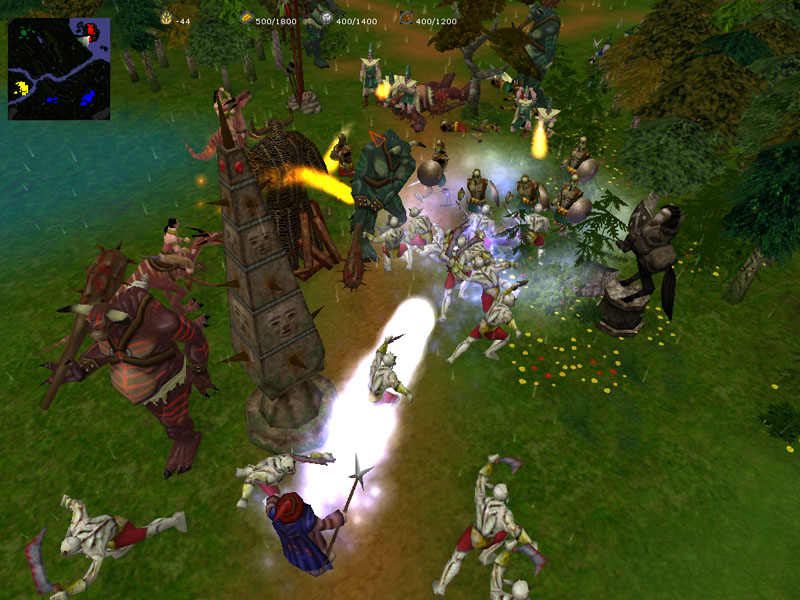


Glest Screenshot A free 3d real-time customizable strategy game.

Glest takes place in a context which could be compared to that of the pre-renaissance Europe, with the licence that magic forces exist in the environment and can be controlled.

Current version is fully playable, includes single player game against CPU controlled players, two factions with their corresponding tech trees, units, buildings and some maps. Since version 3 multiplayer over network is also available.

Source code available (GPL licence).

Available in Fedora

License: free

Sound:Play in X:Play in Console:Multiplayer:Network Play:3D Acceleration:Source Available:
yesyesnoyesyesyesyes
Suggest an update

Comments

Is this happywindow.org?
Re: question posted by grumbel on Mar 3 2005 12:18 PM
Well, its GPLed and it runs perfectly fine under Wine, enough to make a little penguin happy. If you want native-Linux binaries only we should better start purging all those Java games from this site.
Re: question posted by anonymous on Feb 23 2006 9:03 PM
Java games dont require an emulation layer to run. Well, not unless you're counting the java VM as an emulation layer.
Re: question posted by anonymous on Mar 3 2005 12:22 PM
Well, they thought: should we invest time and effort to port our fine gpl game to linux?
The first impression from linux people: No, we don't want our shit.
We should add a "stupid people is forbidden to use GPL software. Well, at last you guys can buy a mac then.
If it was, why would he want to port? posted by perthpenguinista on Mar 3 2005 10:10 PM
Obviously, the game's author is not happy with (just) MS Windows and game to the obvious spot looking for a leg-up into Linux.

Comes now this whiner and rains on his parade.

Spend a day doing the port, slacker, instead of 30 seconds bitching.

Re: If it was, why would he want to port posted by anonymous on Apr 15 2006 6:52 PM
are all you people stupid? this game RUNS ON LINUX NATIVELY, I built it on gentoo, just had to rename the .zip files and build it with the ebuild script for glest... copied glest-1.2.1.ebuild to glest-2.0.0.ebuild renamed the data file to glest-data-2.0.0.zip and then emerge glest-2.0.0.ebuild WORKED FLAWLESSLY, what's with people running it in wine? HAHAHA. the game doesn't need a linux port it has one. btw running an AMD athlon 64 X2 4400+ here in 64-bit mode.
From the website:

What's missing (and will be done someday): Linux port

Too early to be posted on these boards, methinks (though it looks a nice game).

Re: And for linux.... posted by anonymous on Mar 3 2005 1:01 PM
One of the reasons to post a game here, methinks, it to get attention and help with the development.

How is he supposed to get any help with the Linux port if he is supposed to wait until he's completed the port to start advertising it?

If it runs under WINE, that should more than good enough.

Re: And for linux.... posted by charlieg on Mar 3 2005 4:03 PM
Yes, but technically this is the LINUX game tome. Now if any game that runs with Wine falls under that category, then we may as well just post every single Windows game (even the ones that only partially run).
Re: And for linux.... posted by Hande on Mar 3 2005 4:59 PM
well, maybe we are searching for some help, due the original developers DON'T have the time to make that LINUX port, and i know it could be a PERFECT game on linux.

But it needs YOUR help, linux port and multiplayer mode. Only that.

You have the sources, and dependencies, i don't know how to make it, so i'm searching for some help.
I would like to see this game on linux, and i think this site could help. Now is on windows (shit i know), but are u talking that u don't wanna port this game, only because now is on windows? For me, this reason is like all ppl that makes games for windows and don't wanna port them to linux. Don't?

This game just ROCKS... and NEEDS your help.

Would u take the red pill, or blue one's?
This is indeed a Linux game posted by perthpenguinista on Mar 3 2005 10:07 PM
It is the best of the bunch. It wasn't born with a silver spoon in its orange beak, but rather wants to earn its stripes.

Be a good chap and help the process along, will you?

I'll have to fuss around to find the sources and the dependencies, but it looks really cool!
Ok... so about the install... I had to use wine to install it and cedega to play it (trying to play it with regular wine it kept giving me errors about my screen resolution).

After that it worked wonderfully, however, it is a bit jumpy. I have the latest NVIDIA drivers and it plays smoothly for a few seconds then the game will jerk.

Does anyone know why this might be the case?

Very awesome, by the way. These is like AoK with better graphics. Exactly the kind of opensource game I've been waiting for. :)

Re: Glest posted by grumbel on Mar 3 2005 2:41 PM
I don't have any jumpiness problems with regular Wine, the screen-resolution issue is fixable configurator.exe, just insert a resolution there that your XF86Config supports or unmark the "Change Resolution" box. Only problem left is that the game disappears (it still runs, just no window with graphics there) when I move it in the background or when it looses focus, however when the game runs in fullscreen that isn't much of a problem.
Re: Glest posted by anonymous on Mar 3 2005 8:01 PM
Wow, thanks a lot, this runs really smooth in traditional wine!

I enabled XRandR in the config as you had suggested and changed my sound settings and it went off without a hitch.

I'm not sure how to go about putting it in full screen mode, but I'll look around.

This is really big, the game has potential! I only hope in a linux native version soon. Keep up the good work guys. :)
i hope it gets ported, would be a nice feather in linux's hat. game its pretty professional looking. I made the mistake of trying to build up my base.. computer just came in and slaughtered me :)
Hey! You should be able to port it immediately using winelib. Though I'd prefer and pure linux API.
Re: winelib.... posted by anonymous on Mar 3 2005 5:57 PM
So how are you supposed to build this? I don't see anything in the source to do it.
Re: winelib.... posted by anonymous on Mar 3 2005 10:57 PM
Hehe, I noticed this as well. Guess they're not too serious about asking for help if they don't even put in what environment they compile for and the corresponding project files... the source zip has the bare minimum to comply with the GPL.
Re: winelib.... posted by anonymous on Mar 4 2005 9:20 AM
Just take a look at the boards at the homepage, there is a guide on how to build it.
While I agree that posting Glest on here may help encourage development, as a Linux user, I'd really prefer that LGT continue to be as useful as possible a resource to Linux users -- which means that we Linux folk can browse through it, see a game, and play it (in much the same way as Windows folks do at the retail store).

Perhaps a reasonable solution would be to create a "not currently compatible with Linux" section, so that folks who are simply browsing for something to play can easily find what they want, and folks who want a open-source codebase to hack on (and expand the Linux game library) can easily find what *they* want. :-)

And, as for LGT being a useful place to look for WINE compatibility info -- both WineHQ and Transgaming maintain excellent databases of Windows applications and games and how well they run on Linux. Their interfaces are designed specifically to make it easy to browse through, and I really think that they are a better place to store WINE compatibility information than LGT.

Re: Windows games on Linux Game Tome posted by anonymous on Mar 3 2005 9:32 PM
While I agree that posting Glest on here may help encourage development, as a Linux user, I'd really prefer that LGT continue to be as useful as possible a resource to Linux users -- which means that we Linux folk can browse through it, see a game, and play it (in much the same way as Windows folks do at the retail store).

Ahh... so you want to get rid of all the games that require external libraries, too, right? And those that don't have binaries--just source code? And those that require nasty configuration?

Heck, getting this game to run under wine was trivial compared with some of the hoops I've had to jump through to get *native* Linux games to work.

It runs under Linux. It's open source. It belongs here. End of story.

Re: Windows games on Linux Game Tome posted by simcop2387 on Mar 3 2005 9:51 PM
i know this is probably a troll i'm replying to but... i think what he means is that we ought to have a section for games like this, e.g. it currently does not compile under linux but the authors are wondering about if the linux gaming community might wish to play (e.g. they show their support) their game so that they know they should concentrate on porting it
Re: Windows games on Linux Game Tome posted by god64 on Mar 3 2005 10:22 PM
it runs on wine, so it is NO native linux game. as we all know: Wine Is aN Emulator... if it would be an api, you would have to recompile the software, but you haven't, so technically it's an emulator. which makes windows games not native linux games...

and: if you count wine games, you have to count half life two, james bond 007, world of warecraft also (commercial linux games are posted also, which is ok, because they are linux games)

and: if you count emulators, you yave to post zelda(tm)(c), super mario brothers (tm)(c), the last ninja, world games, winter games, metal slug, golden axe,... ... ...

i guess the harddisk of happypenguin would be full once more if post em all
Re: Windows games on Linux Game Tome posted by anonymous on Mar 3 2005 10:44 PM
if you count wine games, you have to count half life two, james bond 007, world of warecraft also...

Are any of those games open source?

This is. And a Linux port is in the works. If the developers weren't on the job, somebody else could pick it up.

If anything, this is most akin to a buggy new release that needs some cajoling to get it working.

Re: Windows games on Linux Game Tome posted by god64 on Mar 4 2005 5:48 AM
well, none of the games is opensource... so are:

postal 2
Majesty
Creatures

just to name a few... this is not an opensource games homepage, it's a linux games homepage... at least i thougt so until windows games poped up here
Re: Windows games on Linux Game Tome posted by grumbel on Mar 4 2005 8:51 AM
Well, it isn't a OpenSource-only page, but it one with some heavy focus on it. Lots of stuff that pops up here isn't all that playable, under development, hard to compile and whatever, not something you would likly see on a 'pure' gaming site.
Re: Windows games on Linux Game Tome posted by anonymous on Mar 4 2005 6:57 AM
it runs on wine, so it is NO native linux game. as we all know: Wine Is aN Emulator... if it would be an api, you would have to recompile the software, but you haven't, so technically it's an emulator. which makes windows games not native linux games...

Actually Wine stands for "Wine Is Not an Emulator".

from: http://www.winehq.org/site/about :
"Wine is a translation layer (a program loader) capable of running Windows applications on Linux and other POSIX compatible operating systems."
Re: Windows games on Linux Game Tome posted by god64 on Mar 4 2005 7:49 AM

Actually Wine stands for "Wine Is Not an Emulator".

ok, i forgot to put the <irony> tags around. thought that it wouldn't be necessary on that sentence. this was just my way to tell, that even if the developers say its NO emulator (may be a legal reason), technically it is. wine makes windows programs 'think' they are running on windows. so it 'emulates' windows. the way it does it (by 'hooking' into the api calls) doesn't change that fact.

but shhhhh! ofcourse, if microsoft asks: wine is NOT an emulator

Re: Windows games on Linux Game Tome posted by anonymous on Mar 4 2005 12:17 PM
you are 100% correct.wine IS an emulator and I think people should seriously ( and cedega) begin to DO AWAY with it..why?..because we are starting to get REALLY high qualty NATIVE linux games and apps...

why bother with emulation if we can use high quality native stuff..to me non-native means NO THANKS i couldn't be bothered and neither should YOU.

use linux or dont..( dont emulate)

Re: Windows games on Linux Game Tome posted by anonymous on Mar 4 2005 3:25 PM
No. An emulator mimics a piece of hardware, and I don't care if your Compaq does have a "designed for windows" sticker on it, windows is not a piece of hardware.
Wine performs no emulation, no cpu virtualization, nothing. It provides a windows-like application interface ONLY. You might as well call the SDL library an "SDL emulator," dammit!
Re: Windows games on Linux Game Tome posted by anonymous on Mar 4 2005 3:34 PM
Exactly.
Re: Windows games on Linux Game Tome posted by simcop2387 on Mar 3 2005 9:57 PM
i think a better idea might be a section for games that are looking for help making ports for linux. i think this might be a bit clearer and certainly less broad than games that are not currently compatable with linux
Re: Windows games on Linux Game Tome posted by anonymous on Mar 3 2005 10:30 PM
I agree, this would be better for sadpenguin.org
I have no association with this project, but I've been playing it a lot today. It's very polished and professional. I'd suggest that if anyone is interested in a Linux port (using or helping), they visit the link below:
Glest Message Board
It will run very well under wine.
I did all of this with Fedora Core 3: http://fedora.redhat.com/
I installed the latest version of wine: http://winehq.com/site/download
Then I installed winetools: http://www.von-thadden.de/Joachim/WineTools/
Then I ran winetools and installed the 'base setup' and 'install windows system software' in order.
Then I downloaded the windows executable of Glest:
http://www.josezanni.com/glest/descargas/glest_v1.0.9.exe
After downloading Glest, I ran the installer under wine with: wine glest_v1.0.9.exe
This installs glest to your fake windows directory (mine was /home/username/.wine/drive_c/Program Files/Glest_v.1.0.9/)
cd to this directory and run the configuration program under wine with: wine configurator.exe
I wanted fullscreen, so I changed the screen width and height to my desktop resolution (1600x1200).
You will want to set the resolution, refresh frequency, and depth bits to valid values found in your X configuration file (In Fedora Core 3 this is /etc/X11/xorg.conf) otherwise the game will not run. Most likely you will need to set the depth bits to 24.
Now open up your wine configuration file and find a line that says:
"Use XRandR" = "N"
and change it to:
"Use XRandR" = "Y"
In the same file you will find a section called WinMM. Uncomment the "Drivers" line that matches your sound system. I am using the "Drivers" = "winealsa.drv" under Fedora Core 3. If you do change it make sure the others are commented out.
In the same file you will also find a line that says:
"HardwareAcceleration" = "Emulation"
It is most likely commented out. Uncomment it.
Now save that file.
Finally, run Glest under wine with: wine glest.exe
I am running the game perfectly and it is really well done.

Mattleaxe
Re: This is a really great game posted by anonymous on Mar 4 2005 12:15 AM
and the wine configuration file is at: /home/username/.wine/config

mattleaxe
Re: This is a really great game posted by anonymous on Mar 4 2005 1:32 AM
Awesome. Thanks for the help! :)
Re: This is a really great game posted by anonymous on Mar 5 2005 6:44 AM
i got message" "Your system das't suport OpenGl 1.3" when runing glest under wine

any sugestions ?

Despite--or because of--all the arguments about wether this game belongs here or not.. could it be considered a GotM project? (the goal being to have it run natively, probably by porting to use the sdl..)

I haven't looked into it greatly, but it *seems* like a cool game.

Re: Candidate for Game of the Month? posted by anonymous on Mar 4 2005 2:29 AM
Thats a great idea!
I agree with it!
Re: Candidate for Game of the Month? posted by anonymous on Mar 4 2005 2:55 AM
Thinking the same myself
Re: Candidate for Game of the Month? posted by Hande on Mar 4 2005 4:28 AM
Look at this message to get more info of this reply:
Spread Glest

Before making the proposal we need to make a nice TODO list, so we could have more options to become GoTM, and finally get that NEEDED linux port, and maybe network play, too.
Re: Candidate for Game of the Month? posted by poundsmack on Mar 4 2005 5:53 PM
i think the game belongs here personaly. and would be a good canidate for game of the month. I remember when NetPanzer first showed up on the site as a windows only gane and now look at it http://netpanzer.berlios.de/ it runs great on my linux box
For those complaining about the lack of source code to the game, have a look at the Glest sf.net project page and stop whining. I agree the Glest homepage could be more explicit about this, but at the end of the day the homepage is directed towards users who just want a runnable version of the game, not the source code like developers. It wasn't exactly hard to find and a developer is supposed to have a bit of technical nouse about him/her.
Re: Where to find the source... posted by anonymous on Mar 4 2005 5:38 AM
you are annoying.
do you know how many excellent games never finished, because "the others are to stupid to do this and that"?


und auf deutsch:"Wenn man nichts Nettes zu sagen hat, soll man den Mund halten." (Klopfer's Mutter zu Klopfer in "Bambi I").
Re: Where to find the source... posted by anonymous on Mar 4 2005 7:52 AM
wohingegen "you are annoying" ja wirklich nett ist...
Re: Where to find the source... posted by anonymous on Mar 4 2005 11:24 PM
00101010 10011011 01011010 11101011 10001010 !!!!!!!?!!!!??!!
Tada, the first Linuxversion is there: http://www.glest.org/board/viewtopic.php?t=520

Toll, findet ihr nicht auch?

Lustiges Denglisch ;)
Game under wine is not playable. View is shaking. fixme:wave:DSD_CreateSecondaryBuffer (0x403a3d40,0x4069fc1c,80,0,0x43b9dc94,0x403a3d1c,0x43b9dc70): stub fixme:wave:DSD_CreateSecondaryBuffer (0x403a3d40,0x4069fc1c,80,0,0x43b9dc94,0x49ea376c,0x43b9dc70): stub fixme:wave:DSD_CreateSecondaryBuffer (0x403a3d40,0x4069fc1c,80,0,0x43b9dc94,0x49ea378c,0x43b9dc70): stub fixme:wave:DSD_CreateSecondaryBuffer (0x403a3d40,0x4069fc1c,80,0,0x43b9dc94,0x49ea37ac,0x43b9dc70): stub fixme:wave:DSD_CreateSecondaryBuffer (0x403a3d40,0x4069fc1c,80,0,0x43b9dc94,0x49ea37cc,0x43b9dc70): stub fixme:wave:DSD_CreateSecondaryBuffer (0x403a3d40,0x4069fbfc,80,0,0x43b9dc94,0x49cb4c54,0x43b9dc70): stub fixme:wave:DSD_CreateSecondaryBuffer (0x403a3d40,0x4069fc1c,80,0,0x43ba2774,0x49efa204,0x43ba2750): stub fixme:wave:DSD_CreateSecondaryBuffer (0x403a3d40,0x4069fc1c,80,0,0x43ba2774,0x49ec4814,0x43ba2750): stub fixme:wave:DSD_CreateSecondaryBuffer (0x403a3d40,0x4069fbfc,80,0,0x43b9dc94,0x49cb4c74,0x43b9dc70): stub
Re: not playable posted by anonymous on Mar 5 2005 8:13 AM
There a guide few posts down on getting it working with wine in FC3.

Also, here's a preliminatry linus port "There is no sound and there is an intermittent crash bug on exit, but otherwise it seems playable:"

Check .

Re: not playable posted by anonymous on Mar 5 2005 8:15 AM
Bah, it killed me links! Link 1 Link 2.
playable on linux, but needs more yet posted by Hande on Mar 5 2005 9:26 AM
Yep, seems some ppl are working hard to bring us a linux port.
We've got Glest running under Cedega currently. Great game! If you'd like to check out how I got around a crash on install, I wrote a brief installing Glest doc up.

That should make up for the lack of a weekly game update on PCBurn :).
Re: Glest working in Cedega/WineX posted by Inhibitionist on Mar 5 2005 2:02 PM
Ya know.. I checked that URL and *still* managed to mung it up. Here's the appropriate link. Glest linux install.
Ok I finished a first unofficial linux version that should be as playable as the windows version now. You can get it here:
Please try it and send me feedback. Unfortunately I wasn't able to contact the original author yet.
Re: Unofficial Linux Version posted by anonymous on Mar 5 2005 4:27 PM
"Notice: This project uses jam (and not make) as build tool." How do I use jam? :-/
Re: Unofficial Linux Version posted by MatzeBraun on Mar 5 2005 4:36 PM
Install the package that comes with your distribution and type "jam" instead of "make". I f there is no package go to ftp://ftp.perforce.com/pub/jam download and compile it.
One small bug posted by Inhibitionist on Mar 5 2005 4:57 PM
Works great. The only oddity I noticed was that you can't excelerate the game, which is normally done by hitting "+". Aside from that it's flawless.
Re: One small bug posted by anonymous on Mar 6 2005 10:37 AM
Sure? Here + and - works. Mind you just the one on the Keyboard, not Numblock_Plus and Numblock_Minus. Btw. I just discoverd you can move the Camera. Type m to switch to free Cam mode and move it with a,d,s,w.
Re: Unofficial Linux Version posted by anonymous on Mar 5 2005 11:45 PM
The configure scripts says "checking OpenGL extensions... configure: error: Your opengl library doesn't seem to provide shader extensions"

I have an Nvidia TI4600. Any advice?

Re: Unofficial Linux Version posted by Xenocide on Mar 6 2005 12:03 AM
Well, make sure your nvidia drivers are installed and working properly. You'll have to dig around for resources on whatever distro you use to make sure of that. If Doom3 runs then surely this should. And of course, you better have a 3d card that does pixel shaders (i thought that card does, but maybe not...)
Re: Unofficial Linux Version posted by Gatonegro on Mar 6 2005 4:06 AM
Hum. I've got an nVidia GForce4 MX 440 with 64 Mb Ram. I don't know if it supports pixel shaders (in fact, I don't even know what that is). However, if I run the Windows version of Glest through Cedega, it does launch (and shows 3Ds, but crashes when I try to start a game).

¿Should I configure something in the nVidia (and if so, how)? ¿Or is it a bug in the ./configure (and if so, can you fix it)?

Thanks a lot for packaging this for GNU/Linux. It's good to see high-quality Free Software games arise. I give this one three stars, because it seems very well done and promising, but there is not GNU/Linux support yet. Once I've tried it, I'll review my rating.
Re: Unofficial Linux Version posted by Gatonegro on Mar 6 2005 4:21 AM
By the way, I think I've got OpenGL running with the correct nVidia drivers (glxgears gives an average of 1300 fps, at times peaking to 3000, 4000 and -- rarely -- 5000).

Also, the exat error message that ./configure gives is:
"checking OpenGL extensions... configure: error: Your opengl library doesn't seem to provide shader extensions.

¿What should I do to enable shaders? ¿Isn't the game able to run without them? ¿How can they be turned off?
Or else, ¿could you provide a binary version?
Re: Unofficial Linux Version posted by MatzeBraun on Mar 6 2005 4:22 AM
I'm not 100% sure but I think the 440MX card was a bit crippled in the area of shaders. (even geforce 3 is better in this aspect). Someone knows more about this stuff?
Re: Unofficial Linux Version posted by anonymous on Mar 6 2005 5:10 AM
You're right, it has no pixel shaders.
Re: Unofficial Linux Version posted by anonymous on Mar 6 2005 11:51 AM
I have the same problem with my GeForce FX 5200 on Ubuntu. glxgears shows ~4000 fps and ppracer works fine.
Re: Unofficial Linux Version posted by MatzeBraun on Mar 6 2005 4:21 AM
Maybe the headers/libraries you have installed don't match your nvidia driver. So it's possible that precompiled things work, but compiling things doesn't...
Re: Unofficial Linux Version posted by Gatonegro on Mar 6 2005 4:22 AM
That may be. ¿How do I check it?
Re: Unofficial Linux Version posted by MatzeBraun on Mar 6 2005 4:41 AM
For people with the opengl extensions missing errors: Could you tell me what graphics cards and drivers you are using, the config.log file from the glest dir as well as /usr/include/GL/glext.h and eventually a list of all glx/opengl related packages you have isntalled so that I have a chance to investigate this problem. Please send the stuff to [email protected]
Re: Unofficial Linux Version posted by thor27 on Mar 6 2005 6:02 AM
It should be interesting to have a linux bin version!
Re: Unofficial Linux Version posted by Hande on Mar 6 2005 6:04 AM
Great work!!
Re: Unofficial Linux Version posted by gamertux on Mar 6 2005 6:28 AM
Thank you! I have found all information for compiliation of Glest in a readme, so I did have no problem here. Great port. I did have some problems with the data file. Some file extensions were broken for me (e.g. "Tech/Magitech/Factions/Tech/Units/Armored_Swordman/models/armored_swordman_standing.g3d" was "..../armored_swordman_standing.g3". I changed 5 or 6 file extensions, some g3 to g3d and 1 wa to wav and 1 tg to tga).
Re: Unofficial Linux Version posted by MatzeBraun on Mar 6 2005 7:51 AM
Very odd, the files are correct here and for most other people who tried the port. Maybe it has to with the tar version or your disk was full? (I have "tar (GNU tar) 1.14" here)
Re: Unofficial Linux Version posted by gamertux on Mar 6 2005 9:47 AM
I have also tar 1.14 installed. The problem was my laziness. I used mc to extract the data tar.bz2. Now I have done it via bunzip2 and tar and now every files are ok. Thanks again.
Re: Unofficial Linux Version posted by anonymous on Mar 6 2005 7:15 AM
Compiling for me was smooth. I have an nVidia MX 440. When I try to start a game I get the following error:

Exception: OpenGL error: invalid operation at file: sources/renderer.cpp, line 2351 Segmentation fault

Whoa, thanks DUDES! Works nicely in Slackware 10.1 :)
Re: :))) posted by anonymous on Mar 6 2005 11:56 AM
I'm also using slackware 10.1, but I got a couple segmentation faults while trying to start a game.

I compiled glest from [1] and it's looking beautiful. The sound works, and the opening runs smoothly, although it was originally troublesome to install xerces-c.

The first time I clicked "Play now!":

% glest
void Shared::Platform::Window::setStyle(Shared::Platform::WindowStyle) not implemented.
void Shared::Platform::Window::setBounds(int, int, int, int) not implemented.
Exception: Your system doesn't support 3 texture units, required for shadow map
zsh: 722 segmentation fault glest


I then switched shadow map to disabled in the config screen:

% glest
void Shared::Platform::Window::setStyle(Shared::Platform::WindowStyle) not implemented.
void Shared::Platform::Window::setBounds(int, int, int, int) not implemented.
Exception: OpenGL error: invalid operation at file: sources/renderer.cpp, line 2351
zsh: 1268 segmentation fault glest


I'm using a geforce4 MX440 video card with the nvidia drivers, version 6111.

Let me know if I should post anything more.

[1] http://www.stud.uni-karlsruhe.de/~uxsm/glest-1.0.10-r2-source.tar.bz2
Re: :))) posted by anonymous on Mar 6 2005 1:06 PM
I'm using a nvidia 6800 card, with the 6629 drivers. Compiled xerces like so: export XERCESCROOT=/home/xxx/xxxx/src/xerces-c-src_2_6_0/ ./runConfigure -plinux -cgcc -xg++ gmake etc.

I already had Jam installed from when I compiled Netpanzer. I am using http://www.stud.uni-karlsruhe.de/~unatc/glest/glest-1.0.10-r1-source.tar.bz2 though, not *r2*.bz2...

BTW, having a save game option would help a tad. ;)

Re: :))) posted by anonymous on Mar 6 2005 1:08 PM
Grrr, the darn thing hasn't put my end of line returns in. :/
Re: :))) posted by anonymous on Mar 6 2005 3:09 PM
Thanks for replying. :-)
How do you install and compile this game so that it runs in linux.

THX

Re: How to install game posted by anonymous on Mar 6 2005 1:41 PM
Id like to know that too. The readme is not very comprehensive. Compile goes fine, but what do I do with the data files? Where should the ini file go and so on?
Re: How to install game posted by anonymous on Mar 6 2005 3:37 PM
After compiling just copy the executable glest in the directory with the data files. So the executable is in the same directory as glest.ini. Now you should be able to play Glest by running the executable ./glest (Not much of an installation for a multiuser machine, but it works.)
Re: How to install game posted by anonymous on Mar 6 2005 3:51 PM
Kind a stupid question but when using jam what are the commands i should use to compile this game. THX for the tips so far.
Re: How to install game posted by anonymous on Mar 6 2005 6:51 PM
just type "jam" (as you would for "make")
Re: How to install game posted by anonymous on Mar 6 2005 9:09 PM
how and why does one compile the game and how.
NO glest.ini found posted by anonymous on Mar 7 2005 11:06 AM
I got an error after my Jam build right when i tried to execute glest...heres what i got.

[Kreppnar@AlienBox glest-1.0.10]$ ./glest

Exception: Can't open properties file: glest.ini

[Kreppnar@AlienBox glest-1.0.10]$

If someone could help me figure this out, that would be wonderful..thanks

-Kreppnar-

Re: NO glest.ini found posted by fenio on Mar 7 2005 11:37 AM
Just put data files in the same directory and should work.

regards
fEnIo

Re: NO glest.ini found posted by anonymous on Mar 7 2005 11:45 AM
I put the data folder in the same folder with source....and i dont get it..its almost like it never created a glest.ini ... i have searched for it

thanks

-Kreppnar-

I managed to work under a GeForce 4 MX ... I send a mail to the linux version author concerning the changes...

If you wan't to do the same, find all "assertGl();" and replace to "//assertGl();" (without "") in those files: renderer.cpp lib/sources/graphics/gl/light_renderer_gl.cpp lib/sources/graphics/gl/text_renderer_gl.cpp

and disable shadows and 3d textures in the config menu.

Re: working under a GeForce 4 MX posted by thor27 on Mar 6 2005 4:11 PM
ok...now my rating for the game! :-)
Re: working under a GeForce 4 MX posted by Gatonegro on Mar 6 2005 4:35 PM
Thanks a heap to you and to MazteBraun (I assume he is the "linux version author"). You both have got this to run on my computer!

I'm rating the game with 4 stars now, because it really looks very polished. Now, when I get time to play it, I may give it the remaining star.
Re: working under a GeForce 4 MX posted by thor27 on Mar 6 2005 4:59 PM
OK...I'm assuming that too :)

and for who didn't get it working yet, you need to get this source to do the changes: http://www.stud.uni-karlsruhe.de/~uxsm/glest-1.0.10-r2-source.tar.bz2

or you will not get passed the ./configure

Ok, I solved all known problems with the linux port I think. I also setup a homepage for the port. Please take a look at:
http://www.stud.uni-karlsruhe.de/~uxsm/glest
Re: Linux Port posted by anonymous on Mar 7 2005 7:07 AM
Hey, thanks!

I just had to make two changes to compile.

lib/include/platform/types.h:62:11: missing terminating ' character
So I got rid of a single quote on the #error line.

lib/include/graphics/gl/opengl.h:55: error: `cerr' undeclared in namespace `std
so added #include <iostream>

Now it plays nicely on my geforce mx440, again disabling shadow map :-).

take care.
Re: Linux Port posted by anonymous on Mar 7 2005 7:45 AM
Now that was fast! Congratulations!

(I hope that you didn't left too many bugs lurking around ;))

Re: Linux Port posted by MatzeBraun on Mar 7 2005 7:59 AM
Sorry for these small issues. Fixed version is uploaded now.
Re: Linux Port posted by anonymous on Mar 7 2005 8:27 AM
Oh, well, seemed to work for me from the start ^^. VERY nice work, thanks.
Re: Linux Port posted by Mishura on Mar 7 2005 12:07 PM
I tried the new build and it worked! Thanks!
After I build the game when I try to start it I receive the following error :

Exception: Can't open properties file: glest.ini

Re: Exception: Can't open properties fil posted by anonymous on Mar 7 2005 2:16 PM
Have you checked to see if you have a glest.ini file?
Re: Exception: Can't open properties fil posted by anonymous on Mar 8 2005 7:15 AM
You need to extract the data-files into a dir, and copy the binary into the same dir, and then run it.
Wow, this port was awsome fast! I'm very impressed. I will compile it when I come home this week end ;-)
Binary files or a Loki-installer would be wonderful! It seems im always missing something when I try to compile it myself. I can only fins the sources of Xerces-C for Mandrake for example. No idea on how to compile that...
Re: Binary files posted by thor27 on Mar 7 2005 4:22 PM
sure..that would be awesome!!
doesn't works for me

X Error of failed request: BadFont (invalid Font parameter)
Major opcode of failed request: 145 (GLX)
Minor opcode of failed request: 12 (X_GLXUseXFont)
Resource id in failed request: 0x2c00001
Serial number of failed request: 143
Current serial number in output stream: 144
OpenGL error: glest: lib/sources/graphics/gl/font_gl.cpp:39: virtual void
Shared::Graphics::Gl::Font2DGl::end(): Assertion `glIsList(handle)' failed.
Abortito

I've changed
Display* display = XOpenDisplay(0);
to
Display* display = glXGetCurrentDisplay();
in lib/sources/platform/gl_wrap.cpp, line 159
and commented
XCloseDisplay(display);
line 184

now works
ciao
Re: Nice game but... posted by MatzeBraun on Mar 8 2005 6:10 AM
Thanks for the hint, I've put this in r4 now.
Re: Nice game but... posted by anonymous on Mar 31 2005 4:51 AM
I get the same error after I set "Play now" and Loading some files, but my file 'gl_wrap.cpp' it's all ready modified.
After playing for some time my screen went off (as when you leave the screensaver for a time..) and when I move the mouse the screen comes back.
Re: It's not ok... posted by anonymous on Mar 8 2005 2:29 AM
same problem here, but with ut2004;-)
it dosen t work posted by anonymous on Mar 8 2005 10:37 PM
I install the game but when i try to run it i have the next error: Exception: Can't open properties file: glest.ini
Whenever I run glest the screen just goes black and the glest process is using 60-70% CPU but nothing else happens, I have to pkill -9 glest to get out of it. Other OpenGL games work fine, I have a Radeon 9100. The following is dumped on the console by glest:
void Shared::Platform::Window::setStyle(Shared::Platform::WindowStyle) not implemented.
void Shared::Platform::Window::setBounds(int, int, int, int) not implemented.
virtual void Shared::Platform::PlatformContextGl::makeCurrent() not implemented.
Killed
Re: Problems running glest posted by anonymous on Mar 8 2005 3:21 AM
the same in on my pc (celeron 2.0 GHz, intel 845E, 2512 ram, 2*40GB 7200 rpm, inno3d fx5500, suse 9.2). other opengl apps run well. thanks, bernard
Re: Problems running glest posted by anonymous on Mar 8 2005 7:58 AM
Same problem here except X completely freezes. I have to reboot X. Running on my PIII 933 Coppermine, 384 MB Ram, nVidia GeForce 5200 256 MB, Mepis 3.3)
Re: Problems running glest posted by MatzeBraun on Mar 8 2005 2:43 PM
Please take a look at the post I wrote here: http://glest.jackie3d.org/board/viewtopic.php?t=520&start=45 and create a backtrace for me. Also are you sure it is a glest only problem? Did you actually compile! another opengl app before that did work?
Ati 9200SE, 2.4 kernel on Gentoo: Works perfectly. Thanks!

The only things I'm missing from the game (maybe they are put in at a later time) are keyboard shortcuts one gets accustomed to when playing similar games. Grouping and storing groups of units to numbers, using keypresses for attack, go, stop and so forth.

Also, the little map on the top left of the screen cannot be mouse-drag navigated, you have to click to see another spot on the map, and you can't click on an area that has fog of war over it (undiscovered). That makes it very hard to send scouts out, because you'll have to keep watching them and send them forward further every few steps or so.

Another little usability thing was, it's kinda tricky to send units to get resouces at times. I've tried several combinations of left and right clicks and sometimes they'd just refuse to move, or do what I wanted them to do. I think just having such a unit selected and then rightclicking some resource should get them going.

VERY nice game! Please keep up the good work!

Groups posted by Hande on Mar 8 2005 6:53 AM
U could do it, i think it was pressing CRTL+number
then press number and make some noise.
Re: Works fine with 2.4 kernel, Gentoo, posted by anonymous on Jun 7 2005 8:25 AM
Agreed, hit CTRL+ to assign to a group, and the number to select the group. Limited to 16 units per group, it seems.
Re: Works fine with 2.4 kernel, Gentoo, posted by anonymous on Mar 19 2008 6:50 AM
Agreed, hit CTRL+ to assign to a group, and the number to select the group. Limited to 16 units per group, it seems.
uh oh
Ok, now. Can we agree that posting a opensource win32 game is ok? ;-)

Havent seen it or played yet, so I am not gonna rate it for now.
Re: WinSource posted by charlieg on Mar 8 2005 6:02 AM
Actually it now has sources that compile successfully for Linux, so it's techinically a Linux game as well.
Re: WinSource posted by patrix_neo on Mar 8 2005 11:21 AM
Could'nt have said it better myself. OpenSource == Multiplatform abillity.
Re: WinSource posted by Gatonegro on Mar 8 2005 3:32 PM
But only if someone does the porting.

In other words: any Free game belongs here, as long as there is a definite will of porting it (note that I say will, not project. In Glest, for example, there was no GNU/Linux port project that I know of, but people wanted it ported).

Because another option is calling this the "Free Game Tome", and then accept games from any platform. But that would mean keeping off commercial games (something that I would approve, by the way, but is out of the question).
Re: WinSource posted by Gatonegro on Mar 8 2005 3:34 PM
[ Oh, we would have to keep off commercial and freeware, shareware, or any kind of proprietary licenses. ]
Re: WinSource posted by patrix_neo on Mar 8 2005 9:38 PM
I find that none should be kept out from the other licenses as long that you can get it running on linux (porting an OS game/compiling source/buying comercial/downloading .bin files etc..).

No need to start the unfamous flaming for this I hope.
Re: WinSource posted by anonymous on Mar 9 2005 12:44 AM

No, open source = freedom to port.

Open 68000 assembler code is possible, but so hard to port it will probably remain untouched unless it's really needed/adored.

Let's not mix concepts. There are applications out there that won't run on OS like BeOS or MS-DOS cause they require a multi-user system. Some games are so into directX hacks that a port could require years of work. Open source does not make a game auto-magically multi-plattform.

I need some help, please...

When I run the configure file, it said that I need to install xerces-c,

so I use urpmi xerces-c and installed the libxerces-c21 and libxerces-c21-devel,

but I still can't make it works...

What should I do to play the game?

Please help!

Thanks...

Re: I need some help, please... posted by d_i2000 on Mar 8 2005 12:28 PM
Hi,

I installed the libxerces-c25 and libxerces-c25-devel. Original from the Mandrake-Sources with urpmi. And I can install the game.....

Re: I need some help, please... posted by anonymous on Mar 8 2005 10:34 PM
I have the same problem, an i resolve the problem rebooting my cpu after install it.
Re: I need some help, please... posted by anonymous on Mar 9 2005 3:27 AM
it does not reboot your cpu, but your computer. cpus arent getting "rebootet"
Re: I need some help, please... posted by anonymous on Mar 9 2005 4:40 AM
I have had to install openAL, libSDL, libxerces-c25, Mesa and jam in order to compile and run glest. and finally nvidia drivers too, because it was really slow with Mesa only (as there was no hardware acceleration).

So I tried this game... and it really has much potential ! It requires a better user interface and some more units/buildings/factions imho, but it really should become a great game then !

Pulp.

I found this project when it was in an earliest stage, a few months ago, and I'm impressed by the result ! The native linux port compile and work very well. Very very good work, congratulations ! It's a very good project for the free community, and it's very welcome on linux...
Re: Glest posted by anonymous on Mar 10 2005 5:38 PM
Well done - looking forward to further development. 5 Stars
thank you indeed for the linux port.

The game looks amazing and i'm eager to try it.

cheers

There is nothing more satisfying than sending a horde of dragons to tell your enemies "All your base are belong to me." Except maybe watching them run screaming in terror.

I can't wait for this game to go multiplayer.

Re: Open Source ain't what it used to be posted by anonymous on Mar 9 2005 7:12 AM
Release 5 makes the game more challenging. It was pretty easy to just go through the upgrade path and destroy the enemies with dozens of dragons, but now I'll need to think of some strategy. Ha!
Please, can't someone compile it for me? And give out some binaries? I can't seem to manage this compilation. It never works no matter what Ill do... :(
Re: Please posted by Netherwolf on Mar 9 2005 12:48 PM
Well, dude, we'd need to know what platform to compile it for. This is the Happy Penguin after all and you could be running Solaris for all we know.
On native AMD64 on gentoo I had no problems at all to compile and play it with

./configure
jam
su
password: (enter root-pw)
jam install

Seems VERY matured, i played and lost one round versus the computer, now i post this comment, but then i will play some more.
the AI has totally walked over me this time, i have an open bill now:D

ps: perhaps you have to "emerge xerces-c jam" before you are able to compile this, but this was mentioned some times before.
OMG! That looks great!... Is possible to play multiplayer game?
Re: WOW! posted by anonymous on Mar 9 2005 7:10 PM
Not yet, but there is a young thread on the glest development board regarding network code.
I have two machies, both of them with Debian SID. Glest compiles with many warnings but it compiles at last.

One of the machines has a nvidia GForce2 Ultra graphics card and latest nvidia drivers and nvidia-glx, latest libsdl , latest libopenal and xerces26. When i run glest i get this error.

Exception: Couldn't set video mode 1024x768 (16). SDL Error is: Couldn't find matching GLX visual

I have glx extension enabled in XFree86-4 and other OpenGL, like Enemy Territory, works well.

In the other machine is a laptop with ATI Radeon IGP320 and i have dri 3D enabled with Xorg 6.8.1. In this machine glest compile with the same warnings that avobe but when i launch it i get this error.

Fatal signal: Segmentation Fault (SDL Parachute Deployed)

Re: Doesn't work for me posted by anonymous on Mar 10 2005 5:19 AM
I had this error too: Fatal signal: Segmentation Fault (SDL Parachute Deployed)

Have you checked if you have write permissions in the directory? After chmod -R 777 ./ everything worked very well.

Re: Doesn't work for me posted by anonymous on Mar 10 2005 11:57 AM
It really isn't so difficult to use sane permissions, and it's not such great advise to tell someone that they should give world write permissions to their directory. Although you're probably the only person who ever logs onto your computer, this could become a bad habit.
Re: Doesn't work for me posted by toptnc on Mar 10 2005 4:27 PM
I compile and run glest as a normal user, i have rwx permissions in the directory where i run glest, and i get the same error.
Re: Doesn't work for me posted by anonymous on Mar 10 2005 6:54 PM
Well then, have a look at what's wirtten in glest.ini. The default settings for resolution an refresh rate are 1024x768 and 75Hz.
That error occurs if your X server doesn't support these settings.
Change gelst.ini to something that actually works for you.

Cheers.
Re: Doesn't work for me posted by anonymous on Apr 9 2005 10:14 AM
After editing glest.ini with my deskop settings, I receive this error:

Exception: Couldn't set video mode 1024x768 (16). SDL Error is: Couldn't find matching GLX visual

Here is my glest.ini file:

; === Properties File ===

AiLog=0 AiRedir=0 CameraFps=100 ChangeDisplay=1 ColorBits=16 ConsoleMaxLines=10 ConsoleTimeout=1 DayTime=1000 DebugMode=0 DepthBits=16 FastSpeedLoops=2 Filter=Trilinear FilterMaxAnisotropy=1 FocusArrows=1 FogOfWar=1 FogOfWarSmoothing=1 FogOfWarSmoothingFrameSkip=3 FontConsole=-*-utopia-*-*-*-*-12-*-*-*-*-*-*-* FontDisplay=-*-utopia-*-*-*-*-12-*-*-*-*-*-*-* FontMenu=-*-utopia-*-*-*-*-12-*-*-*-*-*-*-* Lang=espanol.lng MaxLights=4 PathFindLevelsMax=250 PathFindRefresh=10 PhotoMode=0 RefreshFrequency=85

ScreenHeight=768 ScreenWidth=1024 ShadowMapAlpha=0.1 ShadowMapFrameSkip=2 ShadowMapSize=256 Shadows=ShadowMapLike SoundStaticBuffers=16 SoundStreamingBuffers=4 SoundVolumeAmbient=80 SoundVolumeFx=80 SoundVolumeMusic=90 StencilBits=0 Textures3D=1 UpdateFps=40

*****

I use a geforce nvidia mx 440, siemens nixdorf refresh: refresh rate: 85; screen: 768x1024.

Re: Doesn't work for me posted by anonymous on Jun 18 2005 4:25 AM
Im noob to Linux so i dunno what you are talking about can you plz try to tell a noob in a litle easier way what you mean?
Re: Doesn't work for me posted by anonymous on Nov 24 2005 2:10 AM
I had the same problem and all I did was chaneging the glest.ini of the data directory with the one of the source directory...

hope it will help you.

I Dont see any linux versions about, and it runs using direct x 9.
Re: Does this run under linux? posted by anonymous on Mar 9 2005 6:54 PM
Please follow the "Download Glest" link above.
First time I run this game: no problem

Ever since I get: Exception: Can't open properties file: glest.ini

Re: Exception: Can't open properties fil posted by anonymous on Mar 10 2005 2:37 AM
First time I run this game: no problem.

Ever since I get: Exception: Can't open properties file: glest.ini

Re: Exception: Can't open properties fil posted by anonymous on Mar 10 2005 5:08 AM
'glest' is looking for glest.ini in your current working directory, and it will also look for the data files in 'data' (relative to the cwd), so you'll need to cd to the right directory first.
Great game, but without save game option and multiplayer :/.
Well, I'm disappointed. I wanted to play this game but in the installation it called for xerces-c. I went to the site to download and it has to be the most confusing installation process I've yet faced. Way above my head. Is there anyway to get around this?
Re: xerces-c posted by MatzeBraun on Mar 11 2005 4:05 AM
Most probably your distribution has already a package for xerces. I just couldn't put references to all these packages into the readme text because they are different for any distro out there :-/
Reading all these comments here and in the glest forums teachs you again that creating linux packages is a real pain. Yes compiling static binaries would be an option but I'm not in the mood fiddeling with compiler flags yet, and my gentoo is optimized for P4 so the binaries would only work on P4 when I create them. The option would be to install ALL dependent libs again without optimisation which I don't have time for at the moment
Though if someone would donate some statically linked binaries of glest (or maybe a solution where just libc is linked statically and the other libs are shipped with the package).
Re: xerces-c posted by anonymous on Mar 11 2005 6:17 AM
Funny, I found the build instructions extremely easy :) Anyway, here's a mini-howto that should work on most GNU/Linux systems:
Download the sources in your home directory, extract them (tar zxvf xerces-c-src_2_6_0.tar.gz) and go in the newly created directory (cd xerces-c-src_2_6_0).
Type:
pwd
...it should tell you where you are on your system.
Then type:
export XERCESCROOT=$PWD
...where $PWD is the output of the pwd command you had above (it should be something similar to /home/username/xerces-c-src_2_6_0)
Finally, type the following commands:
cd $XERCESCROOT/src/xercesc
autoconf
runConfigure -plinux -cgcc -xg++ -minmem -nsocket -tnative -rpthread
gmake
Building is finished, you just need to install it. Become root and type:
gmake install
That's it. I hope this helps.
Re: xerces-c posted by veritas366 on Mar 11 2005 2:33 PM
Thanks. I realize more experienced users can find things easy that newbies find confusing. For example, I attempted to follow your instructions. Here is what I did...all directly copied from the terminal. Please let me know what I did wrong. Thanks!

[root@localhost downloads]# cd xerces-c-src_2_6_0 [root@localhost xerces-c-src_2_6_0]# pwd /home/ty/downloads/xerces-c-src_2_6_0 [root@localhost xerces-c-src_2_6_0]# export XERCESROOT=/home/ty/downloads/xerces -c-src_2_6_0 [root@localhost xerces-c-src_2_6_0]# [root@localhost xerces-c-src_2_6_0]# cd $XERCESCROOT/src/xercesc bash: cd: /src/xercesc: No such file or directory

Re: xerces-c posted by veritas366 on Mar 11 2005 2:37 PM
Sorry, that didn't format right. Hmm...let me try this way.
  • [root@localhost downloads]# cd xerces-c-src_2_6_0
  • [root@localhost xerces-c-src_2_6_0]# pwd /home/ty/downloads/xerces-c-src_2_6_0
  • [root@localhost xerces-c-src_2_6_0]# export XERCESROOT=/home/ty/downloads/xerces -c-src_2_6_0
  • [root@localhost xerces-c-src_2_6_0]# cd $XERCESCROOT/src/xercesc bash: cd: /src/xercesc:
  • No such file or directory
Well, sorry for the bullet points...copy from terminal to this forum lost formatting, I guess.
Re: xerces-c posted by anonymous on Mar 11 2005 10:14 PM
Hi again :)

Make sure you type every command correctly:

> # export XERCESROOT=/home/ty/downloads/xerces -c-src_2_6_0
There shouldn't be a space between xerces and -c-src_2_6_0, and you typed XERCESROOT instead of XERCESCROOT.

By the way, to paste the output of your terminal here you can include it between <pre> </pre> tags, it will keep the formatting.
Re: xerces-c posted by veritas366 on Mar 12 2005 5:17 AM
Well, I got one step further. Thanks for spotting the typo. It allowed me to change into the xercesc directory. Here's what happened:

[root@localhost downloads]# cd xerces-c-src_2_6_0 [root@localhost xerces-c-src_2_6_0]# export XERCESCROOT=/home/ty/downloads/xerces-c-src_2_6_0 [root@localhost xerces-c-src_2_6_0]# cd $XERCESCROOT/src/xercesc [root@localhost xercesc]# autoconf [root@localhost xercesc]# runConfigure -plinux -cgcc -xg++ -minmem -nsocket -tnative -rpthread bash: runConfigure: command not found

There was no output after autoconf, just a new command line, so I assume it worked. the line about "runConfigure" I copied and pasted from your post, so there shouldn't be any typos.

Re: xerces-c posted by anonymous on Mar 12 2005 6:30 PM
Try using ./runConfigure ... (with the same arguments). It looks like the current directory isn't in your path.
Re: xerces-c posted by veritas366 on Mar 12 2005 7:15 PM
Ummm...thanks. Now I just have to find "OpenAL" sigh....I went to the openAL site and it looks like more complications. Any tips? I don't even see the LInux downloads...They told me to enter the following line in the terminal:

cvs -d:pserver:[email protected]:/usr/local/cvs-repository login

Naturally, I don't have cvs on my system. Installed that...got past the login and typed:

cvs -d:pserver:[email protected]:/usr/local/cvs-repository co openal

Lots of scrolling text...wheeeeee!

Seemed to install fine...but ./configure still says looking for openAL.

this is really a complicated install.

Re: xerces-c posted by anonymous on Mar 12 2005 7:36 PM
hi,

i have solved this with cvs openal install... www.openal.org - i think

Re: xerces-c posted by anonymous on Mar 12 2005 10:43 PM
Hello again

It can't find it because it didn't install them, it just downloaded them from the CVS repository.

But if there is an OpenAL RPM package available for your distribution, it would be much better to install that than from the CVS, so it would keep the RPM database updated. If not, install them from the CVS sources you just downloaded. Just go in the openal directory it just created, cd to the linux diretory and install it (cat INSTALL).

Then you will need jam to compile Glest, if you don't already have it installed.
Re: xerces-c posted by veritas366 on Mar 13 2005 9:56 AM
Well, thanks for your help. I'm going to give up on this game. There is no cvs directory. tHere is no openAL directory or at least I can find none using search. This game is still for Linux users of some expertise and I"ve wasted enough time. I'm sure, in time, if the game catches on, then a version will be made so that mortals can also use it.

And for those who say "it worked on my system on the first go", well, that's great for you. Just read the above thread and see that it is not an easy install for some of us. good luck to the developers of this game and I'll tryit out in a generation or two.

Re: xerces-c posted by anonymous on Mar 14 2005 1:07 PM
:) ... everything is hard for first time. I was allmost crazy by installing (boson on mdk9) from sources for first time. This is similar case... U need only some time and patience ( and correct libs :) ). Next time you accomplish every (allmost :) ) source installing realy fast! It is worth the effort... Good luck! (sorry for my bad english :) )
The Installation is easy...

Download Sources&Data, extract in the same folder and type ./configure && jam

xerces-c: apt-cache search xerces-c ^^

Re: Glest posted by veritas366 on Mar 11 2005 5:00 AM
Well, I don't completely understand those commands, but I typed them in (actually cut and paste) and it still hung on "install Xerces-c". Note that this was also AFTER I had found and installed an rpm of Xerces-C. I use FC3 and I have the regular repo plus Dag's rpm's and neither has xerces, unfortunately. The version I found to install is 1.6.0-1 so maybe that's just not new enough, but Synaptic, my package manager, notes it as installed.

I'd love to support this game...it looks like a very good one. Other ideas???

Re: Glest posted by anonymous on Mar 11 2005 5:23 AM
dont forget the -dev rpm package to your xerces-c version. I have installed version 2.3.0-37 and it works fine with the game.
Re: Glest posted by veritas366 on Mar 11 2005 5:36 AM
Well, I'm asking on the forum for my distro (FC3) if anyone knows where rpm's are specific to Fedora for this. The one I found was a much older version anyway. If the site where you found your rpms has one suitable for FC3, please pass on the link!
Re: Glest posted by anonymous on Mar 11 2005 7:47 AM
A person who posted in this glest development board thread apparently has successfully used this src rpm using rpmbuild --rebuild on fedora core 2.
This src rpm also works for me (slackware 10.1, rpm2tgz).
Hope this helps.

One note about this xerces-c version. 2.6.1 isn't an official xerces-c version; this version was is modified for the needs of a particular project. I linked directly to their rpm above, but it seems like most people are managing fine with the official xerces-c.
Re: Glest posted by veritas366 on Mar 11 2005 2:21 PM
Unfortunately, rpmbuild is not a recognized command on my system, so I'll have to try the other way listed below. Thanks, though.
Re: Glest posted by anonymous on Mar 12 2005 5:56 AM
Install rpm-build package.
Re: Glest posted by anonymous on Nov 14 2005 10:04 AM
When i install my glest_game folder to my home directory, and then install sources a glest_sources_(version) gets installed there and in that mk and sources and so on.. which folder do i need to be in to do ./configure? i used ./configure.ac but im not allowed to acces it, its in my user tho and when i DO acces it, it has lots of errors in line 5 for example.. compiling is just crap, you need to install a whole bunch of stuff and then read blablabla and fail fail fail and retry retry retry until you get it.. then there's LOTS of bugs usually, and not to mention prerequisites :P:P:P thats the BIG hole of opensource.. btw the distros are always outdated.. *sigh*
This game is totally awesome, i play it night&day.
its by far the best RTS on linux.
cant wait for it going multiplayer.

to the xerces-c-problems:
in almost every distro theres an xerces-c

on gentoo, just type "emerge xerces-c"
on mandrake just type "urpmi -i xerces-c"
and on debian just type "apt-get install xerces-c"

i dont know how this works in suse or slackware, but it should work in a similar way.
noone needs to download the xerces-c-sourcecode, if he knows his linux.
Re: know your distro posted by anonymous on Mar 13 2005 5:05 AM
noone needs to download the xerces-c-sourcecode, if he knows his linux.

Exactly, never touch the source code. Forget optimizations, forget inexistant xerces-c packages. If a xerces-c package doesn't work and no one is fixing it you're stuck until the next package release. Especially people who make those packages, they know their linux so don't use the source code. Instead they use this quite useful command:

$ summonpkg xerces-c --distro=slack,fc3,suse,mdk --mirrors

And the packages for the requested distributions automagically appear in the current directory as well as on all the mirrors on the net. The xerces-c webmaster should remove the build instructions since no one should use it and summon some packages instead.
Re: know your distro posted by veritas366 on Mar 13 2005 9:58 AM
that sounds cool. summonpkg is not a command recognized on my system. Where can I get it?
Re: know your distro posted by anonymous on Mar 14 2005 2:56 AM
you are a funny guy.
many user on newer distros like suse and mandrake dont even have a compiler installed.
so dont talk from optimations please.
for this goys a package is much more convenient than the sourcecode.
you need much more set up on your system to compile a sourcecode than to install a package.

so put your guns down, please, we just want to play.
Re: know your distro posted by anonymous on Mar 14 2005 2:46 PM
Yes, packages are very convenient. Why don't you post links to up-to-date xerces-c packages for recent releases of the distributions you listed above?
Re: know your distro posted by anonymous on Mar 15 2005 2:49 AM
I would like to see as well a link to xerces-c packages for Slackware 10.x, I had to compile it by hand (even though, being pretty new to GNU/Linux, it was easier and took less time than searching for an inexistant package). It would be really useful if I could remove all my compilers from my system and use only packages from now on. Plus, I would be qualified as someone who knows his linux :)
Re: know your distro posted by anonymous on Mar 15 2005 2:39 AM
many user on newer distros like suse and mandrake dont even have a compiler installed.
Then they'll need one to compile jam... which is required to compile glest... which doesn't have packages for most distributions.

so put your guns down, please, we just want to play.
Guns? Heh, you are the only one to see guns here...
there is no 'xerces-c' in debian.

closest thing I could find via synaptic is: Validating XML parser library for C++ (development files) Xerces-C is a validating XML parser written in a portable subset of C++. This package contains the development files for Xerces. It also contains various sample files.:: version libxerces21c102 and its DEV library as well

I am still unable to get things compiling due to this error: -------- checking for SDL - version >= 1.2.5... yes checking for xerces-c... not found configure: error: Please install xerces-c

?

thx

Re: can't find xerces-c posted by anonymous on Mar 12 2005 5:07 PM
http://www.apache.org/dist/xml/xerces-c/xerces-c-src_2_6_0.tar.gz you need to compile it good luck ;-)
Re: can't find xerces-c posted by anonymous on Mar 13 2005 10:15 AM
thx for this but too bad this had to be such a nasty install for the linux base.
I"m glad we have it but it would be nice to get installs that an average person could accomplish without command line necessity.
cheers indeed though for the effort and giving us linux folk the opportunity to try this.
cu ----
Re: can't find xerces-c posted by anonymous on Mar 14 2005 7:21 AM
'libxerces26' or 'libxerces26-dev' to build the sources.
on my computer i cant enable shadows = the game load ok. but i cant see the map =all become grey (deb/sid nvidia mx 440) but without shadows, all is ok very nice game :-)
Re: shadow poblem posted by anonymous on Mar 12 2005 9:39 PM
It probably requires a pixel shader, which is not present on the MX440. The 440 probably shouldn't have been sold as a GeForce4, since that leads people to think it has the GF4 feature set, but nVidia's big on misleading naming schemes, I guess. (ATI seems to prefer confusing ones.)
Re: shadow poblem posted by anonymous on Mar 22 2005 7:39 PM
I have GeForce2 MX400 here and disabling the shadows solve this problem for me too. Awesome game, cant wait for play it online =)
I just made some Debian packages for Sarge. You can find them at:

http://apt.linex.org/dists/cl/juegalinex/binary-i386/

Or put this in your sources.list:

deb http://apt.linex.org/ cl juegalinex

They' re brand new, so comments are welcomed.
Re: Debian packages posted by Gatonegro on Mar 17 2005 12:43 AM
Good thing. ¡Thanks!

[ Por cierto, muchas gracias y mucho ánimo a todos los que sosteneis LinEx. ¡Ya podrían aprender el resto de las administraciones! ]
i have´nt really gotten it to work on linux, but it runs on windows.. and umm.. it´s probably teh coolest free RTS i have seen hopefully they´ll work on the linux port... and it will run on all machines.. including mine :P
I hadn't heard about Glest until very recently, so after seeing a few screenshots that made my toes curl -- let's just say I've been playing for awhile. Very nice game, feels rather complete already even though work continues. Smooth as silk an Debian-based Mepis Linux with an nVidia FX-5200 and an Athlon XP 2200+ with max detail.
The game just hangs during startup on a PPC machine :-(
Re: Hangs on PPC on startup posted by MatzeBraun on Mar 26 2005 2:06 PM
The game has some problems with endianess and won't run on ppc yet. Someone at the www.glest.org forum did some patches though that might help.
i get this message [root@localhost glest-1.0.10]# ./glest ALSA lib pcm_hw.c:1155:(snd_pcm_hw_open) open /dev/snd/pcmC0D0p failed: Device or resource busy /dev/dsp: Device or resource busy void Shared::Platform::Window::setStyle(Shared::Platform::WindowStyle) not implemented. void Shared::Platform::Window::setBounds(int, int, int, int) not implemented. virtual void Shared::Platform::PlatformContextGl::makeCurrent() not implemented. Exception: Your system doesn't support OpenGL version 1.3 You may solve this problem by installing your latest video card drivers [root@localhost glest-1.0.10]# but i have the 6111 nvidia drivers runing can some one helpme please
Re: opengl 1.2 posted by anonymous on Mar 25 2005 9:18 AM
so you don't have a recent accelerated 3d driver installed .... or at the wrong place
Re: opengl 1.2 posted by anonymous on Mar 25 2005 9:23 AM
ah, didn't read your post until the end. you should run glxinfo and check OpenGL Vendor String, to see if your nvidia driver is started. if it is, try to check where libGL.so is, and make the directory available to /etc/ld.so.conf. if not, try to reinstall the driver without x running.
Re: opengl 1.2 posted by anonymous on Mar 26 2005 5:26 AM
the nvidia-driver installs on nearly every linux just fine without changing something.

and you dont have to change something to ld.so.conf, because the libGL.so is always installed in /usr/lib, and that is in ld.so.conf already.

"glxgears" should output fps > 1000, if you have openGL installed, if you got less, then you use only software-rendering.
"glxinfo" should output your nvidia-libs.
This program directly accesses /dev/dsp, and thus any sound daemon that is running needs to be stopped. Thus if you are running esound, like I am on Ubuntu Hoary, try 'killall esd'.

After you exit the game, type 'esd &' to restart the daemon for other sounds.

Corey

Re: Sound posted by anonymous on Mar 26 2005 1:38 PM
Or you simply can use a wrapper, for example artsdsp (if you use arts, the KDE sound manager) : artsdsp glest
Re: Sound posted by anonymous on Mar 26 2005 1:47 PM
Sorry, i meant :

artsdsp ./glest

Re: Sound posted by anonymous on Jun 7 2005 7:17 AM
Under KDE on MDK 10.2, which uses aRts, I run glest with:

artsshell suspend && glest

which suspends rather than kills aRts, allowing you to have sound again when you go back to the desktop without restarting anything.
i installed from the loki installer onto fc3 and i get this error:

*** glibc detected *** free(): invalid pointer: 0x08147288 *** ./glest: line 62: 11088 Aborted ./$GAME_BINARY "$CMD_ARGS" "$@"

anyone know what is going on?

Re: errors posted by cyberbillp on Mar 26 2005 6:17 AM
Same here. I'm on Fedora Core 3.

Installed Glest from the Loki installer. Tried as a user, then as root. Won't run.

[bill@spock ~]$ glest *** glibc detected *** free(): invalid pointer: 0x081475a0 *** /usr/local/bin/glest: line 62: 5434 Aborted ./$GAME_BINARY "$CMD_ARGS" "$@" [bill@spock ~]$ su Password: [root@spock bill]# glest *** glibc detected *** free(): invalid pointer: 0x081475a0 *** /usr/local/bin/glest: line 62: 5468 Aborted ./$GAME_BINARY "$CMD_ARGS" "$@" [root@spock bill]# exit exit [bill@spock ~]$

Re: errors posted by cyberbillp on Mar 26 2005 8:11 AM
Updating SDL to 1.28 fixed it for me.
Re: errors posted by anonymous on Mar 26 2005 4:30 PM

This is a feature of glibc. It helps you to debug memory problems.

You can disable it by typing "export MALLOC_CHECK_=0" before starting glest.

However, this error message does indicate a bug in glest (or one of the libraries it uses) so it should really be fixed.

Matt

it's really great to see that the linux port is making giant leaps. I would never have thought that it would be playable so soon. I've found a bug which was also in the windows version (I thought it was due to wine): the father I move the view north the choppier and slower the game gets (from ~40 fps to ~3 fps). I have no idea why this happens, my hardware isn't quite new so it may be that people with stronger hardware are just not noticing this bug. and there's some output on the console that looks interesting >> mjb@mjb:~/games/glest$ ./glest void Shared::Platform::Window::setStyle(Shared::Platform::WindowStyle) not implemented. void Shared::Platform::Window::setBounds(int, int, int, int) not implemented. virtual void Shared::Platform::PlatformContextGl::makeCurrent() not implemented.OpenGL error: invalid operation at file: sources/renderer.cpp, line2351 OpenGL error: invalid operation at file: sources/renderer.cpp, line173 ... OpenGL error: invalid operation at file: sources/renderer.cpp, line173 Too many opengl errors, disabling messages. <<
Re: great! posted by anonymous on Mar 26 2005 1:27 PM
The game quickly gets slow unless I disable 3D textures.
(Maybe because of my `wimpy' video card).
Re: great! posted by anonymous on Mar 26 2005 6:57 PM
The water in the game uses 3D textures, so if you move the camera next to a river and your card doesn't support them, render will fall to software and run very slow. Just disable 3D textures.
Re: great! posted by anonymous on Mar 27 2005 2:44 AM
thanks, that helped -a lot-
Config: AMD 2500+, 512 Ram, BFG Nvidia FX5900XT Mandrake 10.2 (Community Test) Loki Installer

Smooth as silk - No issues thus far.

i think that this game is awsome, but i really want games that i like to be perfected i thing it needs 2 or 3 more tilesets and MORE units and buildings and of course netplay than it will be perfect

linux rules

Re: awsome but needs more posted by anonymous on Mar 27 2005 8:38 AM
I meant think not thing
Re: awsome but needs more posted by anonymous on Mar 27 2005 8:47 AM
Hey, check out the glest discussion boards. :-)
impressive work
Yeah, really awesome open source gameing title. As someone said it lacks in building options, but it's fair to missing out in this stage, I think. The guys behind this game are nothing but excellent group of game creators! Thinking on multiplatform is what I like about those behind the game. Heard the editor is about to get possible to porting too in the near future.
  Anyhow...as a mage, what does this energytower do? Anyone knowing about those? Checked the forums but no luck. I am constantly running low on energy resources.
Documentation, even not that detailed would be appreciated. Even a FAQ would be fair enough me thinks. Best of luck with this.
Re: Better than freecraft posted by anonymous on Mar 28 2005 4:32 PM
As far as I remember the towers are the energy resources for the mages. Don´t hesitate to ask in the Glest forum, it´s made for that. (from: enveloop)
this game has great potential, but it still needs a lot of work. THUMBS UP BIGTIME!
When I try to start the program, it complains about a missing font (something like "Exception: font not found"). Do anyone here know which font it uses?
Re: Font problem posted by anonymous on Mar 28 2005 1:57 PM
There are some posts regarding font issues in the linux version thread on the glest development board.
Re: Font problem posted by MatzeBraun on Mar 31 2005 5:16 AM
You can configure fonts in the glest.ini file.
Excellent Game, Had a little trouble getting all the parts to function at first. but great start guys, wish you all the best and keep up the good work.

Is there any way to pause or save the game?

Re: Glest posted by anonymous on Mar 28 2005 4:29 PM
if you want to pause the game... press P :P Saving is not possible.

by the way, I guess that some of you don´t know this: if you press M you can change the camera to "free mode", and you can zoom and rotate it with A,W,S and D. Try doing this while in pause for some cool "Glestrix" effects. (from enveloop)

Great games. Installed without any problems (debian packages). Looking forward to a campaign like tutorial, or a campaign and a tutorial.
I guess I will have to play this on my kid(s) Windows machine. Under SuSE 9.2 (After updating pretty much everything) I get:

me@moe:~> fglrxinfo 
display: :0.0  screen: 0
OpenGL vendor string: ATI Technologies Inc.
OpenGL renderer string: RADEON 9200 Series DDR Generic
OpenGL version string: 1.3.4893 (X4.3.0-8.10.19)

me@moe:~> glest void Shared::Platform::Window::setStyle(Shared::Platform::WindowStyle) not implemented. void Shared::Platform::Window::setBounds(int, int, int, int) not implemented. virtual void Shared::Platform::PlatformContextGl::makeCurrent() not implemented. Exception: Your system doesn't support OpenGL version 1.3 You may solve this problem by installing your latest video card drivers

All other 3D games for Linux run fine on this machine and it seems to be the OpenGL versions match.

Thanks

Re: Great game but I give up. posted by MatzeBraun on Mar 31 2005 5:15 AM
Odd, you could try latest release (7) which fixes a few problems for opengl detection and is also more verbose in case of errors in this area.
Re: Great game but I give up. posted by anonymous on Apr 11 2005 6:35 PM

Nope,

Using glest_1.0.10-r7-multilanguage.run still doesn't work.

Has anyone got this game running under Linux using ATI drivers? Just curious. I'm not going to buy an Nvidia card when all the other 3D games/Apps under linux work just fine. Yes I know, ATI bad, Nvidia Good etc. Your preaching to the wrong person.

Thanks for the help.

Re: Great game but I give up. posted by anonymous on Apr 19 2005 6:14 PM
Same Issue here... Any help appreciated!
Re: Great game but I give up. posted by anonymous on Jul 19 2005 4:20 PM
Same here. Broken detection code in Glest since ATI's FGLRX supports OpenGL 2.0.
Got Glest running fine on FC2 after compiling latest version of jam,just woundered when and if multiplayer may be implimented-great to see a real-time game of this type with such polished graphics for linux. Couple of friends have found the initiate resource gathering sounds weird.Very promising game though. PJOC NZ.
Re: Lan Multiplayer for Glest....? posted by anonymous on Mar 29 2005 5:10 AM
It sounds weird on purpose, because they gather resources by means of strange obscure incantations. By the way, the summoner´s summoning sound is much weirder if you listen to it carefully, or so I believe. :P (from: enveloop)
Re: Lan Multiplayer for Glest....? posted by anonymous on Mar 29 2005 11:50 AM
is it just me or is the magical faction really much harder to play than the technical?
Re: Lan Multiplayer for Glest....? posted by anonymous on Mar 31 2005 10:23 AM
i think in the beginning the technicians are easier, but later in the game the magicians have stronger weapons
Re: Lan Multiplayer for Glest....? posted by anonymous on Apr 11 2005 11:20 AM
Magic "builders" can attack, while the technical cannot. That is a huge advantage as far as defence. This compensates for their lack of towers. In all, I'd say they're both fairly matched in the beginning. Toward the end though, Magic has the dragons that can destroy just about any map. The update coming out in a month or so is going to add a lot of great new content.
Re: Lan Multiplayer for Glest....? posted by anonymous on Apr 20 2005 11:03 PM
I thought the same, but finally realized that summoning shields (which is a not protection for the caster, but a unit) gives you the needed infantry.

Sorry, didn't mean to spam, but I thought these screenshots were really great. Shows that development hasn't stagnated (as many games are GPL-ed, then abandoned by the origional developers). These guys have done some great work.

Screenshots of new units:
screen37gz.jpg
tower_of_souls.jpg
flying_machine.jpg
screen12vw.jpg
screen21is.jpg
wickerdaemon0ps.jpg
Daemon_Giant.jpg
daemongiant14je.jpg
daemongiant25df.jpg
daemongiantwire0eu.jpg
daemongiantcolors1og.jpg
and new tilesets:
tilesetobjects26gv.jpg

To give credit where credit is due, these were the message board topics I pulled all these images from:
http://www.glest.org/board/viewtopic.php?t=563
http://www.glest.org/board/viewtopic.php?t=569
http://www.glest.org/board/viewtopic.php?t=539&start=15&sid=526140f10f45704e6dd08233800693f5

Re: New Screenshots of Upcoming Update posted by anonymous on Apr 13 2005 5:48 PM
OMG! Just release it! (multiplayer :)
Well, "just" one of the best Open Source Games I've ever seen!!!!!!!! Keep up the good work!!!
$ glest X Error of failed request: BadLength (poly request too large or internal Xlib length error) Major opcode of failed request: 146 (NV-GLX) Minor opcode of failed request: 3 () Serial number of failed request: 8 Current serial number in output stream: 8

This is a good game. What is there feels very professional (nice graphics, voice feedback from units) and whilst there's not a great amount of content (yet) what has been done so far has been done well. There's still lots of work to be done to make this a more complete game but it's a great start! A few notes:

  • The learning curve is a little steep in that the computer attacks strongly and quickly if you start up with the default options (I've not tried anything else yet).
  • My builders (from the magic tech tree) were pretty dumb. They didn't defend themselves unless instructed and a few wayward attackers would chop through them happily unless I intervened.
  • During the night cycle it got way too dark. I could hardly see what was going on. I guess I could bump up my screen's brightness but should I need to?

I'm looking forward to seeing further development of the tech trees and perhaps even some single player campaigns. This definitely has the potential to be one of the leading OSS games and I'm grateful that MatzeB spent the time porting it to Linux.

Btw, if it just loads up a grey screen when starting a grey screen, disable shadows (done easily through the menu).

Is there a source tarball?
Re: Where is the source tarball, please? posted by ZlatkO on Apr 19 2005 10:01 PM
Yes, just click the Download Glest link. ;-)
No luck with radeon 9200 card (DRI driver) and glest 1.0.10:

void Shared::Platform::Window::setStyle(Shared::Platform::WindowStyle) not implemented.
void Shared::Platform::Window::setBounds(int, int, int, int) not implemented.
virtual void Shared::Platform::PlatformContextGl::makeCurrent() not implemented.
Exception: OpenGL extension not supported: GL_ARB_texture_env_crossbar, required for Glest

All other 3D games I have tested work nicely.
>glxinfo
name of display: :0.0
display: :0 screen: 0
direct rendering: Yes
....
OpenGL renderer string: Mesa DRI R200 20030328 AGP 2x x86/MMX+/3DNow!+/SSE TCL
OpenGL version string: 1.3 Mesa 5.0.2
Re: No luck with Radeon 9200 posted by MatzeBraun on Apr 20 2005 4:57 PM
"Exception: OpenGL extension not supported: GL_ARB_texture_env_crossbar, required for Glest"
Well you need that opengl extension. and the DRI driver doesn't seem to support it. Maybe try getting an NVIDIA graphics card? geforce 2/3 class hardware should be really cheap and nvidia has excelent linux drivers.
Re: No luck with Radeon 9200 posted by anonymous on Oct 20 2005 4:07 AM
The DRI drivers have been exposing this extension for some time. The game should run with an updated driver. If an updated driver is not available for your distribution install a snapshot from http://dri.freedesktop.org.
This is a very nice game!! Ran flawless on my debian sid box using the installer from http://www.liflg.org/?catid=6. This is a project I will keep an eye on :)
*very* nice :)

My only complaints:
  • I haven't been able to play as Tech vs. the computer (it just always sets me to magic)
  • no story line (I'm sure this will come...)
  • The tech tree is a little small
  • Overall though, a great game. I'm very impressed!
    Re: very nice! posted by anonymous on May 2 2005 1:52 PM
    there are no campaigns, but there´s a storyline: http://www.glest.org/eng/background_1.htm

    Linux (FC3), glest_1.0.10-r7-multilanguage.run.

    I can run this game under one non-root user (the user from which I installed - but i used sudo to run the Loki installer), but when I try to run it from another user, I get:

    /usr/local/bin/glest: line 63: 17690 Segmentation fault ./$GAME_BINARY "$CMD_ARGS" "$@"

    strace partial output:

    ...
    chdir("/usr/local/games/glest")         = 0
    rt_sigprocmask(SIG_BLOCK, NULL, [], 8)  = 0
    rt_sigprocmask(SIG_BLOCK, NULL, [], 8)  = 0
    rt_sigprocmask(SIG_BLOCK, NULL, [], 8)  = 0
    rt_sigprocmask(SIG_BLOCK, NULL, [], 8)  = 0
    rt_sigprocmask(SIG_BLOCK, NULL, [], 8)  = 0
    stat64("/etc/fedora-release", {st_mode=S_IFREG|0644, st_size=35, ...}) = 0
    rt_sigprocmask(SIG_SETMASK, [], NULL, 8) = 0
    rt_sigprocmask(SIG_BLOCK, NULL, [], 8)  = 0
    rt_sigprocmask(SIG_BLOCK, NULL, [], 8)  = 0
    rt_sigprocmask(SIG_BLOCK, [INT CHLD], [], 8) = 0
    _llseek(255, -59, [1341], SEEK_CUR)     = 0
    clone(child_stack=0, flags=CLONE_CHILD_CLEARTID|CLONE_CHILD_SETTID|SIGCHLD, child_tidptr=0xb7feb708) = 17574
    rt_sigprocmask(SIG_SETMASK, [], NULL, 8) = 0
    rt_sigprocmask(SIG_BLOCK, [CHLD], [], 8) = 0
    rt_sigprocmask(SIG_SETMASK, [], NULL, 8) = 0
    rt_sigprocmask(SIG_BLOCK, [CHLD], [], 8) = 0
    rt_sigaction(SIGINT, {0x807603b, [], SA_RESTORER, 0x6af8c8}, {0x8087357, [], SA_RESTORER, 0x6af8c8}, 8) = 0
    waitpid(-1, [{WIFSIGNALED(s) && WTERMSIG(s) == SIGSEGV}], 0) = 17574
    fstat64(2, {st_mode=S_IFCHR|0620, st_rdev=makedev(136, 1), ...}) = 0
    mmap2(NULL, 4096, PROT_READ|PROT_WRITE, MAP_PRIVATE|MAP_ANONYMOUS, -1, 0) = 0xb7de4000
    write(2, "/usr/local/bin/glest: line 63: 1"..., 93/usr/local/bin/glest: line 63: 17574 Segmentation fault      ./$GAME_BINARY "$CMD_ARGS" "$@"
    ) = 93
    rt_sigprocmask(SIG_SETMASK, [], NULL, 8) = 0
    --- SIGCHLD (Child exited) @ 0 (0) ---
    waitpid(-1, 0xbffff0bc, WNOHANG)        = -1 ECHILD (No child processes)
    ...
    
    Re: runs under one user, not another posted by anonymous on May 15 2005 10:18 AM
    Same problem here, for all users, no matter who installed it
    hft@h23:~> glest Exception: Couldn't set video mode 1024x768 (32). SDL Error is: Couldn't find matching GLX visual
    Im running simply mepis, a debian based distrobution with kernel 2.6.10, this game is great, keep up the good work and i hope you continue developing it ....system specs running this game

    *-core description: Motherboard product: P5P800 vendor: ASUSTeK Computer Inc. *-cpu description: CPU product: Intel(R) Pentium(R) 4 CPU 3.00GHz vendor: Intel Corp *-memory description: System Memory physical id: 35 slot: System board or motherboard size: 512MB *-disk description: ATA Disk product: WDC WD800AB-60CBA0 vendor: Western Digital physical id: 0 bus info: [email protected] logical name: /dev/hdc version: 03.06A03 serial: WD-WMAA51126576 size: 74GB capacity: 74GB *-multimedia description: Multimedia audio controller product: 82801EB/ER (ICH5/ICH5R) AC'97 Audio Controller vendor: Intel Corp. capabilities: pci normal_decode bus_master *-display description: VGA compatible controller product: NV34 [GeForce FX 5200] vendor: nVidia Corporation physical id: 0 bus info: pci@01:00.0 version: a1 size: 256MB width: 32 bits clock: 66MHz

    Great f'ing game, but pretty boring after 1 hour of play. After you master both tech lines, take on 1 computer then 3, and play all maps, what else is there to do? I rolled through everything pretty quickly, since I'm a stud and all. I guess I need more of a challenge, like a Democrat trying to win the White House. Something like that. Make it that hard and you got yourself a game. Good job overall.

    3-1/2 Stars.

    P.S. Please make the default language English, not French or Russian or whatever that funky language was. It's only courteous to use English primarily when speaking to an international crowd.

    thx.
    Re: Tastes Great - Less Filling posted by anonymous on May 20 2005 5:26 PM
    How about you let the authors of the game make the primary language whatever their native language is? Not everyone speaks english. This might be news to you but french is the official language of more countries than english. And in actuality, it wasn't french or russian, the default language is spanish.
    Re: Tastes Great - Less Filling posted by anonymous on May 23 2005 4:27 PM
    Hi. The default language is english, but in the Debian packages is spanish. You see, those packages are for LinEx, which is a distribution with more than 200.000 users. So, I'm sorry if you had to click twice to change the language, but you're not the primary target of the packages.
    Re: Tastes Great - Less Filling posted by anonymous on Aug 4 2005 12:10 PM
    It is english
    Re: Tastes Great - Less Filling posted by anonymous on Feb 28 2007 11:07 AM
    Why, are north-americans the owners of the world? And about MY rights? Do you know that only about 1% people of European Union learns to speak this linguage like a retarded children after study 8 years in the school? Fuck engli$!
    Cool game !

    debian user get it using :

    echo "deb http://apt.linex.org/ cl juegalinex" >>/etc/apt/source.list; aptitude update; aptitude install gleist;

    Cool game !

    debian user get it using :

    echo "deb http://apt.linex.org/ cl juegalinex" >>/etc/apt/source.list; aptitude update; aptitude install glest;

    I can't get this game to run on SUSE9.2 with an NVidia GeForce card.
    I installed it with the SUSE RPM, but when I run it the screen just flickers and I get the following message:

    void Shared::Platform::Window::setStyle(Shared::Platform::WindowStyle) not implemented.
    void Shared::Platform::Window::setBounds(int, int, int, int) not implemented.
    virtual void Shared::Platform::PlatformContextGl::makeCurrent() not implemented.
    Exception: Couldn't select audio context: ALC_INVALID_DEVICE
    glest.bin: lib/sources/graphics/gl/font_gl.cpp:39: virtual void Shared::Graphics::Gl::Font2DGl::end():
    Assertion `glIsList(handle)' failed.
    Aborted


    I know I'm not the first person to encounter this error but I haven't seen anyone post a solution yet.
    I'd really like to play this game, I'm getting kinda bored of Wesnoth!
    Re: Damn! I really wanna run this game b posted by anonymous on May 25 2005 12:11 PM
    Okay, I just installed it with the loki installer and it's now running fine.
    Re: Damn! I really wanna run this game b posted by anonymous on Jul 12 2005 10:33 AM
    Do i need to take rpm :P I installed loki .run on same suse 9.2 and nvidia gforce 4 mx and i have same problem user@linux:~/games/glest> ./glest OpenAL Vendor: J. Valenzuela OpenAL Version: 0.0.7 OpenAL Renderer: Software OpenAl Extensions: Software Exception: Couldn't select audio context: ALC_INVALID_DEVICE
    Re: Damn! I really wanna run this game b posted by anonymous on Jul 12 2005 7:46 PM
    I find the way to make it to work http://www.glest.org/board/viewtopic.php?t=520&postdays=0&postorder=asc&start=150 MatzeB write Actually the game does not use the SDL audio functions but OpenAL. If you want to force it to use other devices you can create a $HOME/.openalrc file and put something like this in it: Code: (define devices '(arts))
    Having compiled it myself it now finally runs.

    It's a very nice game which will get the fifth star as soon as there is multiplayer and some sort of campaign in it.
    Very good graphics, nice gameplay. The only turn-down is that it gets a little boring after you master the two tech lines. Leaves you craving for more. A very good open source game!
    Re: Excelent game posted by anonymous on Jul 10 2005 12:36 PM
    I agree
    Re: Excelent game posted by anonymous on Sep 18 2005 3:45 PM
    True
    According to the forums, new tilesets should be completed June 15th, then tested internally for a few days. We should be seeing some nice new artwork and gameplay very soon!
    Re: New tilesets soon! posted by anonymous on Jul 10 2005 3:04 AM
    what happened to that? :\
    Re: New tilesets soon! posted by bhsx on Jul 12 2005 7:35 AM
    Apparently the merging of code became the top priority. A bit of a shame; but supposedly they'll be releasing an add-on with the new models/tilesets within a couple weeks. We'll see. It will be released eventually, that's for sure; but not quick enough for my taste. Cheers to martino in any case, and the porting guy (Matt?).
    Re: New tilesets soon! posted by anonymous on Jul 15 2005 1:09 AM
    this game just has huge freakin potential. any chance of it becoming gotm?
    I have not had the time to give this game the full run through but from what I have seen so far this is a very good game.
    For those of you who've experienced the ATI bug within this game, no, it's not fixed yet. I'm not sure why, I'm guessing that martino can't reproduce the bug; but it's all over the forums.
    Anyway, the work-around is easy:
    Open configuration.xml
    search for "daytime" (line 128?)
    change the default to 1000000 (line 130)
    save

    I know it's not exactly a "fix," but it'll allow you to play a full game without crashing.
    A video is avaible, about the upcomint glest release, http://www.josezanni.com/glest/descargas/demoglest_v1.2.mpg
    Glest 2.0 RC1 has been released! -Matt

    http://www.glest.org/board/viewtopic.php?t=976

    Is there a place to find a current version for Linux (and preferably a debian package)?

    I noticed Windows was at 1.2.2 and Linux seemed to be around 1.1.0 (with debian at 1.0.10),

    Re: Linux versions a little behind... posted by anonymous on Nov 12 2005 5:31 AM
    Nevermind... nevermind. I didn't see the link for the forums which had more recent stuff. Ignore what I asked since I found it myself.
    I don't see 2.0rc2 release for Linux anywhere, so why bother (AGAIN) with posting WINDOWS-ONLY release note ?
    Re: why bother ? posted by anonymous on Nov 12 2005 9:54 AM
    The code is platform-independent. So you can download the source code of glest from sf.net (version of source code is 1.2.1) or via CVS, than download the data packages and compile the source. It works. I play glest 2.0 on my Slackware and it's fun
    Re: why bother ? posted by komakino on Nov 12 2005 10:01 AM
    Well I'd love to try this new version but unfortunately the developers decided to use Jam as the build tool and I can't seem to find a download of it anywhere on the perforce website. Why they couldn't have used the defacto of Make is beyond me.

    I've tried ftjam and that was marginally more successful in that I could at least download it. Building it was a different matter, and to say the install instructions are vague is as massive an understatement as saying that Ringo was a really GOOD drummer.

    Re: why bother ? posted by anonymous on Nov 12 2005 1:31 PM
    ftp://ftp.perforce.com/pub/jam/

    This works here:
    make; ./jam0 install
    Re: why bother ? posted by anonymous on Nov 14 2005 8:35 AM
    Well I think I have Jam sorted now, but I still can't get glest to compile. I don't even get a proper error message, all I get is: bash: ./autogen.sh: command not found

    The error, by the way, is from autogen, not caused by autogen itself which does exist...I'm not a linux newbie here :) I've checked the autogen script but as the error has decided not to give me a line number I don't even know which command is not found.

    Come on glest team, get your act together and get us the rudiments of an installer.

    Re: why bother ? posted by anonymous on Nov 14 2005 8:52 AM
    doesnt jam come with source code?
    Re: why bother ? posted by komakino on Nov 14 2005 12:31 PM
    Yes, Jam had source code,ut was the lack of useful instructions that annoyed me with that one. Got that sorted though...it's the glest install that is annoying me.
    Re: why bother ? posted by anonymous on Nov 14 2005 2:02 PM
    There are only a few programs used in autogen.sh. There's aclocal (from automake), autoconf, then sed and whatever else (probably shell builtins, mostly). Otherwise, I don't know. I guess you wouldn't see this error if you needed to get rid of dos CRLF's. Also, if you only downloaded the zip'd sources maybe try cvs. Anyhow, good luck.
    Re: why bother ? posted by Coz on Nov 14 2005 3:28 PM
    *points at thingie that says that new unstable Windows data can be used with the linux source code*
    So far, I have been able to play the expansion with only two problems: The glest.ini file, in the ~/.glest directory, MUST be from the old version.

    And the mage tower, is not that it does not attacks, is that it is anti-air only.

    Re: why bother ? posted by anonymous on Apr 15 2006 6:47 PM
    I built the game on gentoo, worked flawlessly none of that file conversion dos2unix crap.
    *sigh* im in my home directory intalling the data files of glest, im using debian and DUH, im in root:P i get this message: apt-get install glest-data_1.0.10_all.deb Leser pakkelister ... Ferdig Skaper oversikt over avhengighetsforhold ... Ferdig E: Klarte ikke å finne pakken glest-data_1.0.10_all.deb
    Re: heeelp!!! posted by anonymous on Nov 14 2005 8:47 AM
    oops, that was norwegian :P:P:P sorry 3 secs
    Re: heeelp!!! posted by anonymous on Nov 14 2005 8:56 AM
    apt-get install glest-data_1.0.10_all.deb Leser pakkelister ... Ferdig Skaper oversikt over avhengighetsforhold ... Ferdig E: Klarte ikke å finne pakken glest-data_1.0.10_all.deb =============================================================================== apt-get install glest-data_1.0.10_all.deb Reading package lists... Done Making overview of something-i-dont-know-how-to-translate-but-not-important... Done E: Couldnt find the package gles-data_1.0.10_all.deb
    Re: heeelp!!! posted by anonymous on Nov 14 2005 9:28 AM
    ok thats fixed.. now i get this running root and from /usr/share/games/glest/ in a linux console Xlib: connection to ":0.0" refused by server Xlib: Invalid MIT-MAGIC-COOKIE-1 key Cannot open display ":0" Xlib: connection to ":0.0" refused by server Xlib: Invalid MIT-MAGIC-COOKIE-1 key Xlib: connection to ":0.0" refused by server Xlib: Invalid MIT-MAGIC-COOKIE-1 key Couldn't initialize SDL: No available video device Xlib: connection to ":0.0" refused by server Xlib: Invalid MIT-MAGIC-COOKIE-1 key Cannot open display ":0" Xlib: connection to ":0.0" refused by server Xlib: Invalid MIT-MAGIC-COOKIE-1 key Cannot open display ":0"
    Re: heeelp!!! posted by anonymous on Nov 15 2005 5:59 AM
    Can you start other X-Applications in this console, e.g. xterm? If not, that's the problem. On my machine I can't run X-Applications via sudo. Please try to verify that.
    Re: heeelp!!! posted by mark7 on Nov 15 2005 9:40 PM
    If this is the case, as root, run:

    $ xauth merge ~nonrootuser/.Xauthority

    (assuming "nonrootuser" is the name of the user logged into X) This will give the root user access to the X session (for the lifetime of that X session), and the ability to display windows and so forth. If you have trouble with this, you can use the far, far less desireable and potentially insecure command (as the user logged into X, not as root):

    $ xhost +local:

    This will allow, for the lifetime of the X session, *all* users on your computer access to your X session -- they can dump the screen, control applications, log keystrokes, and so forth. Avoid this if possible, especially on a public computer.

    I just emerged glest on my gentoo machine and couldn't stop playing since it's a really cool game. Not like other RTS games it's not totally easy to beat the AI opponent, what makes the game really interesting to play. Hopefully there will be a kind of campaign mode in future
    Excellent Real-Time Strategy (RTS) game! It is very addictive and the particular character types in the distributed version are interesting. I'm playing the linux binary version 1.2.1.2 from Loki with the updated 2.0rc1 data set.

    I would like more numbers to assign to groups of troops. I was only able to assign one group of characters the number 1 by pressing -1, but -2 doesn't work.

    Overall this is a terrific RTS game that rivals others I've played in the past like Warcraft and Age of Empires. It is my favorite game that runs on Linux right now.

    I tried Glest and in my opinion it is probably the open source RTS with the most potential. The graphics are *really nice* (full 3d, not isometric) while the music adds to the experience and is not irritating. It even manages to run on my ancient macine.

    Unfortunately (and here is the bad part), it is not multiplayer. If it was multiplayer, Wesnoth would find that it had serious competition.

    I'm very impressed. Easily gets 5 stars!
    There is still no support for multiplayer is there? Would it really require such a fundamental change to how this game has been coded, to get it to be multiplayer? If it had multiplayer then this game would be absolutely awsome.

    Hopefully this new version can still be patched to run of a free software system with free software drivers. I never actually got the previous version going, but I have seen many reports that it can be done.
    Re: Network play. posted by anonymous on Apr 11 2006 12:58 AM
    Yes i think so too only thing preventing this game to be one of the best opensource games is lack of multiplayer.
    Not sure why version 2.0 got posted here. The source is available, but good luck trying to build it--lots of files need to be converted using dos2unix, plus other road blocks. It's painful.
    Re: No version 2.0 for Linux yet posted by anonymous on Apr 11 2006 6:40 AM
    It might be easier to get the source from cvs. You won't have to use dos2unix, at least.
    Re: No version 2.0 for Linux yet posted by anonymous on Apr 11 2006 8:52 AM
    Seems easy to build. I did the following:

    flip -u `find * -type f`

    Then built with

    cd glest_source_2.0.0/mk/linux sh autogen.sh ./configure jam

    and it built with no problems.

    Re: No version 2.0 for Linux yet posted by anonymous on Apr 11 2006 2:06 PM
    I compiled sources for 2.0 version on OpenSUSE 10.0 following theese instructions from forum: * Unpack sources * In 'glest_source_2.0.0: * for i in `find ./`; do dos2unix $i; done * This will make dos2unix on all files * in 'glest_source_2.0.0/mk/linux' * ./autogen.sh * ./configure * dowload ftp://ftp.perforce.com/pub/jam/src and make the binary from sources * copy created binary "jam0" to the 'glest_source_2.0.0/mk/linux' directory * ./jam0 * Then download data package and unpack contents of 'glest_game' to 'glest_source_2.0.0/source/glest_game' * Copy 'glest' binary and 'glest.ini' file from 'glest_source_2.0.0/mk/linux' to 'glest_source_2.0.0/source/glest_game' * You can now move 'glest_game' directory elsewhere and the game can be run from this directory by typing './glest'. From other directories it does not run, however...
    Re: No version 2.0 for Linux yet posted by anonymous on Apr 15 2006 12:28 PM
    Considering the fact that the chances of making an error or of something going wrong increases with the number of steps ... I think I'll wait for the installer ... maybe forever.
    Re: No version 2.0 for Linux yet posted by anonymous on Apr 17 2006 9:31 AM
    Re: No version 2.0 for Linux yet posted by Draconishinobi on May 3 2006 9:14 AM
    something weird is going on.

    Desempaquetando glest (de glest_1.0.10-7_i386.deb) ... dpkg: problemas de dependencias impiden la configuración de glest: glest depende de libxerces26; sin embargo: el paquete libxerces26 no está instalado. glest depende de xlibs; sin embargo: el paquete xlibs no está instalado. glest depende de libsmpeg0; sin embargo: el paquete libsmpeg0 no está instalado. dpkg: error al procesar glest (--install): problemas de dependencias - se deja sin configurar Se encontraron errores al procesar: glest

    Ok, it is in spanish but you can note the names of the dependencies, the problem is that I went to synaptic, installed libxerces26 , xlibs and libsmpeg0 was already installed,

    When I try the pkg again, it says the same error reporting the dependencies are missing but they are installed so I don't know what's going on

    Re: deb package issues posted by anonymous on Apr 12 2006 2:46 AM
    Sometimes on some distributions the library packages are divided on two: package plus package, with for example headers or pkg-config entries. Maybe you don't have those packages installed and hence the errors.
    Re: deb package issues posted by anonymous on Apr 12 2006 2:47 AM
    I meant 'dev' packgages, but 'dev' string was cutted off :)
    It's not good to have ^M in sources ;-) Need to convert all sources. But who cares?
    Re: End line char posted by anonymous on Apr 25 2006 2:24 PM
    Your editor should take care of that...
    I have to agree with the requests for multiplayer. All in all a beautiful game though. Muchisimas gracias al equipo Glest por su trabajo tan cojonudo.
    This is the most professional looking free game I've seen... the graphics are extremely good. However since I'm not a huge fan of RTS games anyway (Dune II was good, but I wasn't into Warcraft) and because it is 3D, and there are so many units to keep track of (which can also hide behind vegetation and structures), I found the controls more difficult to master in the hour or so I played with it. On the whole, as with many other games, I found the 3D effects made the gameplay worse for me, and I couldn't recommend the game.
    This is a very well done piece of software. It looks good. It's engaging. It is well structured. It could use a little more coherent documentation, but that's probably happening anyway via the wiki. Also, it crashes on my ATI under linux, but seems to run fine elsewhere.
    Anyone know where to get a binary for the 2.0 version ... jam refuses to build properly ... I hate jam !
    Re: Compiled binary ? posted by Milky on Jul 27 2006 3:42 AM
    Does the fact that you can't compile it make it a bad game? If you haven't played the game, don't rate it, that's just stupid.
    I've had lots of unnecessary problems with this game, here's a list:

    1) It doesn't compile. (so I use the binary installer, which should be fine, but there's more)
    2) Major problems with sound, the sound driver crashes due to the starge way glest uses it
    3) Graphics problems, in the 2.0 version, the screen becomes grey from time to time for no apparent reason.
    4) Really hard to get working properly, with all three problems just mentioned it's really hard to get this program to run properly. And the installer doesn't do this for you, so you have to search for a way to fix them yourself.
    Re: Problematic posted by anonymous on Jul 27 2006 3:40 AM
    These are obviously problems with your hardware, perhaps you have too old a graphics card for instance. You would rate a game lower than you normally would if your computer sucks?
    Re: Problematic posted by Milky on Jul 27 2006 3:42 AM
    Oh, forgot to login, that was me.
    great game needs save game feature
    Very nice game! With more levels and upgrades it could be a commercial game! Needs save/restore, compaigns and network play (to become perfect :).
    cool game really gd just need a few new things such as more 2 do
    dawid posted by anonymous on Sep 30 2007 1:49 PM
    dasgggggg

    I'd give it 2/5. You have to know that there's more to game than looks. I'm a hardcore arcade-mud player, so you can understand why I prefer a game that gives me excelent gameplay over an unplayable eye-candy (which Glest is).

    I'm playing under Fedora 6 (Glest from Fedora Extras) with AIGLX and Beryl under the hood, so please correct me if anything is my system's or packager's fault, but:
    - I can barely see a thing at night, my mages can't even light the place, my demons don't see at night (normally such creatures have infravision, right?). At the same time, my computer-controlled enemies seem to see everything (no wonder).
    - There's no in-game documentation, nor any on-site documentation (the forum is dead since a week or so, so no luck there either). Searching for /usr/share/doc/glest-2.0.0/readme.txt isn't very user-friendly, not to mention newbie-friendly.
    - There's no "full screen" button, I can't switch applications during the game (It might seem strange, but I'm all against save and restore between missions - it's a good thing there's no such thing :)).
    - There's no "options" menu available from the game. I have to exit map and switch things from the main menu (I perfectly understand some of the settings would require map reload, but why can't I make music louder without leaving the map?).
    - The only group number for which assigning works is 1. I can press ^1 to assign units to a group. No luck with ^2, ^3, ^4. There's no way to win a battle if I can't have more than one group (and no, selecting with my mouse won't do).
    - There are no keyboard shortcuts for orders, not even for attack or hold position. This way my mouse pointer has to run for kilometers in a speed near that of light. That's another reason for me to lose battles. Remember I'm an arcade player, I want to be able to use my manual capabilities as a remedy for my weak strategy skills :)
    - There is no command queueing. I can queue "production" of units in the buildings, but I can't tell my sorcerer to walk here, then there, then there, or promote to someone, then go somewhere, or summon more than one demon.
    - There are no health/mana/experience bars for units, I have to select every unit individually and read the numbers. I simply can't do that in combat to tell my weakest men to retreat and start healing. So this game can't be that "strategy" after all, because all I can do is to tell them to attack and wait for the end of combat.
    - When I want to make a building, I don't know if it'll fit somewhere or not. It looks like it will, but then I get a message that I can't build there (why? no answer). Add that to the fact that every time I have to click three times and move my mouse 2 meters on the screen to order my man to start construction...
    - Mining/harvesting should be automatic if I click right on a rock/tree. Instead, my initiates just go there. Also, they can help eachother with building, but it's hard to click in the right place to do that. Problems with selecting units get bigger in heavy combat, of course.

    This game has lots of potential, I admit. But after 5 years of development, I'd expect some real gameplay at last.

    It plays like the original Warcraft II and is beautiful. Whats odd is it does lack polish in some really basic places. That said its fun and music and graphics are beautiful. It *should* get five stars...but Has been said before night is too dark, and there is no instructions which is really strange. I expect the next release will make this a five star game.
    Installed on Fedora 7 with Yum, and then tried to play it. It is to 3D, it hurts the eyes. RTS games should either have 2D graphics or graphics like in Age of Empires and Age of Empires 2.
    Re: Glest posted by dejan on Feb 14 2008 5:03 AM
    Perhaps you should learn more about the game, ie. how to setup the proper angle (the angle you prefer)...
    l'm running Ubuntu 7.04(all updates etc.....)furfill all glest's requirements......numerous issues with the 2.01 source package-do these guys actually know how to set up a source package to compile under GCC with Jam in a linux enviroment.....?,well compiled fine on previous releases. The autogen.sh they supply has numerous runtime errors.....don't know enough to edit. Oh well!-wait for the next one.
    Re: Compile problems..... posted by shevegen on Sep 6 2007 10:55 AM
    No idea but their windows releases are rock solid.
    Re: Compile problems..... posted by MatzeBraun on Sep 6 2007 4:33 PM
    The old problem... someone with a windows box checked out the source and released it. So the line endings got messed up (CR/LF) problems. You can fix this with a
    find -type f -exec dos2unix {} ';'
    for example...
    Re: Compile problems..... posted by anonymous on Sep 14 2007 12:59 PM
    Yes thankyou that worked.....after satisfying it's Other requirements-that is automake;etc...... Quite polished graphics and tasteful sound effects.
    http://www.liflg.org will hopfully create a installer. At the moment it's very hard to compile and setup on linux.

    Hint: play the indian-mod for glest 2.0.0 on www.titusgames.de /

    www.moddb.com

    What is this game doing on an Linux-oriented gaming site?

    From their webpage:

    • Windows 98/ME/2000/XP
    • Pentium 4 / Athlon processor
    • OpenGL 1.3 compatible video card and drivers (ie: geforce, radeon)
    • DirectX 9 compatible sound card and drivers, and have it installed on your computer (you can download it from microsoft website)

    Does that mean no sound on Linux? Possibly working under Linux if you severily tweak the build should not qualify a game to be part of this game database. Is someone working on a GNU-compatible build system or binary tarballs for ia32 and/or 64?

    Re: Linux compability, please... posted by dejan on Sep 6 2007 1:22 PM
    This game IS Linux compatible - I play it on Linux (native binary) for more than one year. It is one of the best open-source RTS so far, IMHO.
    Re: Linux compability, please... posted by anonymous on Sep 8 2007 5:58 PM
    It is clearly in the top 50 of best open-source RTS games ;-)
    Re: Linux compability, please... posted by dejan on Sep 6 2007 1:26 PM
    Instruction how to get Linux version is on http://www.glest.org/en/downloads.html - just scroll down, and check "Additional downloads". Alternatively go directly to download (source available too) place: http://sourceforge.net/projects/glest . Cheers! :D
    Re: Linux compability, please... posted by dejan on Sep 6 2007 1:28 PM
    Ah, I apologize for so many small replies - i have forgotten to say that Fedora GNU/Linux distribution has Glest by default (ie. possible to install directly via "yum install glest").
    Re: Linux compability, please... posted by MatzeBraun on Sep 6 2007 4:35 PM
    I ported the sound system to use OpenAL on linux. And there's a autoconf/jam build system included. Unfortunately the files in that release have messed up cr/lf because it was produced on a windows box, so for compilation from source, you best checkout the svn version yourself.
    Re: Linux compability, please... posted by MatzeBraun on Sep 6 2007 4:36 PM
    ah and binary installer can be found at http://www.liflg.org/
    It is apparent you have spent a lot of time with the appearance of the game. It looks great. Playability is very poor though. How about...

    - characters that don't just stop their command for no reason - night time where you can *see* worth a crap - zoom in/zoom out - something interesting to play

    Re: Great but really posted by anonymous on Dec 21 2007 4:51 PM
    You can change day length and brightness of night time by bringing up configurator.exe and changing the settings in there. And for zoom, you click M, and then use W,A,S,D keys for rotation and zooming.
    I played it throught and like it vermuch :)
    currently this is the first update in a lot of months.. maybe 6-7 months and they fix a few tiny things!? the game used to go so fast.. i thought this release would have net play.. and they DO need much more depth in their gameplay..
    www.titusgames.de has new a new faction indian and a new tileset for glest. more content more fun.......
    Re: you need more glest fun? posted by tux-gamer on Feb 16 2008 3:43 PM
    Thank's for the info.
    very good game, though lacks some features of other commercial offerings. one feature i would really like to have is one click harvesting, repairing, healing, etc, and I think that at this point it's an important thing to have, so I'm rating this 4 stars
    Re: 3.0,0 posted by titi on Feb 8 2008 12:05 PM
    ??? But glest has one click harvesting, repairing, healing!
    Re: 3.0,0 posted by anonymous on Feb 19 2008 2:24 PM
    Couldnt get healing to work with one click. I had to click on "repair" before clicking on the target.

    The problem with harvesting is that often the unit in question does not start harvesting. Maybe the range of what is harvestable before the unit starts harvesting could be increased.

    Also are there any keyboard shortcuts? I know many people are faster with mouse but i am a lot faster with keyboard

    ... to play Glest. The game just got better! I did not know about titusgame's Indian faction. I must try it ASAP! :)
    network play at last!
    I will download it when I get home
    It's to bad this game was only built for nvidia. It will not work for fglrx drivers. It hasn't for years but they just ignore us.
    Re: Glest posted by tuppe666 on Feb 19 2008 8:27 PM
    Strange comment. Glest works with the latest 6 release of Mesa with ATI cards using the open source driver...and it also works on my intel x3500 with the same. Perhaps if you moved from proprietary drivers you would have more chance.
    Re: Glest posted by dejan on Feb 19 2008 11:26 PM
    I have ATI Mobility Radeon card on my laptop where I successfully play Glest for last 2 years...
    Re: Glest posted by dejan on Feb 19 2008 11:28 PM
    And I use FGLRX drivers. Here is the fglrxinfo output:
    OpenGL vendor string: ATI Technologies Inc.
    OpenGL renderer string: ATI MOBILITY RADEON 9600/9700 Series
    OpenGL version string: 2.1.7281 Release
    Re: Glest posted by anonymous on Feb 20 2008 12:15 AM
    Yeah if you actually start the game up and go to play it. You will find that when you choose to build any building you cann't move it. The game drops to like 0.0001 FPS while selecting a site to build the building. This is documented on there site. And the solution for Windows users is that you have to install a much older version of the ATI driver. But if you are using linux you know it's not possible most times to install older versions since they will not compile against the newer kernel. So again I tell you that this game does not work with the latest FGLRX driver. Nor did it work with the drivers previousely release for awhile now. If you did not notice this then you really didn't even try to play it. I am using the 8.455.2 fglrx driver. It works fine even compiz-fusion and true combat elite all works just fine. Glest will launch but again it's when you go to create a building. This is not something new. It is on there website. But what the found was having to use drivers from the 7 series and not the 8 and that is a very old driver indeed.

    If you would have read I said FGLRX not mesa. Mesa is completely different code base. And ofcouse I would have used mesa if I had an r300 card but I have r500 so mesa is not an option for me. Not until they support r500 at least.

    Re: Glest posted by anonymous on Feb 20 2008 12:18 AM
    Yeah I can do that to. Now actually try to play it. It doesn't work.

    display: :0.0 screen: 0 OpenGL vendor string: ATI Technologies Inc. OpenGL renderer string: Radeon X1950 Series OpenGL version string: 2.1.7281 Release

    It's a known issue and has been ignored.

    read if you didn't see this then you must be living in a world where you post that the game works without even playing it.

    www.glest.org/glest_board/viewtopic.php?t=3141&highlight=building+ati

    Re: Glest posted by anonymous on Feb 20 2008 10:34 PM
    I am able to play glest using the propritary ATI driver, I haven't tried it with 3.1.0 but this is true with 3.0.0.
    Re: Glest posted by anonymous on Feb 21 2008 4:11 AM
    that's funny because the bug is between glest and the Catalist drivers above 7.9 So unless your using an old driver you are lieing. Or maybe you really are using an old driver. Or maybe you can just wish the bug away and it disappears.
    Re: Glest posted by anonymous on Mar 7 2008 6:31 PM
    Unless you are using 7.3, then I have no clue why you would be using a recent ATI driver. Most people are using older drivers and have no trouble at all with it. Quit being abrasive and accusing of others.
    Re: Glest posted by anonymous on Mar 13 2008 3:28 PM
    Of course I'm using 7.3 what the hell else would I use. There is actually people out there using old drivers and old xorg. Wow feel bad for them. Oh yeah and they must be locked into an old kernel to since you need an old kernel to use the old drivers.
    This is a great game, it could use some work, but it's great!

    C@RL

    The developers were able to fix the ATI problem in the svn.

    You have to compile it from source from the svn right now the current tarball is 3.1.1 and it's not in that version. So you have to pull the svn untill there is a new tarball.

    This game has some of the best graphics that I have seen in a Linux game.
    Re: Supercool graphics posted by anonymous on Mar 5 2008 8:10 PM
    The ATI problem is fixed in 3.1.2
    If you want more glest fun download the free megapack with new factions from http://www.titusgames.de
    Re: Indians and Norsemen Mod posted by titi on Apr 2 2008 12:34 PM
    Sorry wrong link: it is http://www.titusgames.de
    Lots of fun mods at the http://glest.wikia.com/wiki/Main_Page
    Re: Glest posted by Trappin on Dec 23 2009 12:21 PM
    http://glestmaps.wikia.com/ for more maps and editing guides
    good game, but anyone know how to save in a misson?

    Log in or register to rate this game or post a comment.