







GNUDoku
Version: 0.93
Category: Puzzle
Average of 3 Ratings: 

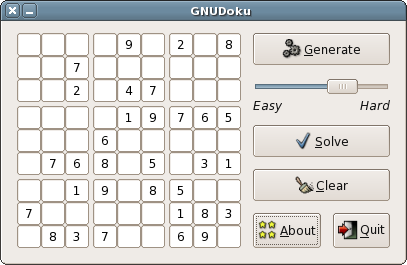 A free program for creating and solving Su Doku puzzles.
You can use GNUDoku to challenge yourself, to compute solutions, or to verify your own solutions.
A Su Doku puzzle is a 9x9 grid which must be filled with numbers between 1 and 9 such that each row, column, and 3x3 square contains all 9 numbers.
License: free
Requirements: gtkmm-2.4
| Sound: | Play in X: | Play in Console: | Multiplayer: | Network Play: | 3D Acceleration: | Source Available: |
|---|---|---|---|---|---|---|
| no | yes | no | no | no | no | yes |
Submitted by jcspray on 2005-06-23.
Like that's going to stop me. I commented out the relevant sections of the code (The inside of the about dialog function, and any line containing "set_image"; also, I changed ABOUT to QUIT) , and it compiled and ran. (On a completely unrelated note, the website is asking for packagers.)
The actual game works well for Su Doku. A way to print out puzzles might be an interesting addition, but I don't need it. There is no installation needed, and the entire game is contained within the binary.
Anyway, game's fine, installation needs some work.
8<-------------- snip --------------
--- GNUDoku.C.orig 2005-07-03 22:13:02.000000000 +0100
+++ GNUDoku.C 2005-07-09 09:35:29.000000000 +0100
@@ -351,24 +351,21 @@
Gtk::Button &generatebutton = *Gtk::manage(new Gtk::Button);
generatebutton.set_label(_("_Generate"));
generatebutton.set_use_underline();
- generatebutton.set_image(*Gtk::manage(
- new Gtk::Image(Gtk::Stock::EXECUTE, Gtk::ICON_SIZE_BUTTON)));
+ //generatebutton.set_image(*Gtk::manage(new Gtk::Image(Gtk::Stock::EXECUTE, Gtk::ICON_SIZE_BUTTON)));
generatebutton.signal_clicked().connect(
sigc::mem_fun(*this, &GNUDoku::generatePuzzle));
Gtk::Button &solvebutton = *Gtk::manage(new Gtk::Button);
solvebutton.set_label(_("_Solve"));
solvebutton.set_use_underline();
- solvebutton.set_image(*Gtk::manage(
- new Gtk::Image(Gtk::Stock::APPLY, Gtk::ICON_SIZE_BUTTON)));
+ //solvebutton.set_image(*Gtk::manage(new Gtk::Image(Gtk::Stock::APPLY, Gtk::ICON_SIZE_BUTTON)));
solvebutton.signal_clicked().connect(
sigc::mem_fun(*this, &GNUDoku::solvePuzzle));
Gtk::Button &clearbutton = *Gtk::manage(new Gtk::Button);
clearbutton.set_label(_("_Clear"));
clearbutton.set_use_underline();
- clearbutton.set_image(*Gtk::manage(
- new Gtk::Image(Gtk::Stock::CLEAR, Gtk::ICON_SIZE_BUTTON)));
+ //clearbutton.set_image(*Gtk::manage(new Gtk::Image(Gtk::Stock::CLEAR, Gtk::ICON_SIZE_BUTTON)));
clearbutton.signal_clicked().connect(
sigc::mem_fun(*this, &GNUDoku::clearBoxes));
@@ -390,10 +387,12 @@
Gtk::HBox &buttonbox = *Gtk::manage(new Gtk::HBox);
buttonbox.set_spacing(12);
- Gtk::Button &aboutbutton = *Gtk::manage(new Gtk::Button(Gtk::Stock::ABOUT));
+ /*
+ Gtk::Button &aboutbutton = *Gtk::manage(new Gtk::Button());
aboutbutton.signal_clicked().connect(
sigc::mem_fun(*this, &GNUDoku::showAbout));
buttonbox.pack_start(aboutbutton);
+ */
Gtk::Button &quitbutton = *Gtk::manage(new Gtk::Button(Gtk::Stock::QUIT));
quitbutton.signal_clicked().connect(
sigc::mem_fun(*this, &GNUDoku::doQuit));
@@ -437,6 +436,7 @@
}
+/*
void GNUDoku::showAbout()
{
Gtk::AboutDialog dialog;
@@ -447,6 +447,7 @@
dialog.run();
}
+*/
void GNUDoku::doQuit()
I would like to try the GNUDoku, but only if it required only GTK (and an old version, like 2.2). At least I like that it does not require Gnome.
One question: Can I "write" my puzzle in GNUDoku and ask it to solve it? Or it will only solve puzzles generated by the program itself?
As for suggestion for improvements: Would be nice if the 'solve' button would present the solution in a way that better shows which numbers were given/already filled out and which the computer put in. Would also be nice to have an undo or at least restart button. A Hint button to show a posible next step to fill in (either by only showing which field can be filled, or by also giving the value to put in there).Maybe an additional small text area with each number field to write in things like numbers possible in that field
Pit
I think there should be different styles (i.e. fg/bg colors) for "fixed" numbers, player written numbers and computer solution numbers. This is easy to implement and will improve the gameplay a lot.
This may be very useful.
I would also like to have a way to make annotations on-screen.. but I am not sure how this would look like. there are two annotation schemes described in wikipedia. this may be a start.. or maybe have a look at the game "Einstein's puzzle" (IIRC) also on happypenguin.. the way to show 6 little boxes (or nine for GNUDoku) inside each box to show the numbers that are still available could be followed.
Thanks for the game.