







Kye
Version: 0.9.4
Category: Puzzle
Average of 4 Ratings: 

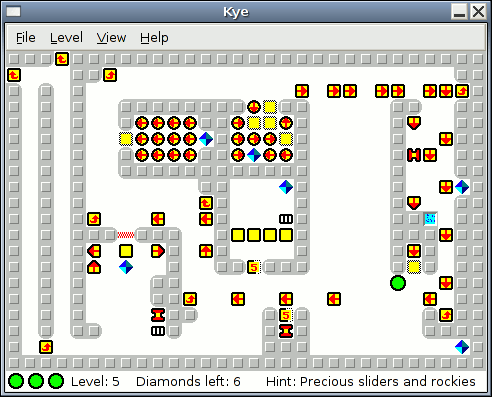 A puzzle game with a variety object types and types of level
Kye is a puzzle game which takes ideas from Sokoban and the genre of falling-rocks puzzle games. However, it includes a wider range of objects, allowing a larger variety of puzzles to be constructed. It is a clone of the original, shareware, Kye for Windows, and is compatible with the large number of existing extra levels designed for the Windows version of Kye. A level editor is also included, and it is easy to make your own levels.
License: free
| Sound: | Play in X: | Play in Console: | Multiplayer: | Network Play: | 3D Acceleration: | Source Available: |
|---|---|---|---|---|---|---|
| no | yes | no | no | no | no | yes |
Submitted by anonymous on 2006-01-08.
I think the controlling of the main object need little tweaking. So the green object stops when you lift your finger from the keyboard.
:) Going to play some more now.
Traceback (most recent call last):
  File "./Kye", line 21, in ?
    from kye.frame import KFrame
  File "/home/pit/kye-0.5.0/kye/frame.py", line 25, in ?
    from kye.dialogs import GotoDialog, KyeHelpDialog, KyeAboutDialog
  File "/home/pit/kye-0.5.0/kye/dialogs.py", line 100, in ?
    class KyeAboutDialog(gtk.AboutDialog):
AttributeError: 'module' object has no attribute 'AboutDialog'
Pit
Well, the game seems to have potential, but the controls are horrible to the point of making the game almost unplayable. When I press a key, it seems to be up to pure luck whether the thing I control moves either one square, no squares at all, or halfway across the screen. The interface also isn't very good. You should at least get rid of those annoying messageboxes, but ideally the entire GTK interface should be scrapped. This kind of game really shouldn't use a GTK interface!
Other than that, seems nice, though I couldn't stand playing it for long.
The controls are working in 0.6, but the Go To Level feature is .. not working for me. It asks me to type something in, but whatever I type, it declares 'Level Not Known".
I am annoyed with level 6, with the tedious lifting of objects and then pac-man deaths forcing me to repeat it all, so I would like to skip to level 7.
The idea of go-to-level is to allow you to skip past levels that you have already completed, which is why the game tells you the level name each time you start a new level. (The intention is like in old console games, or games like Lemmings - you can only skip ahead to a later level if you have completed all the preceding levels at least once before*.)
That said, you can open up the .kye file in a level editor and all the level names are there in plain text, so it's easy to 'cheat' by looking up the level names. That said, there are only 6 levels in intro.kye, so there are no other levels to skip to there - plenty more to download from my website, though.
(*) For the next version, I am making this simpler by having the game remember the level names for you.
Traceback (most recent call last): File "./Kye", line 72, in ? f = KFrame(opencall = openfile, restartcall = restartlevel, gotocall = gotolevel) File "[...]/kye-0.6/kye/frame.py", line 135, in __init__ self.stbar = StatusBar(self.canvas.get_image("kye")) File "[...]/kye-0.6/kye/canvas.py", line 67, in get_image pixbuf_loader.close() gobject.GError: Unrecognized image file formatIf that doesn't help, please email me, or kye-game AT googlegroups.com , & include the output of gdk-pixbuf-query-loaders, and I will look into it some more.
That applies to anyone else with installation questions as well :-)
Neat game, by the way. Games like these live or die by the quality of their levels, and Kye's levels seem pretty nice so far.
Perhaps replace the jump to level by name system with a level menu? I always find myself opening the level files with gedit so I can play other levels anyways
This brings me to prefer Xye ( http://xye.sourceforge.net/home.php)
4 stars nevertheless, because its a Kye Clone and a good one.