







LGeneral
Version: 1.2.3
Category: Strategy
Average of 13 Ratings: 

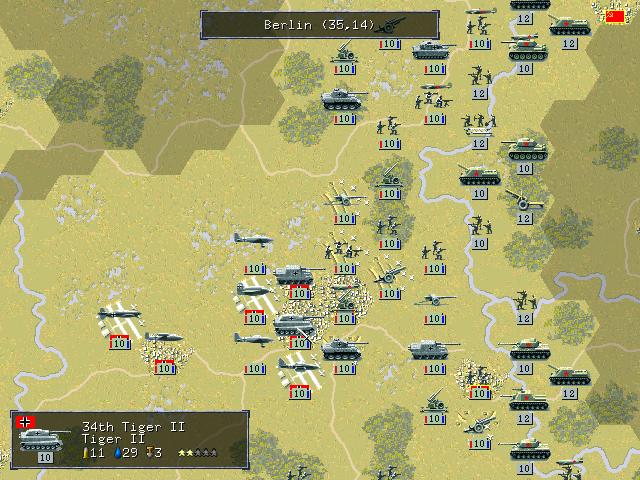 A turn-based strategy engine heavily inspired by Panzer General.
LGeneral is a turn-based strategy engine heavily inspired by Panzer General. You play single scenarios or whole campaigns turn by turn against a human player or the AI. Things like entrenchment, rugged defence, defensive fire, ambushs, unit supplies, weather influence, reinforcements, etc contribute to the strategic depth of the game.
License: free
Requirements:
| Sound: | Play in X: | Play in Console: | Multiplayer: | Network Play: | 3D Acceleration: | Source Available: |
|---|---|---|---|---|---|---|
| yes | yes | no | yes | no | no | yes |
Submitted by nath on 2001-09-11.
checking for main in -lSDL_mixer... (cached) no SDL_Mixer NOT found (get it at http://libsdl.org): Audio disabled
and i dont have sound.
/usr/include/SDL/SDL_mixer.h:61: parse error before `Mix_Linked_Version'
Yesterday I installed SDL_mixer and SDL_mixer-devel, both in version 1.2.4.Idea, someone?
Cheers
Cheers
(No, I wasn't aware of this, but Sam Lantinga just answered a similar question elsewhere. :-)
I have now upgraded all SDL stuff to the latest version, lgeneral 1.0.2 installed without problems.
Hmmm, how do I attack an air unit that is in the same hexagon as one of my ground units? Time to RTFM, I guess.
Although I got totally stomped by the allies in the first scenario, I'd say this is a really neat game.
In the meantime I noticed I can see both units when I hover with my mouse over them...
Still get smashed very quickly ;-)
Where can I find the docs/strategy/unit guides?
Hi. Great game - thanks.
HJowever, the AI is pretty hard to beat. That's both good and bad:
So my comments/questions are these:
A previous poster had a similar question, but got the old RTFM - for your info: I did read the manual, I know the unit strengths and so on.
Basically I'm asking for some good 'Beginners-tips'. I've played strategy games (on a real board, agains a real human!) like Russian Campaign and Empire in Arms, so it's not that I don't get the basic premises - I'm just asking for a little strategiv advice (Calling the pentagon - damn, they won't take my call in the situation room).
I've never played Panzer General, so I have no idea how that works, if there are any hints in the manual or so.
Thank you for your help.
Christian
the AI will be restaurated as soon as I'm back from holidays in a few weeks. It has absolutely no strategic component at the moment but a good tactical one thus it will be able to crash you if it has superior strength but is too weak to get the best out of inferior troops (to delay your progress) so check the frontline for such constellations and use it for your advantage. Apart from that any PG hint page will help a lot with strategic advises as LGeneral is very similiar to Panzer General.
Michael Speck
The Panzer General's faq and its readme.txt helps a lot (google).
It is very good to have such a game on an Unix workstation.
It has already begin to eat all my free time :)
Good vibes ...
PS : ah yes ... I installed the SDL_mixer-dev Debian package to have sound but it does not seem to work ....
But! i have the same problem with SUSE LINUX 7.2
Great game! but I'd like playing PG by e-mail and lgeneral aren't multiplayer, isn't it?
I am truly impressend with lgeneral. It plays well although some improvements could be made:
- Middle mouse button to centre screen
- Saving (screen) options
And an odd issue is that I can not close it in normal fashion. I have to shoot it down with `kilall -9 lgeneral` to shut it down.
One thing though.... How come the combat animations do not run? That is one of my favorite aspects of PG, and to have that working in Lgeneral would be the ultimate gift!!!!!
Please enable this in Lgeneral!
Thanks!
ForgiveR
(I Just love seeing people that makes the old games NEW again :) ).
without it game _looks_ n feels not fully (as it can be)
/Russia Moscow
You must, as explained in the README of the lgeneral installer, do the ./configure, make and make install procedure, and for that you have to install the related libraries to compile everything.
The README about the scenario converter was a bit erroneous as they gave unix command with bad folder names... I just had to figure the good path for both folders.
Good luck in your installation. If you still have problem, explain precisely what it is to have a better answer.
great game I played it over an over again, surely lost one year of my life playing Panzer General, still the best strategic game. What I like especially about it are the German tanks.
LGeneral looks like a nice port with some additional features, but I could only run scenarios and no campaigns.
I have installed the installer version for win32 - yes I know I should be using linux, and I like the Idea about a free unix - unix is even much better than windows, but I wasted another 2 or 3 years of my life getting scanner, printer drivers, mouse drivers, digicam drivers and whatever is around there to work, I even compiled my own linux version, from scratch which took my small machine two weeks ...but what am I talking that much? - Well after another night of scanner installing and almost burning the light, I found out that there are so many other things in life than becoming a real pro in getting Linux to do what win32 does immediately with some punches. I switched back to M$ crap, but at least it works with all devices.
Back to panzer general, I installed the win32 version of lgeneral, and it plays the scenarios well. But it doesnt play the campaigns. It offers the Poland campain in the campaign menu but starts with saying something like "the usual blabalb.." and then nothing happens. From the lgeneral page I see that the original panzergeneral data is required. I have the original game on my computer and I have downloaded the package, but I cannot find the lgeneral converter for win32. does ist exist at all or if not, does someone have a set of converted files?
Cheers, great game, zemos
Thanks,
www.panzergeneral2.com
Thx
In a week I should have a pc ready for LGeneral. I am looking forward to playing it and hopefully I can add some custom scenarios and even a campaign when I learn the Linux basics.
I plan to translate some of the oldies but goodies PG DOS scenarios to LGeneral format....so....I will have many questions to ask due to I don't know a thing about Linux.
If some of you experienced LGeneral fans can give me some tips on converting PG DOS to LGeneral....it would be greatly appreciated.
Dean
P.S. I downloaded and installed the original PG ( DOS version ) and played it through DosBox so I can compare PG and LGeneral. Imho LGeneral is at least as good as PG. it's even running faster than the original and the graphics are on par. I would be willing to pay for a Lgeneral2 or Lgeneral3D version.
Thanks,
Eric
www.panzergeneral2.com
Other than that, this is really incredible game !!!
Really, excellent port. It's a shame that this game is not more known, because it's the best game that I've seen for Linux for people that doesn't have 3D video adapter and wants to play something else aside Icebreaker.
But I have nothing to say except for thanks, and congratulations. In my system (Vector Linux SOHO 5.0.1 -Slack 10.1 based-, standard libraries and installed with bpkg utility), I have found no problem at all. It runs fast (even with my SiS315 bloody video adapter), nice and nicer.
Congrats, thanks & please, more ports of games like this one.
Best regards. Sebastian
A 0install interface for LGeneral is available at http://people.freenet.de/LinuxCNC/0install/lgeneral , all you need to start LGeneral *without* installation is the 50kb 0install Python script from http://0install.org/injector.html
Any feedbacks are welcome... ;)
Are you planning to include the unit purchasing option? Being able to call up units during a battle by either side made PG very challenging. Also, the ability while in a scenario to upgrade and purchase units allowed customization and unique strategies. Thanks for all your hard work. The game is great!
Please make this version into network play, online vs live humans is the best for Panzer General ! ! ! Not easy to add direct play into the code ???
Thanks much Speck for your efforts so far...
www.panzergeneral2.com
I've installed this game a few times but after playing a while gave up each time because I have no idea what unit does what, etc.
Are there any docs or tutorials anywhere?
Notice in particular that during that period some tanks were optimized for fighting infantry and others for fighting tanks, and if you use the wrong ones for the wrong job you'll suffer needlessly.
(There's lots of stuff I'd do differently, but that's the one thing that always makes me ditch it in disgust after playing about half a scenario.)
I'd say this is one of the best tactical games for Linux. I also really like the cyberpunk style.
There are some minor issues however. My biggest gripe is the CPU intensive AI calculations
using lgeneral 1.2beta-11
Go to Erik's web page www.panzergeneral2.com for details on how to get it working yourself or email me at [email protected]
THIS IS FOR REAL THIS IS NOT A HOAX
*** glibc detected *** double free or corruption (fasttop): 0x086e3a50 *** Aborted
On a serious note..
I hope you'll get the undo option right, I'd love to see a XML solution to it (lock the undoable undo's in a list, hint!).
When blasting something landbased to hell using my battleships, the game explodes into memery noise lane.. It just disappears.
Using LGenerals on winXP sp2, haven't tested it on Linux (hey, I use that for more serious things)
Yeah, the user interface needs work.
I can't seem to start a campaign. Or rather, I start the Poland campaign, get the 'Conquer Lodz and blablabla' screen, and then I'm back to wandering about Europe with my cursor. No click anywhere seems to do anything differently than before I 'started' the campaign.
I'm talking about the game.
I hit the right mouse to bring up the menu, select new campaign, hit Poland then click the green tick for Ok. For a fraction of a second a beige-coloured dialog appears, but then its gone and I'm back to looking at Europe with nothing happening.
I'm running the game under Windoze btw (yes I know, its the _linux_ game tome etc).
If you select Campaign, then you select PG (not Poland) and it plays the whole game from the start (Poland). If you select Scenario then you can select Poland or whatever part of the Campaign you want to play. Did you select Campaign or Scenario?
The game dumps text to the console; run it in a DOS window via the command prompt and see what it says.
I right click, and up pops the menu with 6 icons. Icon 4 is a "C", and on mouse-over a textbox appears at the top of the screen saying "Load Campaign". I click on this, and I'm offered a choice of Poland and ... that's it. Poland. Selecting this brings up the description (German invasion of Poland). Clicking on the green tick brings up the beige window for a split second then I'm back to the map. Still nothing in the cmd box.
Ok, so instead I'm trying S for Scenario - and there I see "pg". This brings up a whole swag of choices (none of which is Poland btw). I choose, say, Norway, and click ok. The screen turns black, text scrolls, then I'm looking at oceans, islands and u-boats. Hence, scenarios seem to work.
Still nothing in the cmd box though.
I hope that helps :)
There's obviously something wrong with the win version. Seeing as this is the Linux Game Tome I recommend using the Linux version that works :)
LGeneral Converter for Panzer General (DOS version) v1.2beta-13 Copyright 2002-2005 Michael Speck Released under GNU GPL --- Settings: Source: /usr/local/lgeneral-1.2beta-13/pg-data Destination: /usr/local/share/games/lgeneral Use Individual Palettes Converting: nation database... nation flag graphics... /usr/local/share/games/lgeneral/gfx/flags/pg.bmp: Couldn't open /usr/local/share/games/lgeneral/gfx/flags/pg.bmp
I did a search, and it's not on my system. Reinstall (make clean, make, make install) didn't help. Any thoughts anyone?
> Destination: /usr/local/share/games/lgeneral
> /usr/local/share/games/lgeneral/gfx/flags/pg.bmp: Couldn't open
gfx/flags/pg.bmp and gfx/units/pg.bmp found on my installation. These are created by the converter from the original data.
I understand then that given the above paths, this is how you invoked the converter: lgc-pg -s /usr/local/lgeneral-1.2beta-13/pg-data -d /usr/local/share/games/lgeneral
Are you stating that the message "/usr/local/share/games/lgeneral/gfx/flags/pg.bmp: Couldn't open" came from the converter? If so you were executing the converter as root right, because if not it won't be able to write to the destination folder.
Thanks for the help.
Can anyone please help?
Settings: Source: ~./lgames/pg-data Destination: /home/tim/tmp/pg-data-converted Use Individual Palettes Converting: nation database... /home/tim/tmp/pg-data-converted/nations/pg.ndb: access denied
Any other suggestion?
Thanks in advance
You should get one campaign by clicking Campaign and selecting PG in the left column. You then get World War II - Nazi Germany bla bla bla...