







MAMECAT
Version: 0.44.b46
Category: Util
Average of 2 Ratings: 

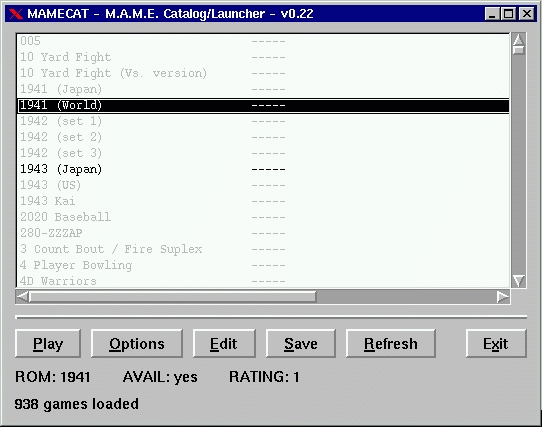 A front console/X front end to X-Mame.
MAMECAT stands for M.A.M.E. Catalog/Launcher.
It consists of three programs:
- mamecat (curses version of the launcher; text-only)
- qmamecat (Qt version of the launcher; X11)
- catgen (a simple catalog generator)
The key-features of MAMECAT are
- preview-image support (Qt/X11 version only !), several file-formats (GIFs, BMPs, XPMs etc...)
- easy, extendable catalog-format (incl. a catalog-generator)
- X11 (using Qt) and text-only (i.e console or xterm) user interfaces available
- works with most recent xmame-versions (should virtually work with any release :-)
License: free
Requirements: The Qt library version 3 or better.
| Sound: | Play in X: | Play in Console: | Multiplayer: | Network Play: | 3D Acceleration: | Source Available: |
|---|---|---|---|---|---|---|
| no | yes | yes | no | no | no | yes |
Submitted by bobz on 1998-12-04.
Rene ;-)
Keep on the good work.
You can get xmame.xgl binaries here :http://www.beimborn.com/cps2/linux/
c++ -L./../../src/common -L./../../src/unzip -L/usr/X11R6/lib -L/usr/lib/qt3/lib -s uic.optionsdialog.o uic.mameoptionsdialog.o uic.editdialog.o uic.emucontrol.o uic.previewcheckdialog.o uic.samplecheckdialog.o qmamecat.o widgets.o aboutdlg.o procmgr.o moc.uic.optionsdialog.o moc.uic.mameoptionsdialog.o moc.uic.editdialog.o moc.uic.emucontrol.o moc.uic.previewcheckdialog.o moc.uic.samplecheckdialog.o moc.qmamecat.o moc.widgets.o moc.aboutdlg.o moc.procmgr.o ../../lib/libmamezip.a ../../lib/libmamecat.a -lX11 -lm -lqt -o qmamecat
/usr/bin/ld: cannot find -lqt
collect2: ld returned 1 exit status
make[2]: *** [qmamecat] Error 1
make[2]: Leaving directory `/home/simcon/Source/qmamecat/src/qmamecat'
make[1]: *** [qmamecat-all] Error 2
make[1]: Leaving directory `/home/simcon/Source/qmamecat/src'
make: *** [src-all] Error 2
[simcon@localhost qmamecat]$
So what do you think is causing this?
Please send your questions and comments regarding QMamecat to [email protected] ! We normally don't recognize other forums... this time it's been a coincidence :).
Regarding your question/problem (short answer):
Well, you CAN use Qt 3.0.5 with qmamecat-0.44.b46, the only problem is that the layout of the new MAME options dialog doesn't work exactly as with Qt 3.1.x and sometimes looks ugly, but it _basically_ works. Using Qt 3.1.0 or above fixes this and so we still recommend to use 3.1.x (3.1.2 is current, btw). The QMamecat FAQ contains a detailed description for how to install two Qt releases is parallel !
Regarding your specific problem:
I bet you have the multi-threaded Qt library installed, which is called libqt-mt.so in contrast to libqt.so, as for the single-threaded version. Either rebuild QMamecat with
(I'd recommend a "gmake clean" before)or symbolically link your multi-threaded Qt library to "fake" the existence of the other version (believe me, it works fine :): Then try again.
Hope this helps,
The QMamecat-Team