







Mother of all gravity games
Version: 1.95
Category: Arcade
Average of 15 Ratings: 

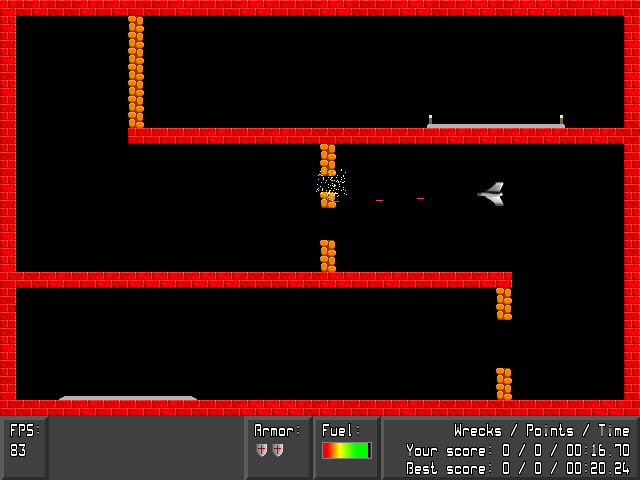 A 2D gravity game combining the idea/fun of SpaceTaxi, GravityForce, etc ...
Moagg combines several game types of other genres like races, search & rescue, seek & destroy et cetera into a 2D gravity game. You are the pilot of a small space ship and have to navigate through different levels.
Besides the gravity that drags you down, there are other obstacles like laser ports, magnets, black holes, cannons, rockets, tanks and grinders.
License: free
Requirements: Java 1.5
| Sound: | Play in X: | Play in Console: | Multiplayer: | Network Play: | 3D Acceleration: | Source Available: |
|---|---|---|---|---|---|---|
| yes | yes | no | no | no | no | yes |
Submitted by agranig on 2003-12-19.
- Which Linux distribution/version are you using?
- Which versions of the following are you using:
- XFree86
- libsdl
- libfreetype
- libparagui
PS: A friend of mine had the same problem. But I'm not quite sure what he did (library updates or something like that), to solve it...# Added framework for background music playback.
# Polished some levels a little.
hmmm...
Sad to hear. Can you tell me, what problems you had?
IMHO, the only rather "nasty" thing is to get a working libparagui. However, if you use the paragui-tarball from Moagg's homepage, there shouldn't be much hurdles left...
I loved Space Taxi, I loved Gravity Force, and chances are I'd like this one as well if I could get the fonts working. Static binary, please...
I did get to try it some by looking at screenshots to figure out what the various menus was supposed to say, and noticed another show-stopping bug (apart from the no text thing): The game slows down to half speed whenever the screen is scrolling. You should fix that.
As noted below, fonts work with freetype 2.1.7. We know it's a little tricky to make this beast work fully functional, and we have been looking and asking for package maintainers since this project started.
However, we're also aware of the scrolling problem (see TODO at http://cvs.sourceforge.net/viewcvs.py/moagg/moagg/TODO?view=markup ), and unfortunately we've no idea why this phenomenon occures on some systems. It doesn't seem to be a moagg-specific issue, because it also occures for example at "gravitywars" on such systems. Some people reported that it disappeared after a kernel update, but we can't track this down because on our current development machines it doesn't occure (in fact it was an issue on my machine at my former company [AMD Athlon900 with ATI-Rage-128], but I don't have access to it anymore).
Btw, if the statusbar and the controls menu aren't displayed properly, check out the latest CVS version, because that fixes came a few hours too late to get into 0.6...
Unfortunately I can't use Freetype 2.1.7, as that breaks all kinds of stuff. Making a static binary isn't hard to do at all, and it'll probably make many people happy =) . (If you do decide to make a static binary available, please offer it in a rpm-less form as well for us without rpm =) .)
For the slowdown-bug... I've got a Pentium III 500 Mhz (...) with 256 Mb RAM, and a NVidia GeForce 3 Ti200 (64Mb) gfx card with Nvidia's drivers (v.4496, render accel enabled), running kernel 2.6.3 (gentoo-r1).
Andy created an archive containing the static binary and all data files, that can be downloaded at http://moagg.sourceforge.net/files/moagg-0.6.1-static.tar.bz2
The next official release however is expected to come as three archives: The source, the data files and a statically linked binary. I promise. :-)
Great! Text in the menus and a working statusbar really adds to the game ;)
Thank you!
Thanks for the static build. It runs well under SuSE 9.0 x86_64.
This game is very well done. It's challenging and fun. I did not play through all of the levels, but it is obvious there is a great deal of variety to be seen, and some very deviously difficult gameplay to be had. The game is clearly feature-complete, so I have no qualms about rating it on its gameplay, rather than its status. I'm giving it five stars. I want to try to encourage continued development. It's unique and good and it can only get better.
I suggest some visual indication before a barrier turns on or a SAM fires. Most of the time, when I approached such an obstacle, I hovered waiting for it to cycle before I moved past it, because I didn't know if it would cycle and kill me. I'd rather know at a glance how much time I have. Plus, hey it gives you an opportunity to implement like a pretty glow effect or something.
Also, consider a timer. Some players might enjoy completing a level as quickly as possible, and seeing this rewarded in a high score list.
I think it's just challenging to look out for SAM batteries, cause they're mostly rather hidden. Adding some sort of indication would just halve the surprise :o)
As you also may have noticed, the amount of fuel goes into the score after finishing a level. So, generally said, the faster you are, the higher will be the score (of course you'll be faster while needing more fuel with permanent active thrust, but I don't think you'll pass a lot of levels by that :o)
* then I got an errormessage saying that $HOME/.moagg/score.xml was missing so I had to create it and add:
highscore
/highscore
(they should be within tags, just couldn't write them out because they are taken as faulty html)
* Then it worked :-)
Sorry for the inconveniences. Indeed, it seems, that there's a missing file in moagg-0.7-data.tar.bz2, which leads to a SegFault when starting up moagg.
Solution 1: Create the file "moagg-0.7/cfg/user/score.xml" or "~/.moagg/score.xml" with the following content manually (as you already described):
Solution 2: Download the fixed data tarball called moagg-0.7.1-data.tar.bz2.
However, I must admit as I get older my patience with difficult games like this gets less and less, and for me this game is just a bit too hard. Perhaps I'm in the minority here, and if you get lots of other comments from people saying they like the challenge, then by all means keep it as it is.
A couple of suggestions that would nonetheless make the game annoy me rather less:
We will rework the missions before releasing 1.0.
There will also be the possibility to resume a mission at the last reached level with resetted score in the next release. A basic implementation already exists in CVS.
Regarding the alignment of the ship: just press the magic "down" key :o)
You can of course set another key in the controls menu.
1. You didn't read the README file. :-) You can use "Cursor Down" to align the ship for landing.
2. Take the source, open libMoaggCore/src/MovingObjects.cpp, play around with the values for the SHIP_MIN_LANDING_VELOCITY and SHIP_MAX_LANDING_VELOCITY macros somewhere around line 522, and tell me which values you prefer.
But yes, thank you, the down key is definitely a Good Thing.
2. I'm afraid I can't be bothered with that right now...
Thanks anyway, a very well executed game.
OK, what about some kind of a time bonus, starting with an initial value, which is continuously shrinking to zero every second or so. Further, I would make the initial value and the speed-of-shrink configurable via the level-file, so there might even be levels without any time bonus...
What do you think?
Perhaps you should make it such that crates reappear, unrescued, if you crash whilst transporting them back to your home launchpad?
> ... you can just pick them up, crash your ship and then go for the next set of crates.
Well, yes. But in the long term, you won't make a good highscore entry this way (assuming of course, that there are much more levels to play...)
> Perhaps you should make it such that crates reappear, unrescued, ...
You get points for picking up crates and twice the points for bringing them back. If you crash, you lose the latter. IMHO the crates shouldn't reappear, because then you would get the pick-up points a second time.
And as for the second point, it could be solved simply by removing the pickup bonus.
Some of Slash's Snakepit was also quite hard, but unlike Mission 1 level 8 it always seemed like I could do it if I had just "one more go", I think I liked those levels most, it seemed like maybe the most work had gone into them. The ice one is only two levels big...
Congratulations! Well, zero-g levels of course are harder than the other ones, because one has to take advantage of the inertia of the ship, as well as the gravity field of the black hole (if there is one) to successfully land on platforms...
Because Andy only made two of them. ;-)
BTW, about one week ago, I released a new version of moaggedit (a Qt-based map editor). So if anyone has spare time left to design some maps and levels, feel free to send them to me.
The game will not run if there is a big file (>2GB) in my home directory. I can move the file somewhere else, but why is it scanning my $HOME in the first place ???
First, moagg tries to locate the data files in $prefix/share/games/moagg, where $prefix defaults to /usr/local. If the data files are not found, the directories ".." and "." will be scanned (see libMoaggCore/src/Configuration.cpp).
I suggest either to install moagg via "make install", or to start the binary out of the moagg subdirectory with "./moagg".
(...) try { SYSTEM_CALL::lstat(file.c_str(), &statEntry);And run it with gdb to find out where it stops. Here is the backtrace:m_entries.push_back(Entry(*dirEntry, statEntry)); } catch (SyscallException e) { std::cerr << "Warning: " << e << std::endl; kill(0,SIGSTOP); } (...)
I am still not sure why does it stat every item in my $HOME, but I am sure it does not depent on whether I install the game or not, nor from which directory I run it. Line numbers correspond to version 0.10 of moagg
First, I misread your posted message output. This error occurs, when your local moagg configuration (located in the ~/.moagg directory) is read. So indeed, it doesn't matter from which directory moagg is started.
Second, can you please try to add a '-D_FILE_OFFSET_BITS=64' to the CPPFLAGS of the Makefile? I wonder, if this works (until I have a better solution).
Third, I can't provide a "quick" solution now. But I added an entry to the TODO list to review the internals of the Directory class. Hopefully, the next release will solve your problem...
It works, thanks!
[Embedded Flash application deleted by moderator]
Cool game btw :-)
- Whenever playing a level with a playfield larger than one screen, the screen scrolls. The problem is the scrolling halves the speed of the game, making it pretty unsteady.
- There's no summary of what to do in a level. The first time I hit al evel where you're trying to pick up the little boxes, I had no clue what to do. I completed the level without picking up the boxes, and had no idea why the level didn't end.
- A preview or 'small view' of the level while playing would be a huge win. I spend time killing ships until I understand what I'm supposed to do.
My platform is Debian testing on a PIII-850.dbs.homeport.org
This is a known issue as described in Debian bug #254761. The real problem is, that we are not able to reproduce this bug on our machines here, which lie in a range of a P3-500 up to an Athlon XP 1800.
You can try to disable the "Full Framerate" option in the menu Options -> Graphics. This will halve the framerate, when a scrolling has to be done.
If this makes no difference, it would be nice if you can compile the source of moagg yourself. I would send you a debugging-patch to track down the actual part that is causing the slowdown. Please contact me, if you want to help me with this. As I said, we were not able to reproduce this on any of our machines...
Just take a look into the README file. ;-) Anyway, some kind of "in-game level descriptions" are already planned and will come in one of the next releases. Just give us some time...
I'm inclined to give it just 2 stars, but I'll give it 3 for "potential." Kudos for creating a game where you could recreate just about any of the classic gravity games as one of the levels. It has a large assortment of level objects and "traps" to choose from. All in all, an excellent product of a two-man team. If I were to rate the game based on "achievement per team member", I'd give this game a 4.
But rating it as a game (that is, how much fun it is to play and so forth), it only gets a 2. Overall, the phrase I would use to describe the game is: "sterile, harsh, and unforgiving, like a cubiform robot sent from a 50s sci-fi movie to destroy mankind."
If the authors want MOAGG to be more than "the union of all sets of features from earlier gravity games," what it needs most is some personality. Some style. Some love. Something to differentiate it from any other given gravity game compilation. In short, it needs to go beyond the product of two programmers. What this boils down to is: distictive, quality artwork and sound; intuitive user interface; and some unique and "zany" level elements. It needs to step away from "generic gravity game" and proclaim, "If anyone else tried to recreate me, they would fail, because I am a reflection of my authors' distinctive personalities." That is, to become a work of art.
In many ways, MOAGG is typical of an open-source game, a product of a community mostly made up of programmers. The stereotypical example of such a programmer is someone who prefers the controlled, logical, impersonal world of the computer over the chaotic, personal world outside the computer. A stereotypical programmer is skilled in use of a logic machine (and inherits some of the computer's "cold precision"), and not learned in aesthetics, art, psychology, or the other person-oriented skills. Thus, what he produces is precise, logical, and algorithmic like a computer, but is lacking in how it engages people.
So to reiterate, if the authors want MOAGG to be truly notable, they need to depart from the world of the computer and focus on the user. Perhaps the easiest way to do this is to seek out the input of non-programmers, particularly those non-programmers who are dedicated to person-orieted skills, and act on that input.
Thanks.
I agree with you. The problem is, that I can't take care of everything. So I hoped that other people will help me e.g. with the artwork stuff (creating really "cool" looking tiles, levels, etc.), as moagg grows. But unfortunately, there wasn't as much feedback as I expected...
Anyway, thanks for your comments. You speak from my soul...
There's too much knowledge in the world for any one person to learn it all, so community contribution is a great way to "broaden" the game. I'm glad to see that the web page is set up to facilitate this, with the list of what volunteers can help with. You might even try breaking it up even further (individual tasks like "New ship graphics in this format and size: ...") to make it more inviting to "impulse" contributors (people who want to help, but are afraid of commitment, as it were).
Feedback can often be slow coming (Rubygame, my main project, in about 6 months has gotten 3 one-shot email queries and 1 person who is willing to help if I can get it to work for his machine). At risk of alternately contradicting and paraphrasing The Cathedral and the Bazaar, I think there's a critical mass that a project needs to reach before it really takes off. Although it's more about interest than about lines of code, or something like that. Perhaps an apt analogy is that of catching a small fish to use as bait to catch a larger fish: the author puts some interest and attention into a project, and then throws it out into the open waters and tries to catch more interest and attention.
I'll see what I can do about graphics (I fancy myself an artist). I haven't played around with the level editor yet, but if it's not possible already, I think now would be a good time to program the structuring for single materials which have more than one tile image as part of it. What I'm thinking specifically are:
(1) a big chunk of material with different graphics at the edges than in the middle (with square tiles, each material would need at least 9 images, possibly 13, to do this properly: four with 1 edge (N,E,S,W sides), four with 2 edges (NE,SE,SW,NE corners), and to make it really nice, 4 with 3 edges (N,E,S,W "peninsulas") and 1 with all four edges (a 1-tile "island")). Ideally, the level designer wouldn't have to specify "the tile at location X,Y is the left edge image from the dirt material", but instead "this picture is the left edge image for the dirt material" and let the level editor figure out that the tile at X,Y is a left edge. If you've seen or can get a hold of the level editor from Warcraft2 or 3 or Starcraft, you'll see what I mean. If you put a tile of material A next to a tile of material B, it uses a different image than if both tiles had been the same material.
(2) a material with some variation in tile graphics (perhaps just placed by the artist, perhaps automatically generated) . (For example, a dirt material might have the occasional "dirt with rock in it" tile.)
Make the scaffold for that in code, and I should be able to quickly fill it with some artwork. :)
Originally, it was intented to be similar to the map-concept of the original Gravity Force game. By the time it grew by supporting multiple layers including seperate alpha- and brightness-effects for each layer.
In future versions I also plan to support maps, that consist of two PNG-images: one for the background and one for the foreground. This shouldn't be too difficult to implement and maps may be easier to be drawn by "artist" people, that don't want to fumble around with tiles... ;-)
I liked this game a lot, before the scrolling bug made it too annoying to play. I mainly wish that bug could be fixed. (I've tried looking at the source and messing with it but I don't really have a clue).
As for graphics you might consider stealing x-moto's graphics engine (it seems suitable, though I don't really know what would be involved).
To make it short: Yes, for nearly two years now. :-(
@xmoto: Initially I never wanted to use OpenGL for rendering because I wanted moagg to work also on "weak" computers without an OpenGL-capable graphics card.
@scrolling: In case that you mean that the game slows extremely down when scrolling is involved, I unfortunately never was able to reproduce this bug on any machine that I tried. The right place in the code to start debugging however would be libMoaggGui/src/PlayGroundMenu.cpp in PlayGroundMenu::do_playGroundFullUpdate(). The video update for non-scrolling frames lies in PlayGroundMenu::do_playGroundRelativeUpdate(). What's happening in the "full update" method is that the full visible part of the shadow surface (lying in memory, holding the whole level including the ship and other objects) gets fully blitted to the video surface. Either this or the next line (where the video surface gets "really" updated to the screen) must be some kind of bottleneck on some systems. But as I said, I was never able to find out why...
I know that CDT exists. And originally (in the 0.x versions) moagg actually was based on C++ and SDL. Further I used to use xemacs for hacking. My conclusion is that this just sucks in comparison to Java. Of course this is just my opinion and we could discuss technology issues forever. So let's leave it at that and just tell me, if you like the game itself or not. ;-)
PS: The old C++/SDL source code of moagg is still available on CVS @ Sourceforge. Feel free to use it / reuse it / take it over (respecting the GPL of course). But I will continue moagg's development with the Java version.
Now grow up and stop whining about "how Java is slow and/or bad".
in your run.sh if JAVA_HOME is undefined you should assume something like /usr or search for Java don't leave the user with an error message. Eclipse for example goes hunting for Java on the system: If JAVA_HOME is declared then
When undeclared
I just fiddled with run.sh it now works on my system Ubuntu 7.10 properly. The problem was although java exists as a command calling ! -x "$JAVACMD" when $JAVACMD=java fails because -x looks for a file in a path but there is no path. Another way to fix that would be to find the path to the java executable with whereis java but that requires more work.
#!/bin/sh # ---------------------------------------------------------------------------- # Moagg2 Start Up Batch script # # Required ENV vars: # ------------------ # JAVA_HOME - location of a JDK home dir # ---------------------------------------------------------------------------- if [ -z "$JAVACMD" ] then if [ -n "$JAVA_HOME" ] then JAVACMD="$JAVA_HOME/bin/java" if [ ! -x "$JAVACMD" ] then echo "Error: JAVA_HOME is not defined correctly." echo " We cannot execute $JAVACMD" exit 1 fi else JAVACMD=java fi fi if [ -z "$JAVA_HOME" ] then echo "Warning: JAVA_HOME environment variable is not set." fi exec "$JAVACMD" \ "-Dlog4j.configuration=file:log4j.properties" \ -jar jar/moagg-1.90.jarAnd benefits? - Portability? For opensource application, yes. Not funny. - Performance? Not funny either. It may be close (but still not equal) to C/C++ in terms of speed, but memory waste is terrific. - Development speed? May be noticeable in enterprise projects, but here... I think all the time you spend on rewriting in in Java could be spent more wisely.
Only excuses, like that `java's not so slow'. Also, I really don't understand why Lua is not enough for this project. You can also use python for scripting.
Anyway, I'm not trying to troll, I just don't understand. The key word is `overkill'.
Not true. Don't mess up RSS with VSZ. If i start up both moaggs on my machine and look at the RSS, I get 61984 kB for moagg2 and 21032 kB for moagg1. So it's actually less than 3 times more "real" memory usage. I can live with that. :-)
Well, at least I have not seen a computer lately which did NOT have a Java runtime installed. :-)
Regarding moagg: I decided to continue development in spring 2007, but thought very long about whether to continue the C++/SDL-based 0.18 version or moving to Java (or even to something different). I decided to go with Java because of the following reasons:
PS: I used to like C and C++ very much. But the more time I spend with Java (and the tool chains around it), the more I hate C++ for being ... just so complicated. Don't forget that the old moagg WAS based on C++/SDL, so I believe that I know what I'm talking about when comparing C++ with Java. :-)
PS2: This is just my opinion and of course I respect if someone has a different opinion. So just tell me if you actually like the game or not, OK? ;-)
             JAVA_HOME=/System/Library/Frameworks/JavaVM.framework/Versions/${JA
VA_VERSION}/Home
I just made it all on one line and it worked. Some things I think that could be improved in your game.- Game could show what containers your ship is carrying in the status bar
- When going beyond 640x480 resolution the in-game menu slows down, pressing the arrow keys to navigate the menu has a delay before you see the change. Also when you up the resolution you can see more of the cave but I think you should keep the same virtual size and just scale up the graphics.
- More levels, or more specifically some easier ones.
- Plot lines to some of the levels, giving you a story as you play each level
- In game level editor
- Maybe try sound effects to see if they are ok. At this stage the game seems fine without them
- Make ready made packages for some systems. Installers for Windows, packages for a few different Linux Distros.
Great game I would say it is like 90% complete. As in 100% complete is what you would expect from an A-grade commercial title.I think I'll strip down the run.sh script again (similar to the run.bat for Windows) to the bare minimum: Use JAVA_HOME. If not present or pointing to an illegal location, try to execute "java" directly (requiring the binaries/links in /usr/bin, /usr/local/bin or a different directory in the PATH).
Check. Also showing the current weapon and multi-shooter would be a good idea, like in maelstrom for example.
This also was a problem until 0.18, because designing "good" levels is very much work and unfortunately I don't have the spare time to do everything on my own. So my focus always was on the tutorial levels trying to demonstrate all features of moagg including things you can do with scripting.
A Qt-based map editor exists (moaggedit). But currently I'm developing a plugin for tiled (http://mapeditor.org/) that is able to load and store moagg map files. Regarding the level files (XML) I don't think it's a good idea to make some kind of in-game editor, because as soon as scripting is involved, a text/xml-editor of your choice ought to be the better environment.
What's currently also missing is a way of adding custom levels to a binary release package without the need of checking out moagg's source code or hacking/copying the levels into the moagg JAR. I'll have to address this in one of the next releases...
Thanks for your feedback.
ERROR: Entering FullScreen Mode
Caused by: java.lang.RuntimeException: Full Screen Exclusive Mode is not supported
Why would I be getting this error? I'm running Ubuntu, maybe my Java Run-time doesn't support this.
Also with the increased screen resolutions and the lag in the menu. I noticed that if you change the timer from GTGE to System the lagginess goes away.
Fullscreen doesn't work on my Linux box (Debian sid) too.
I decided to go with the GTGE timer as default, because the SYSTEM timer leads to a very jerky game flow on my WinXP laptop. So it seems to strongly depend on the target system, which timer is best for the game.
BTW, could you please explain in more detail what you mean with "lag in the menu"? Thanks in advance.
For instance at 1024x768 Resolution on the select game type screen it just took 13 seconds of holding the down key to get from "tutorial" to "back". Up and enter are affected as well. As well as the section where you enter the player name. Once in the game things are fine though.
-1 star for memory usage
Hi. Could you please give me some additional information about this issue? I really would like to know what you exactly mean with "controls not responding". Do you mean that pressing or releasing a key is totally ignored? ...or delayed for some time? ...or something else?
Just a wild guess: Could you try to switch the game timer from 'GAGE' to 'SYSTEM'? (this can be done in the menu: Settings -> System -> Timer).
Thanks in advance.
Does nobody read the mission descriptions of the tutorial levels? ;-)
Hint: Use the 'Cursor Down' key to align the ship vertically for landing.