







Myth II: Soulblighter
Version: 1.3e
Category: Strategy
Average of 15 Ratings: 

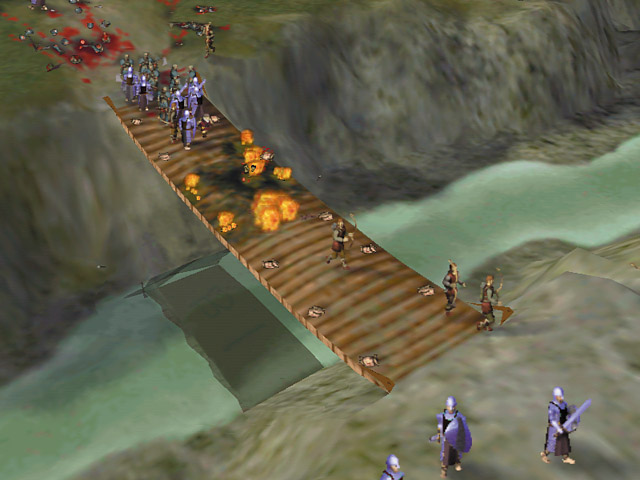 A 3D, fantasy-themed real time strategy game.
Sharpen your swords and fire up the cauldrons--Soulblighter is back! Bungie's thrilling strategy adventure, Myth II: Soulblighter, brings back the scourge of the West and challenges you with all-new scenarios and improved graphics and 3D rendering.
In command of a ragtag army of beserkers, dwarves, soldiers and sorcerers, you are the last hope (yet again) of saving the folk of Madrigal and the West from the evil might of Soulblighter and his minions. Test your fortitiude by challenging others on your network or online to a battle to the death, or cross swords and sages with Soulblighter himself. For fantasy gamers, this is far better than a slab of roast beast washed down with a tall ale...
Thanks to the efforts of Loki, this awesome adventure is now available for Linux 2.x and glibc2. Now you can match the power of your sorcery with the power of your favorite operating system. Get it now...before it's too late.
License: commercial
Cost: $29.95 US
| Sound: | Play in X: | Play in Console: | Multiplayer: | Network Play: | 3D Acceleration: | Source Available: |
|---|---|---|---|---|---|---|
| yes | yes | no | yes | yes | yes | no |
- Myth II: Soulblighter home page
- Download product updates
- Download a playable demo
- Order this game from Tuxgames.com
Submitted by bobz on 1999-08-18.
Even the tutorial is a hoot.
...or must you really fork out twice for one game :/
The only downside is that every new level starts with a new group of characters. This made me reluctant to start a new level immediately after completing an old one.
It's quite fun to watch the movies of the levels you have completed too, and: pause is your friend.
Quite nice. For me, I can't say there "is not enough here to keep [me] playing," as I've gotten many hours out of this game, going back and playing many of the levels over again until I got 'em right (what, me perfectionist?). Now there's an update (Chimera) available with a whole new plotline and series of levels... while they may not be quite as good as the originals, I feel it does increase the value of the game.
Control is... Well, it's not bad, but it's not perfect either. You can order your troops to stand in formation, but they abandon this formation as soon as they move or attack. Among other things, this means you it's very difficult to make units with different movement speeds travel together. Also, some units must be micro-managed if you don't want them doing more harm than good.
If the real-time aspect stresses you, in single-player games you can always turn it down to half speed. Even better, you can move the camera about and issue orders to your troops while the game is paused, enabling you to give orders to many units at one time and have them all start moving the instant you resume. This lets you change the balance of the game to focus on the "strategy" part of RTS.
...and it runs on my 233 MHz, even when using software graphics rendering, which is nice.
I have a laptop with no 3D card so I am stuck with strategy games for the most part due to not having the option for 3D. This game is wonderful. I kept my Windoze ME partition on my laptop for playing games but I am wondering if I should just wipe it out now. Go get this game.
first. In case you have a nvidia card, give it a go.LD_PRELOAD=/usr/lib/tls/libGL.so.1export LD_PRELOAD
I got around all this with an ugly kludge, but it worked, so who cares. I copied the setup file from the CD onto my HD and then edited it. I added:
cd /mnt/cdrom
early in the document right after a line that said something like cd $dirname. I don't actually remember what came after the $. I also scrolled down the document to the point where the variable saying how much space is available is set. The space available is determined using the df command piped through grep and then awk. I didn't bother trying to correct it, but it looks like the problem is that it expects the df output to be all on one line. I just got rid of the df stuff and put a big enough number after the =. I think I chose 800000, which was large enough to allow the largest install. I am pretty sure those are the only modifications I had to make to the script. Obviously those steps would have to be changed for someone who does not have enough disk space and does not mount their cd to mnt/cdrom, but the required changes should be obvious to anyone who needs to do them.
Once I had edited the script, I just had to run my edited version (making sure to use sh setup rather than just setup, just in case) and it installed the program. After that, Myth 2 still would not run. I had to get the latest update for Linux Myth 2 (1.3.1e I think) from one of the loki mirror sites (The sunsite.dk one still works, although I could not always get into it and I think the planetmirror one still works as well) and run that with sh as well. To my surprise, that installed without issue. I thought that I would have to do what I have had to do with most of the other loki updates and exctract the files using the --keep option (-keep in some of them) then descend into the directory it creates and into bin/ then Linux/ then, I think, X86 and replace the loki_patch with the most recent version from icculus.org then run the update.sh back in the main level. After the update was installed, I was able to run Myth 2 and just had to go into the settings to get it to use opengl (I did not need to do anything special from the command line like the other commenter) and it worked. I have only played through a few levels like that and I have not tried to copy in my old save games yet, but it has been working perfectly for the levels I have tried.
I hope this helps anyone who has been having similar problems.
marvin
Remove or rename cutscenes and the game will work fine... without opengl. :'( Can someone find a solution to make Myth2 work with OpenGL ?
- Download windows version 1.5.1 from http://projectmagma.net/m2_update.shtml and run it with Wine - Copy binary and plugins to Linux-versions directory - Run Myth.exe with Wine - Mouse is now centered and is not willing to move. Alt+tab away and back. Mouse should work now.
You should be able to use OpenGL then. And Myth works fine with Wine. With cvscedega it works even better, but without sound,
Sound seems to work only with ALSA-output (use winecfg to configure that). And don't run Myth in Wine's "desktop"-mode.
http://projectmagma.net/cgi-bin/forum/ikonboard.cgi?s=7a2fb689a28ca2c21ee5db37a7339cc7;act=ST;f=4;t=1740 helps too (It seems cutscenes are in different format in Windows-version, so they don't work with that).
I hope Linux-version of 1.5.1 will come. :|
And this is a great game. Very great. One of best games ever.
It's too bad for the OpenGL version but I prefer SDL/X11 version by Loki Myth2 rather than OpenGL with XWine. :) Sound works well with this version. Fear & Loathing too.
I'm waiting for the 1.5 patch from magma. :) Can I help ?
That said, the latest update (1.6) is said to run very well with the current version of Wine. This gives you the option of opengl rendering, plus many modding enhancements used by many recent high-quality plugins. Finally, you'll need the update if you want to get online (there's still a vibrant community at www.playmyth.net).
Anyway, there's a current thread on the Magma forum about getting it working under Wine etc.
For those who haven't played the game, its one of the best squad based real-time-tactics games of all time, developed by Bungie before they were eaten by Microsoft. You can pick up a CD on ebay for $1, so it doesn't take a huge investment to get into it. More info about Myth here.
It works. :)
Just in case that link disappears, basically LD_PRELOAD a library that wraps fopen, and returns an old format meminfo (static file somewhere) when the file is /proc/meminfo