







No Gravity
Version: 2.0
Category: Action
Average of 8 Ratings: 

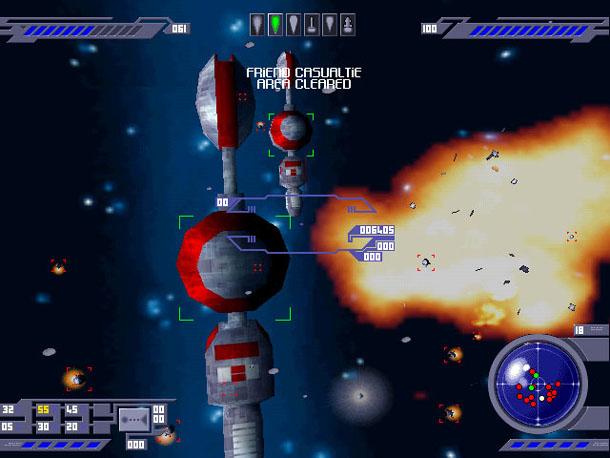 3D space combat game
No Gravity is a fantastic and futuristic universe made of five intergalactic worlds. It is an arcade-type game with great playability, where it is easy to plunge into space battles against spacefighters, space stations and more!
No Gravity is a space shooter in 3D in the style of Wing Commander. The player controls a space ship, viewed in the first person. In each mission, the player needs to accomplish some objectives such as destroying enemy ships or their base, escorting allied ships and clearing mine fields. A brief description of the objectives is given at the beginning of a mission. In some situations, the player has some wingmen and can control them by giving orders such as 'attack enemy', 'retreat' and 'protect the base'. A mission is composed of different sectors which have different objectives.
When the objectives of the current sector is complete, the player needs to go the nearest NAV point, when he can warp to the next sector. In the last sector, a warp gate appears and the player needs to go through it to complete the level. At the end of each episode (each containing 10 missions), there is a large base station to destroy. When the player completes all the episodes (of which there are 5), the game ends. The mission fails if the player is destroyed or an objective is not complete (e.g. an important ship being destroyed by enemy).
License: free
Cost: GNU GPL
Requirements:
- OpenGL
- SDL
- SDL_mixer
- libpng
- libogg
- libvorbis
| Sound: | Play in X: | Play in Console: | Multiplayer: | Network Play: | 3D Acceleration: | Source Available: |
|---|---|---|---|---|---|---|
| yes | yes | no | no | no | yes | yes |
Submitted by anonymous on 2005-03-29.
aclocal: configure.in: 44: macro `AM_PATH_SDL' not found in library
I am using Mandrake 10.1, but surely I don't have installed a package. Does any body knows which one I am missing ??
The game looks great !!
Linux binary is available on the No Gravity Sourceforge Page.
One thing that struck me though is that its basically just a flight sim set in space. The ships are shaped like aircraft - wings and engines at the back. You have a constant forward impulse at a steady speed & you turn as if you're flying a normal aircraft.
What would have really rocked is if they'd had a realistic space flight model. If you fire thrusters, you accelerate and hold that speed/velocity until firing reverse thrusters. When you started to turn you'd continue spinning until you told the ship to stop turning or turn a different way, all the while keeping the same course/momentum.
It would have taken some mastering but really added enormously to the depth of the gameplay. Along with having multiplayer. IMHO.
Btw No Gravity is allegedly for linux, yet the sourcecode only contains build makefiles/projects for MacOSX, Windows and BeOS. Unless I'm missing something.
I've seen a couple of comparisons between No Gravity and VegaStrike. Are they really the same type of game?
My impression is that No Gravity is a pure arcade game whereas VegaStrike is much deeper (almost a MMORPG).
i first copied the libs over from planeshift and it worked, but after this i remembered the "linux32"-programm to start 32bit-applications and it worked (of course)
thanks for this game, this is very nice and verystrike / privateer dont run on amd64 for me.
So far, I have managed to RPM the file rt-nogravity-linux.i386. I renamed it to 'rt.rpm' to rpm the file but it worked (giving me a row of ###########).
Now I am up to the remaining files...
Game Data (rt-nogravity-data.zip) containing file_id.diz and NOGRAVITY.RMX Source Files (rt-nogravity-src.zip) contains - a lot of stuff.
But here's where I get stuck. If I unpack the rt-nogravity-src.zip, there is no "bootstrap" executable to launch as per instruction. If I go into src/Linux there's a makefile, but performing it results in...
../../rlx32/src/linux/systime.c:53: error: `Uint32' undeclared (first use in this function)
../../rlx32/src/linux/systime.c:53: error: (Each undeclared identifier is reported only once
../../rlx32/src/linux/systime.c:53: error: for each function it appears in.)
../../rlx32/src/linux/systime.c:53: error: syntax error before "t" make: *** [../../rlx32/src/linux/systime.o] Error 1
At that point I'm stuck. Where have I gone wrong? Please help.
The instructions for running ./bootstrap are for the case where you download from cvs.
BTW, I had the same error when I tried to compile, but didn't want to bug anyone about it. :-)
I'm not sure where you've gone wrong, but I'd probably try compiling from CVS rather than the source distribution (if you look at the version numbers, the source distribution appears to be 1.98r8a, while the RPM is 1.98r9a). This worked for me.
If you want to try this, do as follows.
If this all succeeds, now just copy NOGRAVITY.RMX into the src/Linux directory and run ./nogravity.
If this doesn't succeed, it's probably worth reporting to the maintainers. (It may be worth reporting to the maintainers anyway if the source distribution doesn't work.)
Hope this helps.
Matt
Oops! In step 2, replace "modulename" with "nogravity".
Matt
cvs -d:pserver:[email protected]:/cvsroot/nogravity login did not seem to do anything except ask for a password (I just hit enter) and then exit. The second command (with "nogeavity") downloaded lotsastufff and bootstrap successfully runs.
Unfortunately, make is now failing...
../../rlx32/src/renderers/opengl/gl_v3x.cpp: In function `void GL_InstallExtensions()':
../../rlx32/src/renderers/opengl/gl_v3x.cpp:110: error: `
GL_MAX_TEXTURE_IMAGE_UNITS_ARB' undeclared (first use this function)
../../rlx32/src/renderers/opengl/gl_v3x.cpp:110: error: (Each undeclared identifier is reported only once for each function it appears in.) make[1]: *** [gl_v3x.o] Error 1
make[1]: Leaving directory `/home/lancer/downloads/games/nogravity/cvs/nogravity/src/Linux' make: *** [all] Error 2
Looks like I'm missing the OpenGL component, but then I'm sure I use that for other things, besides I have an Nvidia card running the download drivers for 3D which I thouhgt was meant to take care of tyhis. How do I check and update?
http://oss.sgi.com/projects/ogl-sample/ABI/glext.h
#define GL_MAX_TEXTURE_IMAGE_UNITS_ARB 0x8872
You can add this line somewhere in the top of the file. This will be checked in the next CVS update.
I think glext.h is normally part of the X windows (or possibly Mesa) development package, so this might explain why updating the graphics drivers didn't fix the problem.
I have similar problem :(
../../rlx32/src/renderers/opengl/gl_v3x.cpp: In function `void* UploadTexture(const GXSPRITE*, const rgb24_t*, int, unsigned int)': ../../rlx32/src/renderers/opengl/gl_v3x.cpp:428: error: `glColorTable' undeclared (first use this function) ../../rlx32/src/renderers/opengl/gl_v3x.cpp:428: error: (Each undeclared identifier is reported only once for each function it appears in.) ../../rlx32/src/renderers/opengl/gl_v3x.cpp: In function `void SetTexture(GL_TexHandle*, int)': ../../rlx32/src/renderers/opengl/gl_v3x.cpp:505: error: `glColorTable' undeclared (first use this function)
but from ./configure
....
checking for OpenGL 1.4 support... yes
....
I have recent version glext.h from Nvidia driver.
Please Help.. i don`t like play in sofware mode..
Try adding '#define GL_GLEXT_PROTOTYPES' just before the '#include <GL/gl.h>' in rlx32/src/renderers/opengl/.h (I can't remember the name of the file at the moment, but I think there's only one header file in this directory).
Alternatively, have you tried the autopackage version?
.. It is working.. :))))
Please can you try adding the following to configure.in, before the "AC_CHECK_LIB([png],..." line, and then rerun bootstrap and configure.
AC_CHECK_LIB([z], [inflate], , AC_MSG_ERROR([Can't find libz library.]))
The small glimpse I had of the game looked great. The controls were easy and intuitive, the graphics were awesome. I look forward to an extended session with the game.
As suggested below, try adding the following to configure.in, before the "AC_CHECK_LIB([png],..." line, and then rerun bootstrap and configure.
It compiled almost perfectly, I just had to run opengl-update xorg-x11 (Gentoo only command?) to fix one opengl error.
The graphics are exellent.
mike@kitchenstadium:~/Documents/nogravity/nogravity/src/Linux> make make all-am make[1]: Entering directory `/home/mike/Documents/nogravity/nogravity/src/Linux' if gcc -DHAVE_CONFIG_H -I. -I. -I. -I ../../rlx32/include -I ../../rlx32/src -I ../../rlx32/src/linux -I ../../rlx32/src/renderers/opengl -I ../../rlx32/src/renderers/opengl/linux -D__LINUX__ -I/usr/include/libpng12 -DPNG_THREAD_UNSAFE_OK -DPNG_USE_PNGGCCRD -I/usr/include/SDL -D_REENTRANT -g -O2 -MT systools.o -MD -MP -MF ".deps/systools.Tpo" -c -o systools.o `test -f '../../rlx32/src/systools.c' || echo './'`../../rlx32/src/systools.c; \ then mv -f ".deps/systools.Tpo" ".deps/systools.Po"; else rm -f ".deps/systools.Tpo"; exit 1; fi In file included from ../../rlx32/src/systools.c:31: ../../rlx32/include/_rlx32.h:104: warning: redefinition of `int8_t' /usr/include/sys/types.h:191: warning: `int8_t' previously declared here ../../rlx32/include/_rlx32.h:106: warning: redefinition of `u_int8_t' /usr/include/sys/types.h:197: warning: `u_int8_t' previously declared here ../../rlx32/include/_rlx32.h:108: warning: redefinition of `int16_t' /usr/include/sys/types.h:192: warning: `int16_t' previously declared here ../../rlx32/include/_rlx32.h:110: warning: redefinition of `u_int16_t' /usr/include/sys/types.h:198: warning: `u_int16_t' previously declared here ../../rlx32/include/_rlx32.h:112: warning: redefinition of `int32_t' /usr/include/sys/types.h:193: warning: `int32_t' previously declared here ../../rlx32/include/_rlx32.h:114: warning: redefinition of `u_int32_t' /usr/include/sys/types.h:199: warning: `u_int32_t' previously declared here ../../rlx32/include/_rlx32.h:116: error: conflicting types for `int64_t' /usr/include/sys/types.h:194: error: previous declaration of `int64_t' ../../rlx32/include/_rlx32.h:117: error: conflicting types for `u_int64_t' /usr/include/sys/types.h:200: error: previous declaration of `u_int64_t' ../../rlx32/src/systools.c: In function `MM_heap_reserve': ../../rlx32/src/systools.c:316: warning: cast from pointer to integer of different size make[1]: *** [systools.o] Error 1 make[1]: Leaving directory `/home/mike/Documents/nogravity/nogravity/src/Linux' make: *** [all] Error 2 mike@kitchenstadium:~/Documents/nogravity/nogravity/src/Linux>
And try again
Here's a snippet of the error messages:
../../rlx32/include/_rlx32.h:110: warning: redefinition of `u_int16_t'
/usr/include/sys/types.h:198: warning: `u_int16_t' previously declared here
../../rlx32/include/_rlx32.h:112: warning: redefinition of `int32_t'
/usr/include/sys/types.h:193: warning: `int32_t' previously declared here
../../rlx32/include/_rlx32.h:114: warning: redefinition of `u_int32_t'
/usr/include/sys/types.h:199: warning: `u_int32_t' previously declared here
../../rlx32/include/_rlx32.h:116: warning: redefinition of `int64_t'
/usr/include/sys/types.h:194: warning: `int64_t' previously declared here
../../rlx32/include/_rlx32.h:117: warning: redefinition of `u_int64_t'
/usr/include/sys/types.h:200: warning: `u_int64_t' previously declared here
../../rlx32/src/linux/systime.c: In function `timer_snooze':
../../rlx32/src/linux/systime.c:53: error: `Uint32' undeclared (first use in this function)
../../rlx32/src/linux/systime.c:53: error: (Each undeclared identifier is reported only once
../../rlx32/src/linux/systime.c:53: error: for each function it appears in.)
../../rlx32/src/linux/systime.c:53: error: parse error before "t"
make: *** [../../rlx32/src/linux/systime.o] Error 1
This with Nogravity 1.99 - anyone else experienced this?
Sorry, but if you can't spell and don't understand basic grammar, perhaps you should get someone to help you with the description.
I think I'll save myself some bandwidth and a blank CD.
I've used the 'Submit an update about this game' link to correct all the obvious grammar and spelling errors. If I've missed any, please point them out. Note that the submission gets reviewed by the HappyPenguin admins before being posted, so it won't be updated immediately.
Matt
Try cd-ing to /usr/local/games/nogravity before running it. I think this will fix the problem. However, I'll see if there's a better way to fix this, even if it is just to give a better error message.
Regarding not giving you an option of where to install the game, I believe this is a limitation/feature of autopackage.
Matt
http://www.realtech-vr.com/nogravity/download.html