







OpenBubbles
Version: 1.2
Category: Arcade
Average of 1 Ratings: 

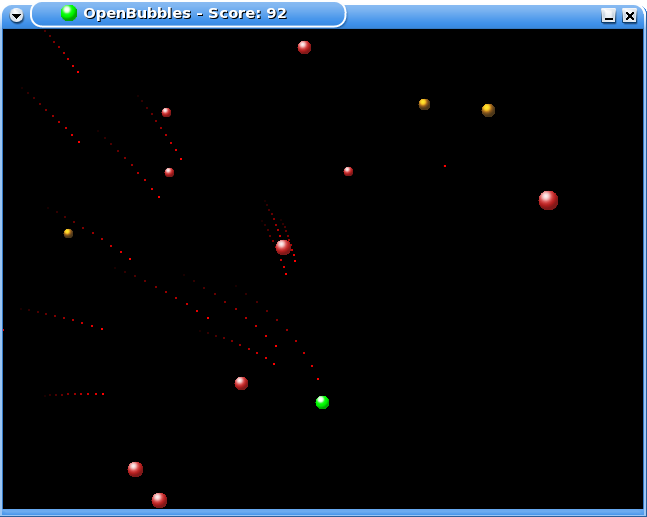 Open source clone of Bubbles
The goal of OpenBubbles is to grow your own green bubble by eating them up. When you hit a smaller red bubble, it disintegrates and gets sucked into your bubble, making it bigger. If you hit a larger red bubble, however, your bubble will either shrink, or if you are too small, disintegrate, and the game will be over. There are other features as well, like bonus bubbles, bouncer bubbles, missiles, and slow motion.
License: free
Requirements: SDL, SDL_image, SDL_gfx
| Sound: | Play in X: | Play in Console: | Multiplayer: | Network Play: | 3D Acceleration: | Source Available: |
|---|---|---|---|---|---|---|
| yes | yes | no | no | no | no | yes |
Submitted by anonymous on 2005-05-08.
And I think I found a bug. When you fire a missle and die and restart then missle is still there in new game.
So...just stay towards the middle. There actually aren't that many bubbles coming in on the edges, so you aren't all that likely to hit one. And once you get your bubble big enough that you don't die instantly, then you can take more chances. Though I've played a lot of Rock Dodger, so maybe I'm just exceptionally good at dodging things. It is a little bit odd that you're the only thing that wraps around at the edges, but once you get used to it, it's kind of neat.
Anyway. I really like the concept, implementation could be better. I find the fades are especially annoying. If you're actually trying to play, rather than watch the interface glitz, it's like, “C'mon, get to the game already!” And I'd like to see prettier graphics while you're actually playing the game. But overall, not bad. Just the kind of thing I like; simple, fun, quick, for when you feel like killing a few minutes.
I'd very much like to have mouse support for controlling the ball.
*** openbubbles-1.0.2/src/sprite.cpp    2005-03-03 09:45:52.000000000 +0100
--- openbubbles-1.0.2.m/src/sprite.cpp  2005-05-11 14:30:22.053300923 +0200
***************
*** 329,342 ****

  void playerBubble::move()
  {
!   if(SDL_GetKeyState(NULL)[SDLK_UP]==1) // up arrow is pressed
!     _y_velocity-=KEYBOARD_SENSITIVITY;
!   if(SDL_GetKeyState(NULL)[SDLK_DOWN]==1) // down arrow is pressed
!     _y_velocity+=KEYBOARD_SENSITIVITY;
!   if(SDL_GetKeyState(NULL)[SDLK_LEFT]==1) // left arrow is pressed
!     _x_velocity-=KEYBOARD_SENSITIVITY;
!   if(SDL_GetKeyState(NULL)[SDLK_RIGHT]==1) // right arrow is pressed
!     _x_velocity+=KEYBOARD_SENSITIVITY;
    sprite::move(); // Actually move the bubble.
    /* Make the bubble go to the other side of the screen if it goes off the
     * screen. */
--- 329,340 ----

  void playerBubble::move()
  {
!
!   int mx, my;
!   SDL_GetMouseState(&mx, &my);
!   _x_velocity = mx-_x;
!   _y_velocity = my-_y;
!
    sprite::move(); // Actually move the bubble.
    /* Make the bubble go to the other side of the screen if it goes off the
     * screen. */