







Pong²
Version: 0.1.3
Category: Arcade
Average of 2 Ratings: 

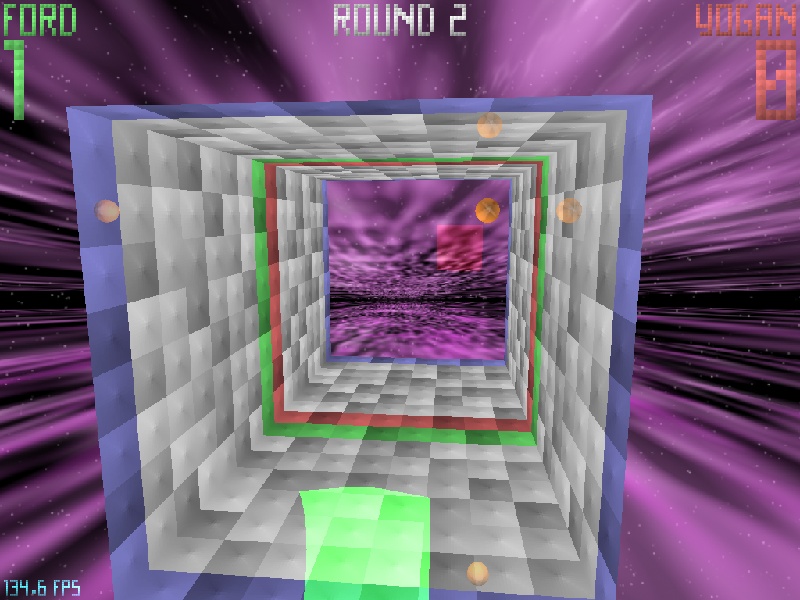 Two player (networked) game inspired by the classical "Pong" in 3D!
Pong² gives you the opportunity to revamp the old and famous gameplay of Atari's first game. It uses OpenGL for drawing, has really freaky visuals and adds another dimension. Every player can move along two axes, and instead of watching the playing field from the side, the perspective is first person.
You can kickoff a ball with your paddle and your enemy has to bounce it back. If he misses the ball, you get one point. To get it tricky for your opponent to catch the ball, you can alter it's direction with your paddle's movement.
License: free
| Sound: | Play in X: | Play in Console: | Multiplayer: | Network Play: | 3D Acceleration: | Source Available: |
|---|---|---|---|---|---|---|
| no | yes | no | yes | yes | yes | yes |
Submitted by anonymous on 2005-02-25.
It would be far better if it used sdl_image to load some JPGs... one and a half meg download does seem excessive for a game that only has 162 kb of source code and 3 major textures. It's only a matter of changing Framework.cpp line 193 into:
Pit
I find the camera movement quite irritating. Why am I viewing the cube from the lower right when I'm moving to the upper right and vice versa? Maybe either move with the padde, or don't move and have separate keys for camera movement.
Pit