







QJoyPad
Version: 3.4
Category: Util
Average of 8 Ratings: 

 Use your gamepad/joystick in any XWindows game
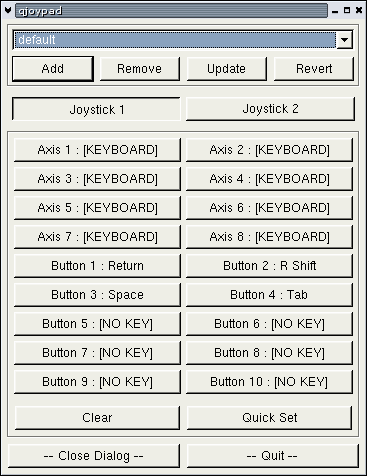
QJoyPad is a Linux/QT program that converts joystick or gamepad input into keypresses or mouse actions for XWindows. This lets you play any XWindows game with your gaming device. Use your game controller in a game that doesn't have joystick support, choose your own custom layouts to play your games how you want, and get rid of extra gamepad plugins for your emulators with QJoyPad.
License: free
Requirements: The QT toolkit and a Linux-supported gaming device.
| Sound: | Play in X: | Play in Console: | Multiplayer: | Network Play: | 3D Acceleration: | Source Available: |
|---|---|---|---|---|---|---|
| no | yes | no | no | no | no | yes |
- QJoyPad home page
- Download QJoyPad
- A conversion utility so you can use your old version 2 layouts in version 3
- A conversion utility so you can use your old version 1.4 layouts in 2.0
Submitted by anonymous on 2004-01-11.
A direct link to the 1.4 version is here;
http://prdownloads.sourceforge.net/qjoypad/qjoypad-1.4.tgz?download
Too bad. I would really like to get joy2key out of my library. :( ...well well. A nice addon in the linux gaming world I'll bet!
"bada bim, bada boom" - It seems my pad works great now, after testing!
Ergo - WingMan RumblePad cordless Logitech USB - works. Period, end of story.
patrix_neoThis would enable me to do basic things in xwindows, like starting programs with my wireles joypad.
I allready use the builtin joystick support in xmms and mplayer.
--Nate.
It warms my heart that my little program is popular enough to be flamed anonymously :-) I wish the author of QJoypad good fortune with his utility.
(As for the reason joy2key kind of sucks, I haven't personally used the program in several years, and no one has volunteered to take up maintainance. If a newer, better program takes it's place, that's fine by me, that's less support email I have to deal with :-)
- Peter Amstutz
I just painlessly compiled and installed this and it appears to work flawlessly. All I had to do was reset the ownership of /dev/input/js* to root.games which I should have done anyways.
It works with my Belkin Nostromo N45 Dual Analog 6-axis 13-button USB joystick From what I can tell its detecting all axes and buttons. It works, simple clean interface, nuff said.
I use it with xmame as I can't get xmame to recognise my USB MS SideWinder Game Pad Pro on /dev/js0! and I've had enough of trying. Anyway I can assign anything I like to my 9 buttons such as Insert Coin, 1 Player Start, ESC and p[ause] :D
Games though really are just one use for this software, as I have a computer a metre from my bed I can use the joypad to read PDF books etc. whilst in bed :p Much comfier than sitting in a chair getting backache.