







Return To Castle Wolfenstein
Version: 1.4.1b
Category: Action
Average of 18 Ratings: 

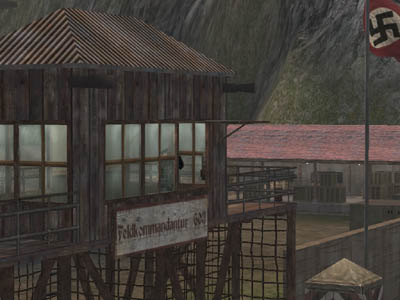 The awesome follow-up to the original Wolfenstein 3D.
This is the follow-up to the old Wolfenstein 3D game, and it does not disappoint. Gorgeous graphics, wonderful sound, and awesome gameplay. Killing Nazis is fun!!! When you've finished the single player missions, go online and check out the rich multiplayer options.
You are B.J. Blazkowicz, [You are B.J. Blazkowicz, a highly decorated Army Ranger recruited into the Office of Secret Actions (OSA) tasked with escaping and then returning to Castle Wolfenstein in an attempt to thwart Heinrich Himmler's occult and genetic experiments. Himmler believes himself to be a reincarnation of a 10th century dark prince, Henry the Fowler, also known as Heinrich. Through genetic engineering and the harnessing of occult powers, Himmler hopes to raise an unstoppable army to level the Allies once and for all.
There are playable single- and multi-player demos at the download site.
License: commercial
Cost: ~ US$49.95
| Sound: | Play in X: | Play in Console: | Multiplayer: | Network Play: | 3D Acceleration: | Source Available: |
|---|---|---|---|---|---|---|
| yes | yes | no | yes | yes | yes | no |
- Return To Castle Wolfenstein home page
- Download Return To Castle Wolfenstein
- Patch download (Flash site--select Downloads->Files)
- Order this game from Tuxgames.com
Submitted by LinuxGamer on 2001-09-23.
#!/bin/sh
./wolf-installer
cp pak/*.pak pak/*.pk3 /usr/local/games/wolfenstein/main
name it setup.sh, chmod it 755, and run that to install the game. Once you do that, you will have your own CD with the files needed to run the game and it will be done for you. You don't have to go to that dreadful windows machine anymore. Do you want it to be any easier? Oh, my bad, there is work involved. Heaven forbid...
As for the installation.. well, they should have made the .pk3 files available on cd, but once you get those extracted, you're over the hill. And the graphical installer work execelent, and the game itself, while unstable once, runs like a rock in the latest releases. I even hear it kicks about 5-15% extra fps out when compared to a windows version.
For the retail version, the documentation says that the game must be installed on windows, and from the windows installation some files must be copied to Linux. It says the windows installation should work from wine, but it didn't for me.
Luckily, I have a windows partition (which, honestly, I had not booted into it for about a year or so), I rebooted to windows, installed the game, rebooted to linux and copied the specified files to my Linux partition.
Once I finally got the game to install on Linux, I was able to run it, unfortunately it keeps crashing.
The error messages I see in the console are (among other messages that don't look like errors):
Received signal 11, exiting...
Shutdown tty console
This is on Debian Sid, Running on an Athlon XP 2000+, 768 Megs of RAM, NVidia FX 5200 card using the latest NVidia Drivers.
The game itself is good, but it is frustrating how it keeps crashing every five minutes.
It loses one star because installation under Linux is a pain.
Received signal 11, exiting... (only when im triying to play single player, the multiplayer part it's fine)
and i did change to the newest nvidia driver version and it still does the same thing. Im using Debian Sarge r3 whith some updates from unastable repositories
i can't find anything on this subject !
can anybody help me ??
(the sound doesn't work either but that's ALSA's fault)
Received signal 11, exiting... Shutdown tty console
I have Fedora 7 - 2.6.21-1.3228.fc7. I'm using the kmod nvidia kernel modules to play 3d games.
I was able to play RTCW the past few days with no problems. Also, I play ET all the time with no problems. I ran pbsetup and it looked like it downloaded some new files, but I still get a signal 11 when I play.
Weird.
I am using Ubuntu 7.04 and had the same problem, all I know is that this worked for me.
Put cd disk one in cdrom,
In Ubuntu, the screen displays cdrom0 screen with all the file icons on it, click this off the screen.
After you click the cdrom screen off, start a terminal
your next command should be wine eject d: (letter of your cdrom drive dos style)
your cd should eject
Push your first cd in and in terminal type in wine d:\\setup.exe (most of cases, some had launch.exe, etc.)
follow the instructions to load game on cd, then when it asks for cd2, push eject button on cdrom drive.
This woiks for me
smerf
killall artsd
killall esd
before playing.
you can hide bodies, defuse airstrikes etc.
much smarter, if i think about it;-)
I was going nuts with this Wolfenstein Enemy Territory sound issue. I have installed the game, but the sound was not working at all. I have tried almost all available solutions from the Internet. None worked. However I have managed to make one solution work properly for me and voila! I HAVE SOUND & MUSIC NOW! )) Read on how I made it:
1. I have downloaded this script: http://nullkey.ath.cx/~stuff/et-sd [...] -sound.gz. (Alternative mirror: http://members.lycos.co.uk/lordban [...] l-sound.gz )
2. The script was not working from scratch. I have had to edit it manually. First locate where your Wolfenstein installation directory is (via locating et.x86 file. The dir/folder where the file is, is your installation dir. In my case it was /usr/local/games/enemy-territory )
3. Now open downloaded script wolfsp-sdl-sound file with text editor (on my Mandriva I just used KWrite, but for other distro just use default one)
4. At the beginning of the file you will find disabled grey text/comment. There will be such a text (search for it): "# You can set this in GAME_PATH environment variable" and just underneath the text there will be the variable called GAME_PATH="".
5. Remove the hash (#) from before the GAME_PATH variable. The text may become colorful as it is no longer disabled comment.
6. Now type in your full path to Wolfenstein installation dir between inverted comas. In my case it looked like this: GAME_PATH="/usr/local/games/enemy-territory". It is like this by defauld, so you may just use it, if you haven't change installation dir.
7. Now go down the file, and locate another variables which are GAME_BIN and GAME_DIR.
8. Change value of GAME_BIN to GAME_BIN='et.x86'
9. Change value of GAME_DIR to your Wolfenstein installation dir only (not a path!). In my case it was: GAME_DIR='enemy-territory'. It's default folder (directory/catalog whatever you call it...) so if you haven't change it during installation, use that one.
10. That's it!
11. Now drag and drop your edited "wolfsp-sdl-sound" file into the console window and execute it by pressing ENTER. Voila! The Wolfenstein is running with SOUND now!
12. [applause]
The main problem with Linux is this damned console/script thing. I mean how they are going to beat Windows, as main Windows advantage is GRAPHICALLY operated environment, not TEXT operated one! This must be changed and all console commands/scripts should have GRAPHICAL (icon to click) equivalent.
Enjoy!
Banter
--------------------------------------------------------------------------------- Brand new advanced Amiga compatible! Visit www.natami.net ---------------------------------------------------------------------------------
Wolfenstein: Enemy Territory is here -> http://happypenguin.org/show?Wolfenstein%3A%20Enemy%20Territory
Windows is a (or THE) consumer product designed for the lowest common denominator. It's good at what it does; well, WinXP is. Linux is the kernel not the interface. I don't think its a Linux problem that somebody finds it taxing to use Mandriva + KDE, Konqueror and KWrite to edit three lines of text in a script before executing it. Incidentally, scripts do have graphical icons that can be clicked. Try right-clicking it in Konqueror and making it executable via the menu.
I personally think M$ are already beaten as they've made an as-good-as-it-gets OS in WinXP, Bill's retired, "PC" games have been largely replaced by consoles, many consumer electronic devices appear as removeable hard drives or use removeable media and users can switch to alternatives like Mandriva or Ubuntu + open source equivalent applications if they have an interest in doing so.
Ask majority of users what Linux is, and the answer will be "OS" not kernel. Most of them have no faintest idea what 'kernel' is. What I am trying to do, is ti help you see, how the things look like from standard user's point of view. Linux as OS will not get far without considering it.
Besides "Linux is a generic term referring to Unix-like computer operating systems." :>
"I don't think its a Linux problem that somebody finds it taxing to use Mandriva + KDE, Konqueror and KWrite to edit three lines of text in a script before executing it"
Got your point. I agree it may seems that I've taken extraordinary means to complete such a trivial task. Actually I was using vi but I can imagine standard user's eyes wide open, when he sees it first time. Not to mention using it.....
Yeah, yeah, we can all play experts in here. It still won't bring linux to the masses. And this is my point. Otherwise what the KDE is developed for? Kind of waste of time and resources... not. Exactly for the same reasons Gnome and KDE are developed, more user friendly interface replacing console and scripts should be pursued.
"users can switch to alternatives like Mandriva or Ubuntu + open source equivalent applications if they have an interest in doing so."
Tell me about it.... Most users will re-switch immediately in panic even to Windows 3.1, once they will be asked to type a single line in terminal. Just have a look at linux based netbook returns.
Cheers.
Editing a script with vi and then drag-dropping it into the konsole is an interesting combination :D After exiting vi try typing "sh wolfsp-sdl-sound" instead because the script isn't executable (I checked).
It still won't bring linux to the masses.
There are several ways you can look at that: It's already available to the masses but they're too stupid/lazy/politically unsavvy to switch: It won't happen anyway because of proprietary file formats / technology lock-in and the onslaught of patents: Who cares, as long as M$ are kicked down enough to dampen their monopolistic tendencies.
...more user friendly interface replacing console and scripts should be pursued
I don't think there's much need anymore for the idiot-masses to open a console. If you want a cross-distro GUI app to edit wolfsp-sdl-sound and execute it, then PyGTK would work and possibly loki_setup would be better, but who would bother. A monumental waste of freely given time and effort is what it would be, compensating for other people's laziness.
Most users will re-switch immediately in panic even to Windows 3.1, once they will be asked to type a single line in terminal
Once upon a time most users used DOS and were constantly editing autoexec.bat and config.com and running games via the command line.
Regards :)
Only thing that solved it was from http://www.playlinux.net/notizie/2010/02/28/return-to-castle-wolfenstein-e-altri-giochi-id-tech-3-che-funzionano who (I cant speak italian) found out it was the OpenGL string that became too long (4096 char).
To fix the problem, you have to edit wolfsp.x86 with a hex editor like ghex / ghex2 and find the string "GL_EXTENSIONS: %s" (without the " thingies) and replace the s with a blank (hex char. 20).
I also tried the sound fix from http://nullkey.ath.cx/~stuff/et-sdl-sound/ via
wget -q -O - http://nullkey.ath.cx/~stuff/et-sdl-sound/wolfsp-sdl-sound.gz | gzip -d > wolfsp-sdl-sound && chmod a+x wolfsp-sdl-soundstarting the game with ./wolfsp-sdl-sound and it workes just fine!
I am working with Linux Mint 9 x86_64 atm.