







Sable
Version: 1.0
Category: Mia
Average of 5 Ratings: 

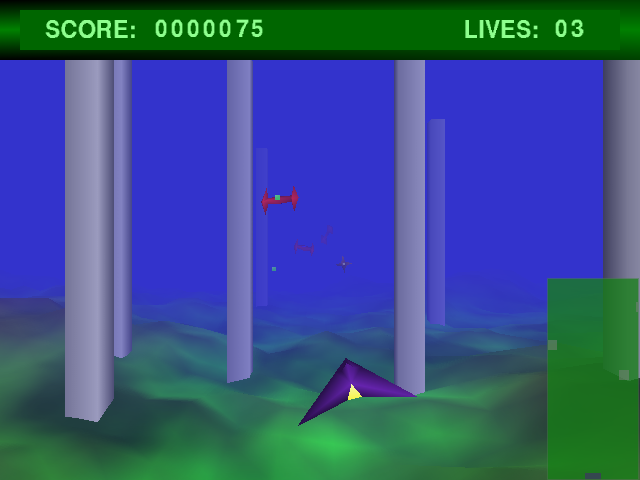 High speed 3-D space shooter
A frantic 3d space shooter inspired by games such as After Burner and Space Harrier. You pilot a ship through an obstacle-laden landscape and attack or evade swarms of enemies.
This game was listed as missing in action: it was no longer available when the site closed.
License: freeRequirements: Requires SDL, SDL_image, SDL_mixer, and OpenGL.
| Sound: | Play in X: | Play in Console: | Multiplayer: | Network Play: | 3D Acceleration: | Source Available: |
|---|---|---|---|---|---|---|
| yes | yes | no | no | no | yes | yes |
Submitted by McMartin on 2005-01-18.
Easy to compile, but I need to add
-L/usr/X11/lib/to LDFLAGS variable in order to linker find libGLU.Simple game, nice idea. Currently, the 3D graphics are still very simple (a better model for player ship and maybe some textures). I miss a music track. I miss sound effects in title menu. The 2D graphics are cheap, they were created using online tools (did you think I wouldn't note? ;-P ). Maybe the "shot" sound effect could be shorter, and enemies could have sound too.
I have one (more) suggestion. Make camera follow the ship (as an option, of course). If you remember AfterBurner and Space Harrier well, the camera was not fixed. This will add action, make shots more precise and make your game less boring.
Maybe in future you could make this game much more like AfterBurner (adding missiles, for example).
it`s got a radar which shows both pylons and enemy crafts. now enable the side view (don`t remember which key -- '3' or '4'), and make sure that there is _no_ boxes on your course. you still get kills, because you actually shoot further than you see on the radar, but no enemy bullets manage to hit you -- at least that was my experience.
initially i thought that the radar only shows the pylons...
anyhow, i managed to get much further with this trick than in normal view.
It was nice to see joystick support for one thing. I had problems with the SDL_GL_SetAttribute( SDL_GL_RED_SIZE, 8) in sable.cpp. Can't use a 8 on my lowend system, 5 is all good.
g++ -o sable vcontrol.o keynames.o bcplrandom.o entity.o entityfarm.o environment.o
game.o geometry.o ground.o input.o menu.o models.o obb.o sable.o textures.o sound.o logo.o `sdl-config --libs` -lGL -lGLU -lSDL_image -lSDL_mixer
/usr/lib/gcc-lib/i486-slackware-linux/3.3.6/../../../../i486-slackware-linux/bin/ld: cannot find -lGLU
collect2: ld returned 1 exit status
make[1]: *** [sable] Error 1
make[1]: Leaving directory `/home/gustavo/Desktop/sable-0.4/src'
make: *** [make-sable] Error 2
bash-3.00#
Greetings,
Does anyone else get this error when trying to run Sable?
SDL PANIC: Video mode set failed: Couldn't find matching GLX visualWhenever I try to play the game, the program exits after issuing the above error. Sable compiled just fine under Debian Linux (Etch) without any warnings, but running Sable always produces this error.
Making things even odder,
glxgearsruns at hundreds of frames per second without a hitch./usr/bin/ld: warning: libstdc++.so.5, needed by /usr/lib/libGLU.so, may conflict with libstdc++.so.6
visual x bf lv rg d st colorbuffer ax dp st accumbuffer ms cav
id dep cl sp sz l ci b ro r g b a bf th cl r g b a ns b eat
----------------------------------------------------------------------
0x23 16 tc 0 16 0 r . . 5 6 5 0 0 16 0 0 0 0 0 0 0 None
0x24 16 tc 0 16 0 r . . 5 6 5 0 0 16 8 0 0 0 0 0 0 Slow
In the source file "sable.cpp", in function "init_graphics" (line 160 or so), changing
/* Ensure various sizes */
SDL_GL_SetAttribute( SDL_GL_RED_SIZE, 8 );
SDL_GL_SetAttribute( SDL_GL_GREEN_SIZE, 8 );
SDL_GL_SetAttribute( SDL_GL_BLUE_SIZE, 8 );
to
SDL_GL_SetAttribute( SDL_GL_RED_SIZE, 5 );
SDL_GL_SetAttribute( SDL_GL_GREEN_SIZE, 6 );
SDL_GL_SetAttribute( SDL_GL_BLUE_SIZE, 5 );
got it to work for me.