







Snowball
Version: 0.2
Category: Arcade
Average of 5 Ratings: 

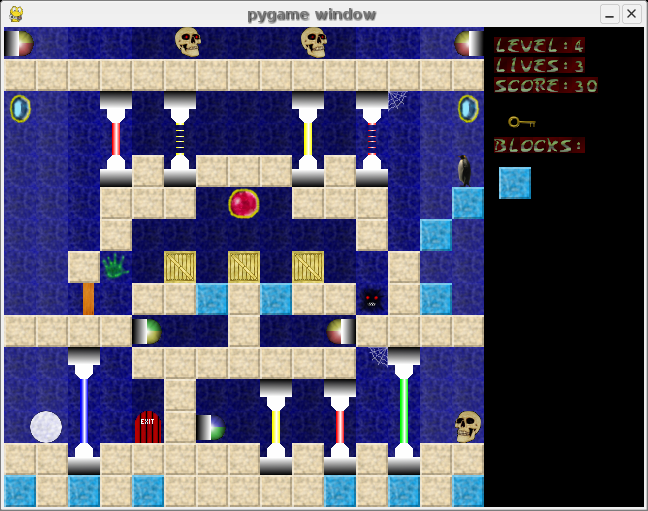 Jump'n'run puzzle game like "Solomon's Key" or "Spherical"
You control Tux the penguin through the levels and help him to guide a snowball save to the exit. Create iceblocks, collect keys, etc. and avoid traps and monsters. The game has a built in level editor but has only 10 levels for this release. It's licensed under the GPL.
License: free
Requirements: Python,
PyGame
| Sound: | Play in X: | Play in Console: | Multiplayer: | Network Play: | 3D Acceleration: | Source Available: |
|---|---|---|---|---|---|---|
| yes | yes | no | no | no | no | yes |
Submitted by anonymous on 2005-08-15.
Hi,
thanks for your comment and rating! Animation and graphic in general need to be improved. I'm working on the next release (V0.2), which will hopefully have a nice visual touch ;-)
Willi Kappler
Extremely polished for a 0.1 release. I'm looking forward to the next version.
Pit
Hi,
nice to hear that people like my game ;-) The key problem that you have needs to be solved, of course! Could you give me some more information ? What os / distribution are you using ? Which version of python and pygame ?
Have a nice day,
Willi
it's not a distribution problem, but one of the hardware. On my desktop it works, but not on the notebook. Both of them run SuSE 9.2 with python 2.3.4 and pygame 1.6.2. So I guess the culprit is that the config file uses keycodes directly and not some 'interpreted value' as given by the keymap....
Pit
I think the problem is introduced because you are using pygame.event.get([pygame.QUIT, pygame.KEYDOWN]) to get the event. This function returns these events from front of the event queue. (Pygame documentation is not correct here, I've just checked Pygame source code. I have to report them this bug.)
I'm able reproduce the problem when application will lost and gain focus multiple times. I guess the focus event chokes up the event queue.
Just use pygame.event.get() and it will work.
hi fidlej,
thanks for the info! sorry for being late, i haven't looked into the comments for a while :-)
The new version fixes the problem.
Have a nice day,
willi
I like this game. The idea with ice blocks is brilliant and the levels are using it a lot.
Questions: how to restart a level? I need this when I'm blocked and can't kill himself.
hi fidlej,
i'm happy to see one more guy who likes the game! the new version has the ability to restart a level with the "k" key, but you will loose a life. the new option menu also allows you to select a start level.
greets,
willi
Nice concept. Needs some serious improvements in graphics, sound and controls and such, but it's a start =)
The gameplay reminds me of Zep's Dreamland, although it's a bit different.
Keep up the good work!
hi trick,
did you try the newest version v0.2? we concentrated on graphic improvement. what's wrong with the controls ? you can customise it in the menu.the sound will be a target for v0.3 ;-)
greets,
willi
Yes, I did try version 0.2. (I wasn't completely sure since you don't have a versioned filename and there's no readme other than that postscript-file, which I had to convert to pdf to be able to read, but yeah, it's 0.2).
About the graphics.. I'm a bit picky about these things, so please don't feel offended or anything, but I still think there's much room for improvement. The graphics is very plain (except for the backgrounds, but some of those look too busy), not very consistent, repetitive, aliased, tile boundaries are too obvious, and the colors choices aren't very good either.
As for the controls, that was a poor choice of words. I didn't mean the keys -- those are fine. I don't think the "handling" of the game works very well, though. Maybe it could be better explained as bugs in the input system. For example, the pause after turning is too big. Also, if you walk the opposite way than you're facing (so that you turn) and then jump (while still holding the walking key), the jump will go straight up in stead of the way you were going. Ice blocks can be placed a long way away from the penguin, depending on tile boundaries (for example, if you stand between two tiles, jump up so that your head is just touching the bottom of a tile above, and press space, the ice block will appear two tiles away -- this makes sense if you think about the tile boundaries, but it still seems too long a way away). Not to mention that jumps follow a triangle form in stead of a curve, so they feel very artificial. Things like that.
(I'd go into more detail about both of these, but unfortunately I don't have the time right now.)