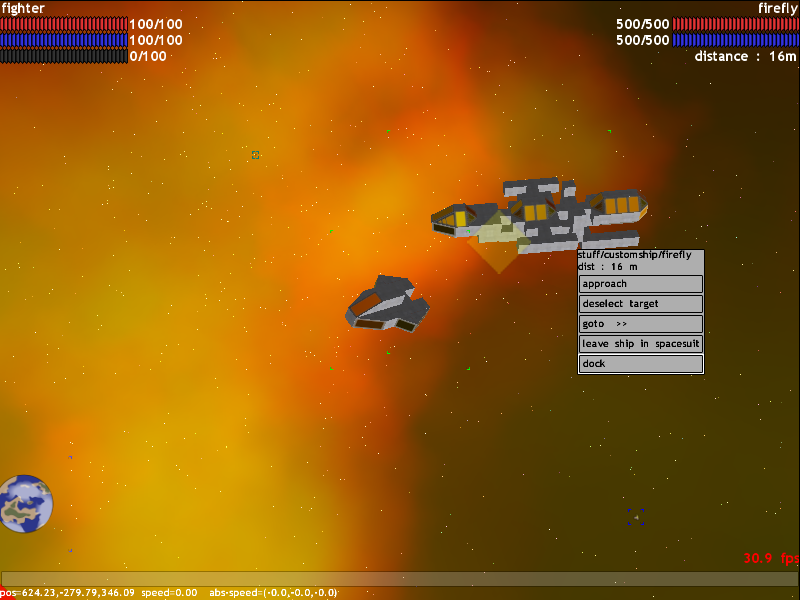


StressFreeZone Screenshot coop-multiplayer spacegame where you can also walk around inside your ship

StressFreeZone is an open-source space-game for Linux and Windows, focused on coop (non-massive)-multiplayer and intuitive gameplay, that is fun to play in short bursts, e.g. on LAN parties.

gameplay:
  • space combat
  • launching fighters from capship
  • exit ship in space-suit
  • walking around inside spaceships
  • lego-like ship-editor
  • (planned) trading, exploration, missions and campaigns

technology:
SFZ is still early in development (pre-alpha, planning/experimentation).
The code is released under GPL, the content will probably be cc-by-sa.
We use the Ogre3D engine and the Lua scripting language, the core code is written in c++.

License: free
Requirements: no linux binary yet, you have to compile from source until we find a maintainer

Sound:Play in X:Play in Console:Multiplayer:Network Play:3D Acceleration:Source Available:
yesyesnoyesyesyesyes
Suggest an update

Comments

at least a little bit to poke around and goof off for 20min?
Re: so dose a little bit of this game wo posted by ghoulsblade on Aug 6 2007 9:10 AM
you can fly around and blast asteroids and pirates, and you can decorate the interior of your spaceship with couches, tables, flowers and stuff like that, but don't expect any real gameplay yet, we're still experimenting with some technical things. We're rather following the "release early and often" style here, so it is still rather early =)
Re: so dose a little bit of this game wo posted by ghoulsblade on Aug 6 2007 9:45 AM
a few more screenshots and our devblog can be found here : http://sfz.schattenkind.net/wiki/index.php/DevBlog
im haveing problems with the fmod requirement. first the link provided on th sfz website does not work. second after finaly finding a download and supposedly installing it sfz still could not find it could some one who have go ten this game working tell me how to install it?
Re: fmod ex problems posted by anonymous on Aug 7 2007 5:50 AM
me again i was wondering if its possible to progress with out fmod if so how?
Re: fmod ex problems posted by ghoulsblade on Aug 7 2007 8:18 AM
you can download fmod here : http://www.fmod.de/ifmoddownload.html

also in the file INSTALL that comes with sfz there is a section "installing fmod" that worked for me (i have kubuntu feisty) :

( see http://zwischenwelt.org/trac/sfz/browser/sfz/trunk/INSTALL )

tar xfz fmodapi40622linux.tar.gz cd fmodapi40622linux su (become superuser/root) make install

if finding it still doesn't work, you can try this, but i didn't need it with the latest fmod version :

(as superuser/root) cd /opt/ mkdir fmod cd fmod cp -r PLACE_WHERE_UNPACKED/fmodapi40622linux/* . /sbin/ldconfig

if it still does not work you can also try using openal instead fmod, see http://sfz.schattenkind.net/wiki/index.php/BuildingWithOpenAL

Re: fmod ex problems posted by anonymous on Aug 8 2007 7:53 AM
all three don't work i still get this

commander@droid1138-desktop:~/Desktop/sfz_trunk$ make scons scons: Reading SConscript files ... Checking for pkg-config... yes Checking for OGRE... yes Checking for OIS... yes Checking for lua50... yes Checking for lualib50... yes Checking for openal... yes Checking for freealut... yes Checking for vorbis... yes Checking for C library fmodex... no Couldn't find fmodex library. Exiting. make: *** [all] Error 1 even after following the directions in build with openal is there something i could change in the SConstruct file so it won't look at all

Re: fmod ex problems posted by ghoulsblade on Aug 8 2007 8:22 AM
whoops, sorry, i describing how to remove fmodex lib from the SConstruct file, i updated the guide http://sfz.schattenkind.net/wiki/index.php/BuildingWithOpenAL

you could also try adding /opt /opt/fmod to this line : libpath = '/usr/lib /usr/local/lib' if you have successfully installed fmod

Re: fmod ex problems posted by ghoulsblade on Aug 8 2007 8:39 AM
my fmod libs are in /opt/fmod/api/lib , you could do a "locate fmod | grep .so" and add the result to that libpath list, but usually the scons script should using pkg-config should find the fmod libs if they installed correctly =(
Re: fmod ex problems posted by anonymous on Aug 9 2007 8:12 PM
it worked but the last third looked like this lugre/src/lugre_sound_openal.cpp:9:32: error: boost/shared_ptr.hpp: No such file or directory lugre/src/lugre_sound_openal.cpp:71: error: 'boost' has not been declared lugre/src/lugre_sound_openal.cpp:71: error: expected initializer before '<' token lugre/src/lugre_sound_openal.cpp:447: error: expected `)' before 'buffer' lugre/src/lugre_sound_openal.cpp:453: error: 'cSoundBufferPtr' has not been declared lugre/src/lugre_sound_openal.cpp:462: error: 'cSoundBufferPtr' does not name a type lugre/src/lugre_sound_openal.cpp: In constructor 'Lugre::cSoundSourceBuffer::cSoundSourceBuffer(float, float, float, int)': lugre/src/lugre_sound_openal.cpp:455: error: base operand of '->' is not a pointer lugre/src/lugre_sound_openal.cpp:457: error: 'mpBuffer' was not declared in this scope lugre/src/lugre_sound_openal.cpp: In member function 'virtual Lugre::cSoundSourceOpenAl* Lugre::cSoundSystemOpenAl::CreateSoundSource(const char*, int, int, int, int)': lugre/src/lugre_sound_openal.cpp:599: error: 'cSoundBufferPtr' was not declared in this scope lugre/src/lugre_sound_openal.cpp:599: error: expected `;' before 'pBuffer' lugre/src/lugre_sound_openal.cpp:600: error: 'pBuffer' was not declared in this scope lugre/src/lugre_sound_openal.cpp: In member function 'virtual Lugre::cSoundSourceOpenAl* Lugre::cSoundSystemOpenAl::CreateSoundSource3D(float, float, float, const char*, int, int, int, int)': lugre/src/lugre_sound_openal.cpp:611: error: 'cSoundBufferPtr' was not declared in this scope lugre/src/lugre_sound_openal.cpp:611: error: expected `;' before 'pBuffer' lugre/src/lugre_sound_openal.cpp:612: error: 'pBuffer' was not declared in this scope scons: *** [lugre/src/lugre_sound_openal.o] Error 1 scons: building terminated because of errors. make: *** [all] Error 2
Re: fmod ex problems posted by ghoulsblade on Aug 10 2007 10:10 AM
please try installing the boost libs for your system. e.g. "apt-get install libboost-dev" on ubuntu/debian
Re: fmod ex problems posted by anonymous on Aug 10 2007 9:22 PM
that worked but then another thing happend

lugre/src/lugre_sound_openal.o: In function `cSoundStreamOgg':

/home/commander/sfz_trunk/lugre/src/lugre_sound_openal.cpp:172: undefined reference to `ov_open'

/home/commander/sfz_trunk/lugre/src/lugre_sound_openal.cpp:178: undefined reference to `ov_info'

/home/commander/sfz_trunk/lugre/src/lugre_sound_openal.cpp:179: undefined reference to `ov_pcm_total'

/home/commander/sfz_trunk/lugre/src/lugre_sound_openal.cpp:172: undefined reference to `ov_open'

/home/commander/sfz_trunk/lugre/src/lugre_sound_openal.cpp:178: undefined reference to `ov_info'

/home/commander/sfz_trunk/lugre/src/lugre_sound_openal.cpp:179: undefined reference to `ov_pcm_total'

lugre/src/lugre_sound_openal.o: In function `Lugre::cSoundStreamOgg::CloseFile()':

/home/commander/sfz_trunk/lugre/src/lugre_sound_openal.cpp:130: undefined reference to `ov_clear'

lugre/src/lugre_sound_openal.o: In function `Lugre::cSoundStreamOgg::FillBuffer(char*, int)':

/home/commander/sfz_trunk/lugre/src/lugre_sound_openal.cpp:149: undefined reference to `ov_read'

collect2: ld returned 1 exit status

scons: *** [sfz] Error 1

scons: building terminated because of errors.

make: *** [all] Error 2

Re: fmod ex problems posted by ghoulsblade on Aug 10 2007 11:17 PM
i think ov_open is from the ogg-vorbis lib , please install the other dependencies listed in the INSTALL file :

liblua50-dev
liblualib50-dev
libalut-dev
libopenal-dev
libvorbisfile3
libvorbis-dev

and also the ones in http://sfz.schattenkind.net/wiki/index.php/Building_from_source if you still have problems.

Re: fmod ex problems posted by anonymous on Aug 12 2007 3:20 AM
i don't think thats it i think it has something to do with the the code or word or whatever in the lugre_sound_openal file. has anyone ever tried installing without fmod on a ubuntu system before?
Re: fmod ex problems posted by ghoulsblade on Aug 12 2007 11:28 PM
i just improved the scons-script/makefile, some lib paths and such, fmod is still the default, but now you can switch to openal by modifying just two lines at the top of the file (i also updated http://sfz.schattenkind.net/wiki/index.php/BuildingWithOpenAL ) maybe it'll work better now
Re: fmod ex problems posted by anonymous on Aug 13 2007 4:34 PM
that may work but the errors seem to be complaining about the lugre_openal_sound file not the scons file ill test what you suggested any way
Re: fmod ex problems posted by anonymous on Aug 13 2007 4:37 PM
i can't find the part of the scons file to change do i have to re download the file?
Re: fmod ex problems posted by ghoulsblade on Aug 13 2007 6:18 PM
you can either run "svn up" if you have subversion installed (apt-get install subversion) or you can download a new zip from here : http://ghoulsblade.schattenkind.net/sfz/sfz_1.0.593.zip (i posted an update to the project description here on happy penguin yesterday, but they have yet to confirm and apply it, it seems this is done manually)
Re: fmod ex problems posted by anonymous on Aug 13 2007 10:39 PM
i think were are closer this is the error part that it spit out

lugre/src/lugre_sound.o: In function `Lugre::CreateSoundSystem(char const*, int)':

/home/commander/Desktop/sfz_trunk/lugre/src/lugre_sound.cpp:20: undefined reference to

`Lugre::CreateSoundSystemFmod(int)'

collect2: ld returned 1 exit status

scons: *** [sfz] Error 1

scons: building terminated because of errors.

make: *** [all] Error 2

Re: fmod ex problems posted by ghoulsblade on Aug 13 2007 11:01 PM
ok, fmod is used by default, you had no luck installing fmod and want to try openal instead, right ? warning, openal is currently unstable, but if you really want to try openal, edit SConstruct and replace this line :
#SOUND_SYSTEM = 'openal'
with this :
SOUND_SYSTEM = 'openal'
(e.g. just uncomment it by removing the #)
Re: fmod ex problems posted by anonymous on Aug 14 2007 12:22 AM
i did that but it still happens (the first time i "#-off" the fmod now its fixed)
Re: fmod ex problems posted by ghoulsblade on Aug 14 2007 2:55 AM
sorry, my fault, something didn't make it into the last zip, here is an updated version : http://ghoulsblade.schattenkind.net/sfz/sfz_1.0.594.zip

or if you don't want to download again, you can edit lugre/src/lugre_sound.cpp and remove this line :

	#define USE_FMOD			1 

Re: fmod ex problems posted by anonymous on Aug 14 2007 3:06 AM
some thing seems to be wrong with the comments there is no line mentioned or link to download
Re: fmod ex problems posted by ghoulsblade on Aug 14 2007 12:12 PM
it seems we found a bug in the happy penguin comment system =) maybe the nesting is too deep. i'll post as a fresh comment
the website is down for a little while as we are upgrading our webserver, should be back up tomorrow or earlier.
Re: website down until tomorrow posted by ghoulsblade on Aug 8 2007 1:16 AM
website is up again =)

Hello!

I'm gamedeveloper too. I was planning to write similar game. Especially lego-like ship editor, walking around spaceships and of course space combat, trading and exploration ;) I was thinking about ability to land on planets, and space stations.

Technically for first version I was planning 2 dimmensions and I wanted give ability to destroy planets. In next versions I wanted to add multiplayer (massive would be great ;) ).

Now I am writing other game.

Keep up the good work!

With regards,
Queight.

@fmod prolem mentioned below : here is an updated version : http://ghoulsblade.schattenkind.net/sfz/sfz_1.0.594.zip

or if you don't want to download again, you can edit lugre/src/lugre_sound.cpp and remove this line :

	#define USE_FMOD			1 

Re: StressFreeZone posted by anonymous on Aug 14 2007 5:07 PM
WAHOOOOOOOOOOO!!!! IT WORKED FINALLY IT INSTALLED!!!! now how do i start it ?(a.k.a. the infamous where did it install question)
Re: StressFreeZone posted by anonymous on Aug 14 2007 5:12 PM
seriously i typed make it did its compiling thing it said "scons: done building targets" and returned me to the comandline and now i don't know how to actually start the game
Re: StressFreeZone posted by anonymous on Aug 14 2007 5:19 PM
wait i figured it out heres what it said. : commander@droid1138-desktop:~/Desktop/sfz_trunk$ ./sfz ./sfz: error while loading shared libraries: libOgreMain-1.4.3.so: cannot open shared object file: No such file or directory
Re: StressFreeZone posted by ghoulsblade on Aug 14 2007 6:33 PM
please try "locate libOgreMain | grep .so" , should give you a path to the file, copy the path to the parent folder, and adjust this line in plugins_linux.cfg : "PluginFolder=/usr/local/lib/OGRE"
Re: StressFreeZone posted by ghoulsblade on Aug 14 2007 6:36 PM
since our openal usage is sort of unstable currently (i think it crashes on laser sound) , you best add "gUseEffect = false" to data/config.lua until we fix the problem.

sorry for all your troubles, i hope you don't expect too much of sfz now, we're still very early in development, and there isn't really much to play yet, but we're working on it ;)

a few notes about what you can do so far : http://sfz.schattenkind.net/wiki/index.php/User_Manual

Re: StressFreeZone posted by anonymous on Aug 14 2007 11:12 PM
i understand the big underdevelopment sign I've just been waiting for a game like this and i would not want to see it disappear i guess you could consider me an unofficial noobish alpha tester

(p.s. changing the data/config.lua.dist file didn't work)

Re: StressFreeZone posted by ghoulsblade on Aug 14 2007 11:46 PM
*g* thats nice to hear, thx =) what does "locate libOgreMain | grep .so" say ?
Re: StressFreeZone posted by anonymous on Aug 14 2007 11:48 PM
oh i didn't see that top one stand by
Re: StressFreeZone posted by anonymous on Aug 14 2007 11:52 PM
ok i tried it but it just said the same thing. the ogre lib is in /usr/local/lib/libOgreMain-1.4.3.so
Re: StressFreeZone posted by ghoulsblade on Aug 15 2007 1:05 AM
hmm weird, you shouldn't have to do this manually if you did "make install" for ogre, but maybe something went wrong, so let's try this :

as superuser/root edit the file /etc/ld.so.conf and add a line with "/usr/local/lib" and run /sbin/ldconfig afterwards.... i hope this helps =)

Re: StressFreeZone posted by anonymous on Aug 15 2007 3:33 AM
before i do anything and to cure me of some of my noobness what is it supposed to do ? out of curiosity
Re: StressFreeZone posted by anonymous on Aug 15 2007 3:43 AM
im going to try uninstalling ogre then reinstalling it
Re: StressFreeZone posted by ghoulsblade on Aug 15 2007 11:43 AM
ogre is the 3d engine we are using, something like a layer above opengl or directx so we can use advanced graphics stuff like level-of-detail, material-scripts, particle-system-scripts, shadows, shaders etc without implementing the lowlevel interfaces ourselves. with ogre we can also store write custom geometry like our spaceships directly to the video ram without bothering with opengl extension headers and setup. storing such geometry on the video ram means we don't need to transfer it to the graphics card every frame, which gives a nice speed boost. sorry if this is all a bit too technical =) in short, with ogre makes it much easier to use all the advanced features of the gfx-card.
Re: StressFreeZone posted by anonymous on Aug 15 2007 4:45 PM
not what ogre does what is your instructions going to do?
Re: StressFreeZone posted by ghoulsblade on Aug 15 2007 5:46 PM
oh, sorry, i misunderstood you. the file /etc/ld.so.conf contains the search paths for "shared objects" = .so files (like libOgreMain-1.4.3.so) for libraries like ogre. my instruction will hopefully solve the error you had : "error while loading shared libraries: libOgreMain-1.4.3.so: cannot open shared object file: No such file or directory" by telling the system where it can find libOgreMain-1.4.3.so
Re: StressFreeZone posted by ghoulsblade on Aug 15 2007 5:49 PM
/sbin/ldconfig reloads the info in there, so you don't have to reboot your system for the change to take effect. see also "man ldconfig" for more infos
Re: StressFreeZone posted by ghoulsblade on Aug 15 2007 5:50 PM
uh oh, bugged thread again, looks like happy penguin comment system doesn't like nesting too deeply,
Re: StressFreeZone posted by anonymous on Aug 15 2007 7:11 PM
ok so what should the line with line with "/usr/local/lib" say?exactly all ld.so.conf so far says is :include /etc/ld.so.conf.d/*.conf
Re: StressFreeZone posted by ghoulsblade on Aug 15 2007 7:27 PM
just /usr/local/lib on the line seems to be enough. my file looks like this : http://www.pasteserver.net/2993
Re: StressFreeZone posted by anonymous on Aug 15 2007 7:57 PM
is was working then it hit this: terminate called after throwing an instance of 'Ogre::InternalErrorException' what(): OGRE EXCEPTION(7:InternalErrorException): Could not load dynamic library /usr/local/lib/libOgreMain-1.4.3.so/RenderSystem_GL.so. System Error: /usr/local/lib/libOgreMain-1.4.3.so/RenderSystem_GL.so: cannot open shared object file: Not a directory in DynLib::load at OgreDynLib.cpp (line 80) Aborted (core dumped)
Re: StressFreeZone posted by ghoulsblade on Aug 15 2007 8:18 PM
ok almost there =) the path you set in plugins_linux.cfg must end with /OGRE , e.g. /usr/local/lib/OGRE , because that is where the plugins are while the actual ogre lib is in /usr/local/lib itself, all the plugins are in a subdir named OGRE
Re: StressFreeZone posted by anonymous on Aug 15 2007 8:24 PM
yes it works !!!=D also nice touch having the default ship be serenity A.K.A. firefly
Re: StressFreeZone posted by anonymous on Aug 15 2007 8:50 PM
now for game play questions first the wiki's user manual is wrong pirates dofire back in single player, and how do i buy a new laser from the base?
Re: StressFreeZone posted by ghoulsblade on Aug 15 2007 9:03 PM
cool, congrats. we'll try to adress the troubles you had and detect them automatically, thanks for sharing ! too keep up to date i suggest you install subverstion (apt-get install subversion) and go to the game dir and do "svn up" , this way you can get the brand new version we are currently working on (featuring very simple delivery missions since this afternoon)

i updated the manual to describe buying weapons in more detail =) most things are currently done via rightclick menu, including buying equipment (select trade) you have to equip weapons to use them, for that you select "info : cargo" from the menubar on the top of the screen.

btw, we also have an irc channel on freenode.net : #sfz if you want to chat in realtime =)

Re: StressFreeZone posted by anonymous on Aug 15 2007 10:19 PM
thank you i hope i cloud be of more help than a fault spotter in the future (i do have a limited knowledge of blender) also if u haven't thought of it yet a return to mother ship button for the fighter or space suit could be useful
Re: StressFreeZone posted by anonymous on Aug 15 2007 10:21 PM
oh almost forgot and a remove furniture button
Re: StressFreeZone posted by ghoulsblade on Aug 15 2007 11:06 PM
return to mothership : good idea, noted=) about remove furntiture : you can shoot it ;) (the spacesuit does have a weapon)
Re: StressFreeZone posted by anonymous on Aug 15 2007 11:14 PM
happy penguin is probably hating us for clogging their comment system like this so i'm going to try posting any thoughts i have in the games forum if thats alright.
Re: StressFreeZone posted by anonymous on Aug 15 2007 11:29 PM
i think happy penguin can take another post with out choking how dose the ship editor work? i hit new then right click the block and it just disappears
Re: StressFreeZone posted by ghoulsblade on Aug 15 2007 11:52 PM
sure, you're very welcome in our forums. about the editor : we've got a culling bug so i suggest starting the editor with commandline parameter "-se" that fixes the culling.

you remove blocks with rightclick, and you can attach new block with leftclick if you select shippart/box from the tool-list on the right.

shippart/* are the different parts you can build your ship with, it works similar to lego. the editor tries to guess a good position for the part and that works most of the time, but you can fine-tune it with the different other tools (rotate, mirror...)

the interface is still a bit strange as the editor is just a first experimental prototype of what we want to do later.

To try out ships you created see this page : http://sfz.schattenkind.net/wiki/index.php/HowToAddShips
Re: StressFreeZone posted by anonymous on Aug 16 2007 12:17 AM
left click is not placing blocks its rotating the camera do u ever consider modeling it after kingdom hearts gummie ship editor
Re: StressFreeZone posted by ghoulsblade on Aug 16 2007 1:38 AM
you have to click on an existing block, new blocks are always attached to things that are already there.

clicking places a block, dragging rotates the camera

I' using sfz_1.0.594.zip. scons quits with an error:
g++ -o lugre/src/lugre_BorderColourClipPaneOverlay.o -c -g -DUSE_OPENAL -DEXT_HASH -I/usr/include/SDL -I/usr/include -I/usr/local/include -Iinclude -Isrc -Ilugre/include -Ilugre/src -I/usr/include/OGRE -I/usr/local/include/OIS -I/usr/include/lua50 lugre/src/lugre_BorderColourClipPaneOverlay.cpp
lugre/include/lugre_BorderColourClipPaneOverlay.h: In constructor 'Lugre::CCPBorderRenderable::CCPBorderRenderable(Lugre::cBorderColourClipPaneOverlay*)': lugre/include/lugre_BorderColourClipPaneOverlay.h:104: error: 'mUseIdentityProjection' was not declared in this scope
lugre/include/lugre_BorderColourClipPaneOverlay.h:105: error: 'mUseIdentityView' was not declared in this scope
scons: *** [lugre/src/lugre_BorderColourClipPaneOverlay.o] Error 1
scons: building terminated because of errors.
Re: compiling fails posted by ghoulsblade on Aug 14 2007 10:34 PM
it seems you have an old ogre version, you need at least 1.4.0 (eihort). ubuntu (and several others?) don't have a packet for that yet, so you'll probably have to compile ogre from source.
since the project updates i post here seem to not be processed i'll just write it here :
the lates packed version is always available under this link :
http://ghoulsblade.schattenkind.net/sfz/LATEST_SFZ_SOURCE.zip
you can use "updater.exe" under win and "svn up" under linux to get the latest changes, as the zip is only updated irregularly.
Re: permanent link to current version posted by ghoulsblade on Aug 29 2007 8:45 PM
In space, there is no absolute "down." In a spacecraft under acceleration, the property of inertia means "down" is always going to be in the direction of thrust, and so spacecraft must be built like skyscrapers, not ocean vessels. Put the engines at one end of that design, and the crew gets pinned to the "wall" as soon as you start moving, which is when you realize that that's actually the floor. :)
You could move the engines underneath, but you'd still have to narrow the floors and balance the weight evenly or the ship will spin or break apart.

Now maybe in the future, as Marge Simpson said, "everything's easier now that scientists have invented magic," and you have some hobbit-powered gravity machine/inertia vacuum that can generate and remove attractive fields, you'll still be better off with a proper "skyscraper" rocket design, because that pull you get from the thrust is *free* when the engines are running. Removing it and generating a second pull to the floor (i.e. side) of the ship is going to take more energy, which means less is available for engines and weapons, and the cruise ship loses out in power and efficiency even with super extra magic tech.
Re: Neat idea but the ships look silly posted by ghoulsblade on Aug 31 2007 11:11 AM
uhm, you know, it's a game, not a physically correct simulation ;) btw, it comes with a shipeditor, though it is only a first prototype, you can make realistic ships if you like =)
Re: Neat idea but the ships look silly posted by anonymous on Aug 31 2007 11:40 PM
It just hurts immersion and looks silly, is all. See

www.projectrho.com/rocket/rocket3f.html#down

for some pics... It's a really good site overall for hard SF info about space travel, lots of interesting stuff there.
Re: Neat idea but the ships look silly posted by ghoulsblade on Sep 2 2007 7:01 PM
hmm , a very interesting think, thx, i added it to our wiki =) we also have a forum where discusssing such ideas is a bit more comfortable than here, btw =)

i only took a quick browser through the file and haven't read all the details, but to me technology like spacefolding might be a good explanation for such rather free ship forms, as it makes possible to move quickly without having to consider incredibly strong inertia forces.

also the assumption that there is some kind of gravity generation technology seems popular in many scifi technologies.

making the shipform and engine placement physically influential might be an interesting addon later, but at first we want to keep things rather simple and focus on getting some gameplay going. sfz is largely scripted in lua, and is very extensible, so maybe there might be a mod or plugin later to add such realisim, if enough people are interested and we find someone to code it.

just my 2 cents, thanks for your interest =)

Log in or register to rate this game or post a comment.