







TinTin++
Version: 2.00.8
Category: Rpg
Average of 5 Ratings: 

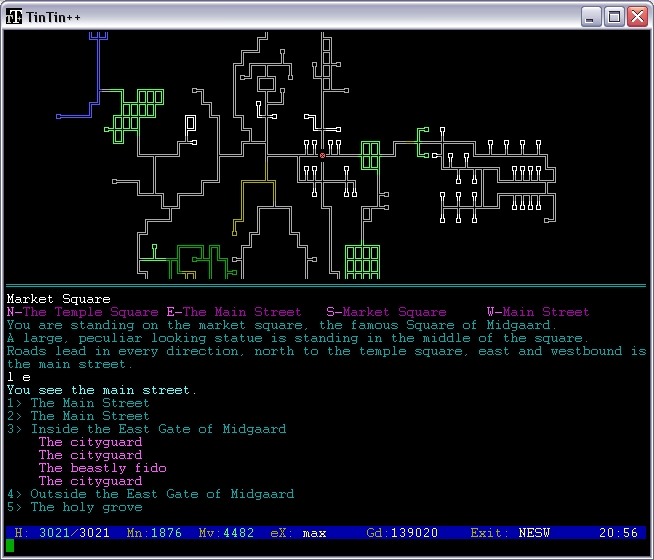 TinTin++ is a mud client that runs in console mode.
 TinTin++ should run on any unix/linux system (BSD, SuSe, Slackware, Debian, Mandrake, to name a few) and emulators, such as Cygwin for windows. Tintin will also run on Mac OS X 10.2 and higher.
Most TinTin++ commands are described in the manual, you might want to look through it first if you need help. The script section gives some useful examples on how to use tintin on your mud.
License: free
| Sound: | Play in X: | Play in Console: | Multiplayer: | Network Play: | 3D Acceleration: | Source Available: |
|---|---|---|---|---|---|---|
| no | yes | yes | yes | yes | no | yes |
Submitted by nath on 2005-05-13.
There are currently two Muck clients. Tinyfugue is too heavy for a normal person to use (basically you have to do everything yourself, and edit cheesy configuration files until hell goes down on you)... or you use TrebuchetTk, which is the official client.
The official one is great but it's.... Tk! Is there any client out there that uses like ...normal widgets? Like GTK or Qt? AND still can handle a MUCK decently?
Anyways, as for a GTK+ client, I would suggest looking at Papaya.
This is better with TinTin.
In what way please?
This is such a vague statement. In fact I encourage EVERYONE to disregard this statement as there were no arguments at all provided to this claim.
If at anything, I can say the same about Tinyfugue, but those vague statements are unfair.
Take a MUD, strip it of all the fighting, put in MUF and you basically get a MUCK. There IS fighting on a MUCK, but that would be roleplayed and often planned first and then executed (though sometimes it would probably just be made up, too).
The trigger system is fairly good, and you can go through and source old perl/python files (its on the message boards how to do it, though it speaks of Ruby instead of ____ language) that some other clients use.
One HUGE bonus is that the coder himself gets on the forum and will personally respond to inquiries, and will (if persuaded) add things in with enough reason. Plus the others in the forums are really rather kind about sharing info and scripts, which makes starting out with it alot easier.
Plus (this may seem a bit odd, but I'm odd anyways), if you're playing a text-based game, why go through the trouble of dealing with a GUI? Open a few shells, run your MP3 program of choice there, vim (or other text editor) in another to write out scripts, and use another to run TinTin++ in. No sense in running your box full blast when all you need is something rather simple. But, thats just me (plus figuring how to connect to the net via console depending on your connection).
Overall a really good client, a bit rough around some edges, but its open-source, so you can alter it fairly freely, and the code is fairly light (WinTin++ install file fits on a diskette).
I'd rather like to see an interface to it, then use bindings in your own language.
However, on the other hand, maybe its not so difficult to make ... :)
The mapper is pretty good if you use the font with line drawing characters and your MUD's areas are nicely spaced out. The screen shot also shows a split screen prompt bar based on the prompt script from the website.
Taking the latest beta into account tintin is by far the best console client out there. However, there are a few downsides a tinyfugue user might see to tintin - namely that it's equally if not more powerful, is well documented, and uses clean scripting that is not exhaustingly complicated to understand.
The "+" symbols in the URL need to be changed to "%2B"
#session horselogy tintin.sourceforge.net 4321 #Trying to connect to tintin.sourceforge.net port 4321. #COULD NOT CONNECT #THERE'S NO ACTIVE SESSION NOW.
Excellent work.