







Unreal Tournament 2003
Version: 2225
Category: Action
Average of 12 Ratings: 

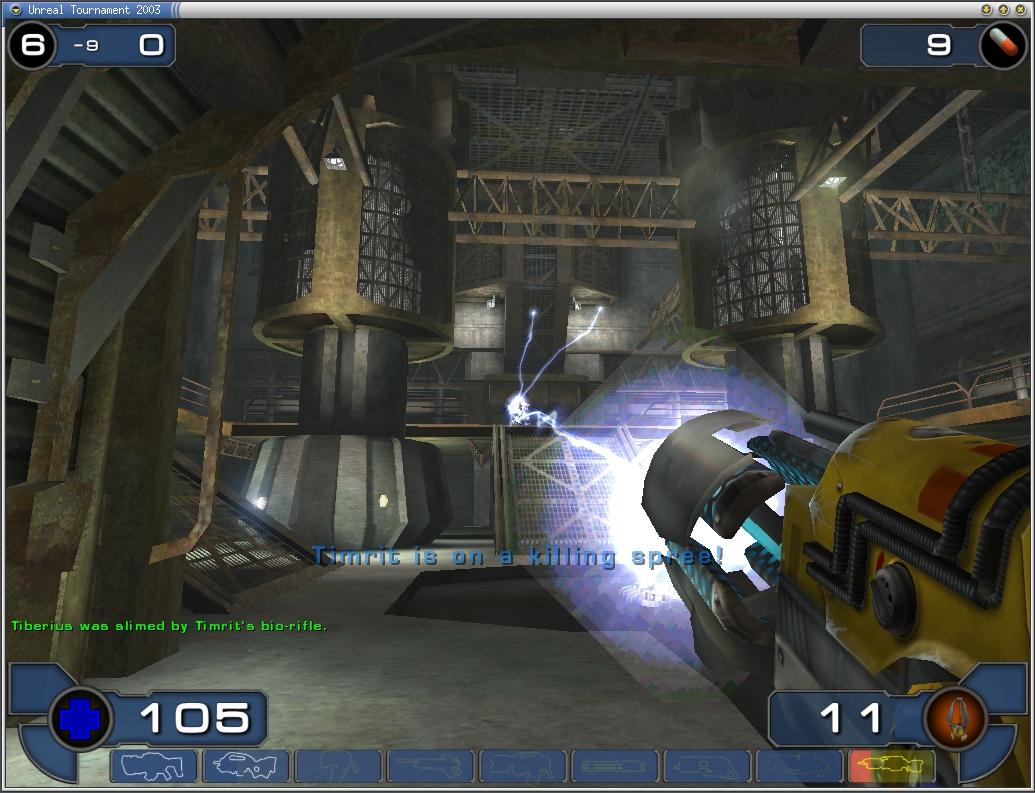 Brutal, pretty multiplayer deathmatch
Unreal Tournament 2003 is the sequel to Unreal Tournament.
The homepage says: "Unreal Tournament 2003 is a lightning-fast, no-holds-barred sport of the future, where warriors face off like the Gladiators of ancient Rome to determine the ultimate combatant. Super human reflexes, awesome weapons and the skill to use them effectively are what separate the good from the bad, the living from the dead, the victor from vanquished.
Unreal Tournament 2003 can be played alone, against computer-controlled 'bots' or against human opponents via LAN or the Internet. The single player experience revolves around progress through a tournament ladder where you play alone or as leader of a team of warriors you select to take on the enemy in the various modes of combat. As your team wins, you'll work your way up through the leagues until the challenge to ultimate combat is met and the true Champion determined.
The multiplayer section of the game is where the skills you have are tested to the limit. Go up against individuals or teams on your own or as member of an elite squad on LAN or the Internet in Unreal Tournament 2003's various modes of multiplayer game play."
License: commercial
Cost: demo is free
| Sound: | Play in X: | Play in Console: | Multiplayer: | Network Play: | 3D Acceleration: | Source Available: |
|---|---|---|---|---|---|---|
| yes | yes | no | yes | yes | yes | no |
- Unreal Tournament 2003 home page
- Download Unreal Tournament 2003
- How to set up a UT2003 Linux server
- Order this game from Tuxgames.com
Submitted by bobz on 2002-09-15.
The core of this game differs little from the original UT - which is not necessarily a bad thing. The graphics and sound are vastly improved, and the new game type (Bombing Run) is a blast. While I got frustrated and bored with the original UT due to various shortcomings, based on this demo, I think UT2K3 will have a longer gameplay life for me. It just feels more solid and more engrossing - and, bottom line, it's a blast to play.
Beat an old lady with a stick and use her cable/DSL modem if you have to, do whatever it takes to get your hands on this demo. And when the full game is released, take similar measures to buy it as well. FPS fans will love this one.
[email protected]
The latest codebase seems to be offering more an more improvements. Let's hope that Epic fixes this problem, though I am sure that they will blame PowerVR for the Kyro's drivers and expect them to do it instead.
It seems like Epic puked out this OpenGL engine in a matter of a week... Things just seem broken and non-standard/incompatible. But it is nice that they offered something, anyway.
http://dri.sourceforge.net/snapshots Here u can DL driver for 3dfx,matrox,Intel,ATI.
Get a GF3. The image quality finally compares to ATI and everything runs perfectly.
First, make sure you have the latest supported drivers from nVidia Don't change anything manually.
Go to K > Configuration > Other > Mandrake Control center >Hardware > Display > Expert Mode > 4.2.0 wth 3D acceleration > 1024x768 + 32-bit
[make sure your video cards memory size supports what you select. For me with a 16 MB card 800x600 + 32 bit is the maximum supported with 3D acceleration. If you have a 32 MB card choose 1024x768 + 32 bit color]
Press ok a few times. Log out and/or restart. Play.
U don't need install mesa if u installed the driver for Linux with 3D.
Excellent work, Epic - and thanks for remembering your Linux lovin' brotha's.
Short answer: you won't be able to play this game with your TNT card.
Longer answer: Your TNT card doesn't have the horsepower (nor probably the right features) to run UT2003. As of right now, the game only runs on nVidia GeForce[1-4] and ATI Radeon 8500 based cards with vendor-supplied proprietary drivers. The reason for this is that UT2003 uses an OpenGL texture compression extention that is patented (boo!), so implementors of the extension have to pay a licensing fee to use it. The message about "DXTC/S3TC" is referring to this extension. But your real problem is outdated hardware, not drivers.
For more graphics card info, check out the README.linux that came with the game, and Matt Matthews' UT2003 overview at linuxgames.com.
For the record, the other message you see, about "XiG-SUNDRY-NONSTANDARD", refers to a mode switching extension used by Xi Graphics X servers. It just means you're not running a XiG server and can be ignored.
thanks you for support
-=JinkSyS=- Not Trolling...
Technically, it should run on the AMD K6-?, but it doesn't because we all know nobody is perfect. I am a K6-3 owner and am waiting for Epic to remove Head from Ass: make your binaries more modular with external optimizations for differing architectures. Maybe we'll see UT2003 on a non-X86, such as Alpha or PPC or Sparc or MIPS, if they took End-Users' advice.
chmod +x UT2003-Demo-Linux.sh.bin
and then run it as a normal binary
or this way
sh UT2003-Demo-Linux.sh.bin
Might pay to be root if you plan on installing to the default /usr/local/games and also run it from Xwindows so you get a nice installation GUI.
Another easy way is "chmod 777 filename" then run it like any other command.
If you are going to "bring him up to speed" you could at least not tell him to do something that is a horrible idea from a security standpoint.
Imagine if you just purchased a car and didnt know how to set the time on the radio, so you ask the dealther who says "Figure it out for youself I can't lead you by the hard your whole life. So stop asking stupid questions". I imagine you wouldn't go back to that dealer, right? If you would, then good for you. You deserve all the beatings you get.
I really HATE people like you a lot. If you won't answer the question because you're too "elite", then don't answer the damn question. The only reason you act like that is, because you think you're superior since you know how to use an OS that someone else doesn't. Believe me, no one but unsociable asshole geeks like you find that "cool".
Grow the hell up, or shut up.
$ ./ut2003_demo


Backtrace:

[ 1]  /lib/i686/libpthread.so.0 [0x40d73e55]

Signal: SIGSEGV [segmentation fault]

Aborting.
I'm on Mandrake Cooker and installed the UT patch. Does anybody else have the same problem? With cooker? Thanks!
The proper fix is to upgrade to the latest glibc.
Alternatively, what I did while waiting for a fix at the time was symlink /lib/i686/libpthread.so.0 to the libpthread.so.X in /lib (yes, they are different.)
I'll bet one of the above will fix it for you. Good luck.
There was a bug . There is a mailing-list also specially for linux.
LD_PRELOAD what you *realy* need. Update your application settings for UT2003 to reflect LD_PRELOAD, or create a script setup the LD_PRELOAD'd environment
Any suggestions?
I am operating through a internal net, and has a gateway out. If that makes any sense. :)
Is there any good IRC channels to meet some DB-fans for a matchup? I do rarely visit those "forums".
/The Patrix_neo bot.
I don't know of any other game that makes this much use of my hardware, please let me know if there are others.
Anyhow the game is great :-)
I have an Athlon XP-2000 with a Geforce 4 Ti 4200, and the game runs like hell.
2) ut2003.ini : (last 'ServerPackages=' - line : Add your mod.
3) execute: './ucc mastermd5 System/*.u'
and MOST importantly: read the installation-notes that came with the mod.
This has made the mods work for me.
I have the original Setup.int but still get the no matching delta error. Using Suse 9.0 on a laptop with Ati Radeon. For the rest 3d support works. When I rin the game now 2199 version, it runs too fast! Any ideas? would love to get it running straight!
Thanks in advance.
busy.sh called as "busy 10" pushes the CPU long enough to the limit for the timing measure of ut2k3 getting it right :)
Critical: GL_EXT_bgra not supported - bailing out.
Anyone an idea what that means? Graphics card is a Matrox:
Init: GL_RENDERER : Mesa DRI G400 20010622 AGP 1x x86/MMX
Init: GL_VERSION : 1.2 Mesa 3.4.2
ThanX,
Pit
FPS is great (Geforce2) on XP1900+ and install was easy, once I could locate the install script on the 3rd disc. Just followed a mag's recommendation to run is as follows:
sh /mnt/cdrom/linuxinstall.sh
It bodes well for the release of many more games.
With an athlon XP 2100+, GForce 3 ti 200, 512mb of pc 2700 mushkin RAM the game flies. the fact that we Linux gamers don't have to play with the a CD in the drive, means we don't have to risk scratches to our play disc through constantly handling. (put that in your pipe and smoke it windoze users).
All commercial game developers should pay close attention to the model Epic has used for shipping Linux games.
ERROR: No matching delta for /usr/local/games/ut2003/System/Setup.int The program returned an error code (3) Update failed
Anyone know what is wrong/how to fix it?
DISCLAIMER: there might be other files from the Bonus Pack interfering with the patch as well - System/Setup.int just happens to be the first one that pops up and stops the patch from working. All I can say is that I do have Epic's Bonus Pack installed (and I took care not to overwrite any existing UT2003 files when installing it), and both the update process and the updated game itself work fine for me. YMMV.
"cannot handle file 'libc.so.6' with TLS data The program returned an error code (1)"
That is using the patch llinked to above. If i use the one on the ut2003 website. it has a wierd file extension (.tar.tar) and i cannot extract it!!
please, help!
this one unzips fine. but when i run it i get:
"Couldn't run autoupdater (loki_update). Is UPDATER_PATH set?"
its typically nice of them to put no instructions in the archive whatsoever.
have tried running it from home and from ut directory. have also tried seting this variable to point to both the updater dir and the ut dir. NOTHING WORKS.