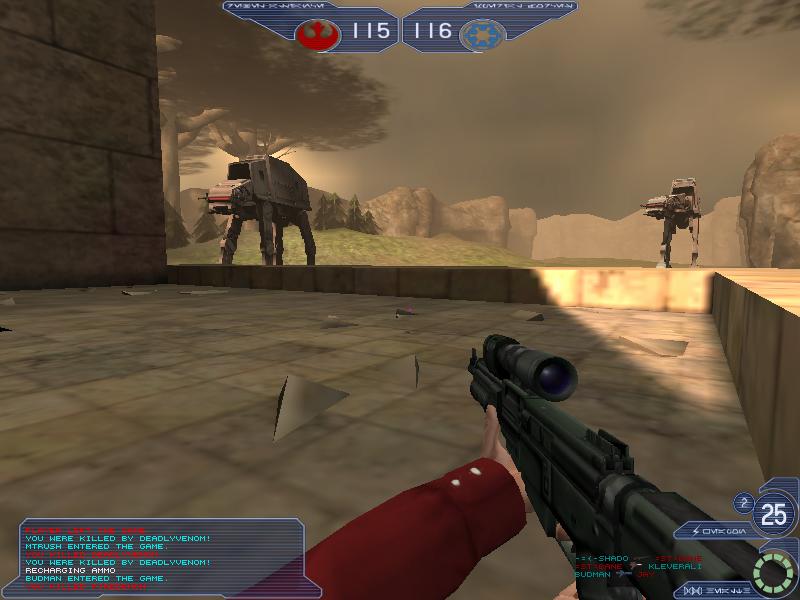


UT2003 Troopers Screenshot UT2003 Mod with a Star Wars theme

The first full MOD for UT2003 is based in the Star Wars universe. The battlefields upon which the gameplay of Troopers will take place will include many of the well-known and recognizable locations from the original Star Wars trilogy. They comprise a wide and varied selection, and are sure to entertain any demographic.

License: free
Requirements: UT2003 full game

Sound:Play in X:Play in Console:Multiplayer:Network Play:3D Acceleration:Source Available:
yesyesnoyesyesyesno
Suggest an update

Comments

Does somebody knows how to install this mod and then how to start ut2003 that way, that it starts the mod?
Re: Installation under Linux posted by anonymous on Jul 22 2003 2:52 PM
ut2003 -ini=troopers.ini -userini=tuser.ini log=troopers.log -userlogo=TroopersLogo.bmp
Re: Installation under Linux posted by anonymous on Jul 22 2003 2:54 PM
Instructions found at http://www.thehaus.net/index.php?ent=4725

"Apparently the ut2mod installer didn't want to create the necessary directories. From your ut2003 directory, issue the following commands:

mkdir Help/ReadmeContent mkdir Help/ReadmeContent/Gifs mkdir Troopers mkdir Troopers/TAnimations mkdir Troopers/TMaps mkdir Troopers/TSounds mkdir Troopers/TStaticMeshes mkdir Troopers/TTextures

After that, run the ut2mod installer thusly (you will need to point the command to wherever you unzipped the ut2mod):

cd System ./ucc-bin umodunpack -x TroopersInstall.ut2mod -nohomedir

Finally, edit the Troopers/TroopersLinux.sh script so it reads thusly (keep everything after ../ut2003 on one line):

#!/bin/sh ../ut2003 -ini=troopers.ini -userini=tuser.ini log=troopers.log -userlogo=TroopersLogo.bmp

If you are running a dedicated server, add -nohomedir to the end of that command. Unfortunately, I must say that my initial impressions of the mod are not favorable. I played a Rebel and if I get hit twice by a Stormtrooper, I'm dead. If I accidentally fall into some water, there seems to be no way to swim. You drown very quickly. I'll read up on it a bit more and report back later."

I went to the site and checked the screenshots, they are awesome...

Shame Ut2003 under linux goes a bit crappy for me..

mmm... anyone knows the ideal setup for ut2003 under linux?

athlon xp 1400 1,2Gigas DDR RAM Sound Blaster Live! Nvidia geforce 3 64 mb.

Re: Amazing screenshots posted by anonymous on Jul 25 2003 8:03 PM
Your computer is all fine and good except for your video card. Geforce 3 with 64 MB's of RAM isn't good enough for UT2003. That's right. You aren't good enough Polly Prissy Pants- Now what? You gonna cry? Anyhow, Minimal GeForce 4 Ti4200. This game is a hog, no matter what OS. In fact, most people don't play it because it's a slideshow on average computers... again, no matter the OS. Massive maps that slow to a crawl, etc.

I bought the game from tuxgames, but personally play Enemy-Territory or Return to Castle Wolfenstein. Enemy-Territory is coming along way- and it's free. Very popular. UT2003 is just too heavy for me to enjoy. My vid card can start heating up after a map or two.

Re: Amazing screenshots posted by anonymous on Jul 30 2003 11:08 PM
I'm running a geforce 3 with 64 meg myself, and, unless you turn the detail/texture/resolution settings way up, it will work fine. It's true that you get more out of it with more powerful cards, but it's by no means a requirement. I have personally played it on a computer with a geforce 2 with 32 megs, and it still played just fine on fairly average video settings across the board. So, I don't know what kind of a problem that other guy has, but don't worry about your system- it will work great.
I tried running this mod:

---------------------------------------------------- [darklord@darkforce Troopers]$ ut2003 -ini=troopers.ini -userini=tuser.ini log=troopers.log -userlogo=TroopersLogo.bmp Can't find file for package 'WinDrv'

History:

Exiting due to error ----------------------------------------------------

Am I just not starting it right?

Any ideas? Thanks...

Re: Can't find files posted by anonymous on Aug 16 2003 12:01 PM
I get the same error.. find any fixes yet? I have reinstalling and it still gives the same error. only seems to run when I am logged into a GUI using root .. When I login as a user and try to su and run it, it still gives the error
Re: Can't find files posted by anonymous on Aug 16 2003 12:08 PM
try removing ~/.ut2003 directory. This worked for me :)
Re: Can't find files posted by anonymous on Sep 5 2003 1:39 PM
Did you go to /usr/local/games/ut2003/System/ and replace "Troopers.ini" with the "DefTroopersLinux.ini" file?

That "WinDrv" error indicates it tries to load some D3D/DX stuff.

Log in or register to rate this game or post a comment.