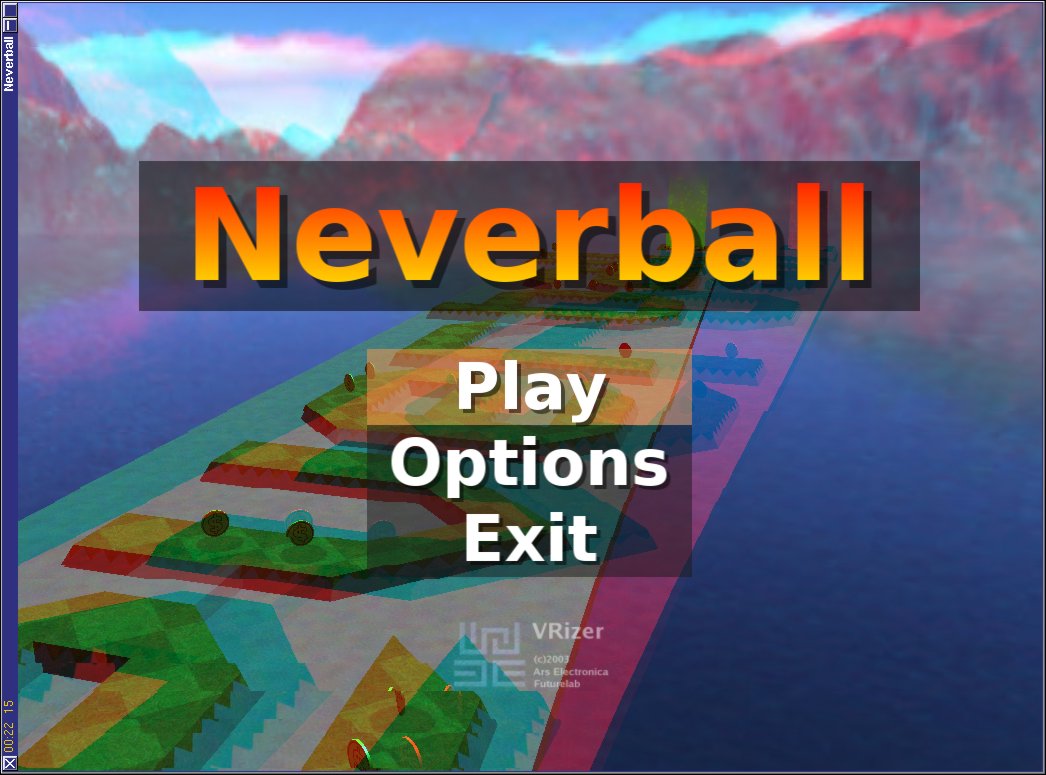


VRizer Screenshot Library to create stereoscopic output for arbitrary opengl software

Originally developed for using UT2003 in Virtual Reality setups like the CAVE, VRizer evolved to a versatile tool to create stereoscopic output for almost arbitrary OpenGL games.
Successfully tested on: UT2003, TuxRacer, Neverball, Trackballs, Foobillard, Scorched3D...

License: unknown

Sound:Play in X:Play in Console:Multiplayer:Network Play:3D Acceleration:Source Available:
noyesnononoyesno
Suggest an update

Comments

Tried it with gl-117 and got a really good 3deffect
If only it was free software.
I played a movie using mplayer and opengl output... somehow that works as well, motion is a bit blurry though
can someone post a working config file here? ive been fiddling with it, and i cant get it to work the way i want it too... (the way i want it is the way its in the picture). anyone?
Re: working config file? posted by anonymous on May 13 2004 6:23 AM
for neverball i recommend

rgstereo y
scale 10

the snapshot was made with an old version of neverball, dont know if anything crucial changed since then.
When I start the game with SuSE Linux in root, the ball, the backgrounds and the textures are shown, but the floor is invisible!! I can't see where the holes or walls or floor are. When I play the game without OpenGL, the games shows a floor but runs shitty. How can I solve the problem?

Answers to: [email protected]

Re: Problems posted by rlk on May 13 2004 12:15 PM
You're probably seeing a bug in Neverball, or at least the failure of it to work around a driver quirk, rather than a problem with VRizer. If you're using version 1.2.5 of Neverball, you can try editing your .neverballrc file. Try changing the 'shadow' value to 0, 1, or 2.
i tried that configuration, it seems to work (although it doesnt seem that 3d to me :S ). it does working with ut2004, but expect a severe fps drop.
Re: thanks posted by anonymous on May 13 2004 2:07 PM
yes of course, should be right about 1/2 of the original fps (left and right eye per frame).
Excuse me for asking a dumb question, but what equipment do you have to use with this stuff? Plain, simple red/blue glasses?
Re: VRizer posted by Aicop on May 13 2004 9:42 AM
I use red/blue glasses, and It looks good - here are some screens I took using VRizer and UT2k4
  I get nothing but segfaults when trying to use this binary. Let me guess, non-nvidia users need not apply?
  Kernel 2.4.25, glibc 2.3.2, Radeon.
Re: Nothing but Segfaults posted by anonymous on May 14 2004 2:13 AM
VRizer should not depend on the hardware because it doesnt link to a specific opengl lib. maybe you can post the output up to the segfault.
Re: Nothing but Segfaults posted by anonymous on May 14 2004 1:33 PM
I ran an strace, but found no significant messages up to the segfault -- weird. I hate binaries.
Re: Nothing but Segfaults posted by anonymous on May 14 2004 3:19 PM
so, putting strace aside, is there no output at all (stderr or stdout) between starting the app and the segfault?
Re: Nothing but Segfaults posted by anonymous on May 16 2004 2:59 PM
Same problem on my machine. Already any suggestions how to help it?
Re: Nothing but Segfaults posted by anonymous on May 17 2004 1:16 PM
is there any output before it segfaults?
Re: Nothing but Segfaults posted by anonymous on Jun 29 2004 12:33 PM
I have the same problem. Here's the output with Neverball:

XCreateWindow: 32x32+0+0 id=29360130 parent=70
XCreateWindow: 32x32+0+0 id=29360131 parent=70
my_glXChooseVisual
XCreateWindow: 800x600+0+0 id=29360141 parent=70
XCreateWindow: 800x600+0+0 id=29360142 parent=70
XCreateWindow: 800x600+0+0 id=29360143 parent=29360142
Segmentation fault

steven

i exported it: export LD_PRELOAD="path/vrizer.so".

after exported. neverball and all gl programs say :

XCreateWindow: 32x32+0+0 id=77594626 parent=142 XCreateWindow: 32x32+0+0 id=77594627 parent=142 [guy@golem2 test]$ pen shared object file: No such file or directory

when i ran vendetta i got a logo of Vlizer and i noticed a few changes in the textures, but no sterio.

i use nvidia drivers, it might be somthing about them.

did i do somthing worng?

Re: does anyone know what is worng? posted by anonymous on May 14 2004 2:18 AM
seem VRizer cant fine some shared lib (...pen shared object file: No such file or directory). there has to be some more output. can you post the whole output?
Re: does anyone know what is worng? posted by anonymous on May 31 2004 9:05 AM
thats all i see:

[guy@golem2 VRizer-0.1-bin]$ export LD_PRELOAD="/home/guy/Desktop/VRizer-0.1-bin/vrizer.so" [guy@golem2 VRizer-0.1-bin]$ neverball vrizer.so: _init_vrizer global config file (etc/vrizer.conf) ...no config file present user config file ($HOME/.vrizerrc) ...no config file present local config file (./vrizer.conf) reading config argument =<10> end of _init_vrizer vrizer.so: _init_vrizer global config file (etc/vrizer.conf) ...no config file present user config file ($HOME/.vrizerrc) ...no config file present local config file (./vrizer.conf) ...no config file present end of _init_vrizer XCreateWindow: 32x32+0+0 id=81788930 parent=142 XCreateWindow: 32x32+0+0 id=81788931 parent=142 [guy@golem2 VRizer-0.1-bin]$ object file: No such file or directory

Re: does anyone know what is worng? posted by anonymous on Jun 1 2004 6:43 AM
I have exactly the same problem. The program starts (the resolution is switched or a window is created (depending on the game)) and exits with memory access errors or simple SDL errors.
Re: does anyone know what is worng? posted by anonymous on Jun 29 2004 12:16 PM
the new 0.4 also has the same problem
Re: does anyone know what is worng? posted by anonymous on Jun 29 2004 4:33 PM
its really hard to say without the linebreaks. but the "object file:..." statement seems that there might be some lib missing (or a link to a devel version - see README and INSTALL).
furthermore the "reading config argument =<10>" stuff puzzles me. you might have a wrong ./vrizer.conf file lying around (see also README/INSTALL).
hope this helps.
I went to the web site and the faq is just a broken link. Anyone have some sample config files? most games appear to work with this library, however i need to adjust the color some for my red blue glasses and the seperation seems a little extreme for some games thanks

Downloaded this, was afraid that it'd be complicated to get working... Up and running on my first game within 60 seconds! A lot of games certainly seem to need some tweaking though. My eyes aren't *that* far apart.

Most fun game I found so far would be GLTron. The 3D is good, if a little disorientating. The debris flying about when you crash is a nice effect :-)

Worst game: Crack Attack... Though I probably shouldn't have tried, since it's only supposed to be 2D with 3D effects :o)

If you can lay your hands on a pair of red/green glasses, give this a shot

Anybody know of a good place to buy the 3D glasses? Do I have to go online to find them, or is there a store chain that sells glasses that work? Also, are there differences between different kinds of glasses that make them work better or worse? Recommendations?
Re: Glasses? posted by kgroombr on Oct 11 2004 11:25 AM
Here is a site that sells these:

http://www.berezin.com/3d/3dglasses.htm

I haven't used Vrizer, but my guess is you need red/cyan.

There are a lot of choices, so if you get some, please reply back to this and let us know which ones worked good/bad for you.

Thanks, Ken

[email protected]

Re: Glasses? posted by anonymous on Oct 11 2004 1:09 PM
very cool. thanks!
Re: Glasses? posted by kgroombr on Oct 17 2004 4:07 PM
After thinking about it, I went ahead and purchased the MiraChrome 3D Anaglyph Glasses. I got them yesterday and they seem to work really well. I think the screen colors have to be adjusted to match the glasses since I see a slight double vision effect (not sure if that is what to call it) since I still see a slight red outline since the red isn't totally filtered.

After playing a game, my stomach is rolling. Not sure if it is the glasses or the 3D effects. It is amazing!

The only major problem on ut2003/ut2004 is that zooming doesn't work (i.e. Lightning gun, Tank, etc).

It is very cool though.

Ken

I am just taking my first steps with assembly language recently, and one of the two or so things that bugged me a bit about this library were the logo it puts on the screen in some games and the narrow (IMO) FOV it forces on you.

I figured out a way to remove the logo by making the draw_logo routine return immediately in 0.5. To do this, just use a hex editor to change the byte at 71f4 to C3 (ret) in vrizer.so. 71f4 is where the draw_logo routine starts and the C3 is the return opcode, so it just makes the function return immediately.

Quake 3 runs beautifully with it with no logo showing (use the r_glDriver cvar).

Now if only I could fix that damn FOV or get the lib to work with Doom 3......
Re: Getting rid of the logo posted by anonymous on Oct 16 2004 9:42 AM
grmpf:-[... not very pleased bout this hack, but anyway.
speaking of FOV, this is actually highly configurable. you only have to set up your own screen geometry as in the example config in the README.
-floh
I only have tried VRizer on Neverball 1.4.0 and I do not see the green view, only the red one.
Hmmm, crazy. Somehow, i (and people who tried it didn't either) don't get a 3d feeling if i use rgstereo. Maybe because it's for red/blue glasses(Using red/green)? Also, one can easily see the green(blue)/red parts, whereas one can't in a short film recently shown in TV here..... Just curious, would like to have a REAL 3D UT too :D.
Re: VRizer posted by anonymous on Nov 21 2004 11:02 AM
Well, nevermind. Actually quite obvious, i used green/magenta (polarized?) glasses..... and now i tried it with red/cyan ones and it works...... somehow. The crazy thing about it is, that i have to concentrate on the image to make it look 3D, if i just look at it (surely with the glasses on :D) i even sometimes (yeah, it's not constant -_-) see both images (red/blue(/green)) at the same time. Taking into account that i am looking through the glasses, i think that's a bit crazy.... maybe because i am sitting only about 1/2-1 meter away from my monitor?

Log in or register to rate this game or post a comment.