







X-Plane
Version: 9.50
Category: Simulation
Average of 4 Ratings: 

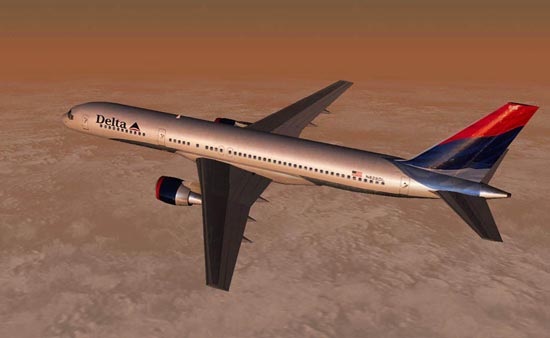 X-Plane is a very realistic flight simulator
X-Plane is the world's most comprehensive, powerful flight simulator, and has the most realistic flight model available for personal computers.
X-Plane is extremely customizable, allowing you to easily create textures, sounds, and instrument panels for your own airplanes that you design or the planes that come with the sim.
License: commercial
Cost: $39 +$10 S/H
| Sound: | Play in X: | Play in Console: | Multiplayer: | Network Play: | 3D Acceleration: | Source Available: |
|---|---|---|---|---|---|---|
| yes | yes | no | yes | yes | yes | no |
Submitted by anonymous on 2004-11-03.
If beta 15 doesn't complete startup for you, try to mkisofs it into a cd image, and mount -o loop it. This build of the linux port is a little wonky about the order of files actually reported by the filesystem (hint: in reiserfs, anything but sorted). A cd file system provides modest guarantee of presorted files, so it works out.
and it can be downloaded from here ;)
http://www.x-plane.com/v8download.html
http://www.x-plane.com/demo.html
"X-Plane 8.00 Beta-17 is now here for Macintosh, Windows, AND LINUX!
Download X-Plane 8.00 Beta, and order your X-Plane 8.00 Beta CD now!"
If you follow the link, you'll find Windows, Linux and MacOS X-binaries there, although the Linux version is only at Beta 15 right now.
Hth,
Chaosspawn23
My prayers have been answered with this Linux port.
Eric
SubSection "Display"
Depth 24
Modes "1024x768" "800x600" "640x480"
EndSubsection
Loads of fun, although it's hard to convince it to run on good gfx with my lousy machine.
Tip: I hear vram and ram are the killer factors here. 64meg on my video card and 380meg ram will simply not cut it.
Now, am I going to buy it? No. It's not the high price (50$) - that part I might put up with. It's the shipping being 30$ for overseas. For a bloody DVD! Sorry pals, but that's way too much. It's 60% of the game's price! Please find another means of shipping, and I might re-consider my decision not to buy.
Oh, before I forget: 5 stars, no question. Truly remarkable work.
Regards
Hans
Don't think you can run this on Linux. Why?
1) There is no linux installer on the disk. You are expected to open up a .rtf file (why not plain ASCII???) which directs you to the website to download the linux installer. The only installer available there is the one for the Demo version. There is no option to install from DVD from this version, so you are expected to re-download the entire 700+MB system *again*.
2) Once you've gotten this far, you're on your own.
3) Once you've PAID for the DVDs, you see a message stating that there is no realistic expectation of Linux support for this product. That message was somehow missing from the demo version. Reel 'em in, then once they've paid, screw them over.
I requested a refund for this product. Not surprisingly, that request was denied.
Do yourself a favor and look at FlightGear instead (http://www.flightgear.org/). Don't waste money on this overpriced hack.
Meanwhile, I'm looking at legal options to recover my losses since they sent me a defective product and won't provide support.
2. There is NO Linux installer on the overpriced DVD (coaster). You open up an RTF format README file (was ASCII text not good enough for a file containing one sentence of text???) which directs you to the website to download the Linux installer. NO LINK PROVIDED.
3. The *proper* Linux installer is nowhere to be found on the main website, only the demo/net installer. The demo/net installer WILL NOT allow you to install from (overpriced) DVD. Only after time wasted on google was I able to locate various DVD installer files on dev.x-plane.com. Not a single one of them worked. Between the various versions of installers, either it couldn't find the mounted XPLANE(R) DVD, or in the case of the 1.12 installer, it found the DVD, but refused to run stating it couldn't find the directorytxt.zip file in the root of the DVD (which because it is NOT located in the root of the dvd, it's in the "x-plane 840" directory.
After plenty of hair-pulling, I gave up and attempted an install on the Mac. The Mac installer locks up at "Reading and Installing file: but_taxi_light-1.png.zip" *every* *single* *time*.
Further issues I discovered with the demo (only *after* I made the mistake of spending money on this thing): Try setting the resolution to something different from the default (especially trying to get fullscreen or at least large enough to take advantage of a large wide-screen display). Watch what happens... you'll be amused. And no, the option to set the resolution to the monitor's current resolution does not work either.
At this point, I state that Laminar has willfully and knowingly sold me a defective product and failed to disclose information either in the demo or at the time of purchase that states whether or not a certain platform is or is not supported. Of course, since it doesn't work on the Mac either, I guess that much doesn't matter, since it's equally defective on a "supported" platform.
I contacted Laminar with the following BEFORE I EVEN RECEIVED IT after discovering a number of problems in the demo:
"I would like to return the product (UNOPENED) for a full refund (I will cover shipping cost). PLEASE LET ME KNOW ASAP IF THERE ARE ANY ISSUES WITH THIS."
Their (expected) reply:
"The demo is exactly the same software as the full version - there are NO differences at all. I'm sorry, but we don't allow refunds."
So Laminar deliberately ships a known unsupported and defective product (and does NOT state this anywhere until AFTER you have paid for it), then refuses to provide a refund. Apparently, Laminar needs to be challenged. And so, here is my challenge:
I will be contacting my lawyer to discuss options to recover my losses (money, time, legal fees, and whatever else I can get), and to require Laminar to provide adequate information disclosure at the time of purchase AND in the demo.
If anyone else would like to mention any problems they've had, please do so here.
Here is the email exchange:
The first part regards mounting the DVD for installation.
The second part solve a little problem I encountered while trying to run.
After that I had no more problem (except that related to ownership and savings of the parameters) In the hope that it will help.
Patrick.
-------------------------------------------------------------------------------------------
Hi --
The mount point is important, yes -- try:
# umount /dev/dvd
# mkdir -p /mnt/dvd
# mount -t udf /dev/dvd /mnt/dvd
Note that the DVD must be mounted as UDF for the installer to run.
Hope this helps --
joshua
On Thu, 25 May 2006, Patrick wrote:
> Hello,
> > I am running fedora core 5; I tried to install from a DVD that I bought
> some months ago; unsuccessfully until now!
> Here are the details:
> > My X-Plane DVD is an 8.21 version with the global scenery.
> > If I let the system mount the DVD (automount), it is mounted at > /media/cdrecorder; in that case, I can easily open the DVD (a link is > automatically created on the desktop), but I have no right to run the > installer (even as root).
> > Therefore, I unmounted the DVD and mounted it manually; in that case, I > can now run the installer, but it is unable to find the DVD from where > it is run (!!!) In case the mounting point would be important, I tested > several different mounting points, but the result is always the same; > the exact message from the installer is:
> > "I need an X-Plane 8.20 or later DVD in order to install this from the > DVD. Order ..."
> > The same result is also obtained whether I run the installer from a user > or the root account.
> > Finally, I tried to install from the net; then, I succeed in installing > but I cannot run X-Plane, although I can run the other programs.
> > If the guy who has ported X-Plane under linux could give me a couple of > advices, he would be very welcome; at the moment, I have no more idea.
> > Thanks in advance for your help,
-------------------------------------------------------------------------------------------
> ./X-Plane-pentium-3: symbol lookup error: ./X-Plane-pentium-3: undefined > symbol: alutInit
> > Naturally, the DVD is mounted manually as you told me.
> Any idea of what is faulty ?
Excellent -- this is easy to solve!
Try:
LD_PRELOAD=/usr/lib/libalut.so.0 ./X-Plane-pentium-3
Glad to hear that everything is working well. I'm a little concerned that you had to run the installer as root -- that might've been related to some left over installer-related files in /tmp (perhaps a directory.txt or some such). You should be able to run everything as user.
Let me know if you have any further questions.
joshua
> > Here are the details of my system:
> Kernel is 2.6.16-1.2122_FC5 (on fedora core 5)
> my graphic card is NVidia GeForce 6800, with the driver
> xorg-x11-drv-nvidia version 1.0.8762-2.lvn5
> kernel module is kmod-nvidia version 1.0.8762-1.2.6.16_1.2122_FC5
> > I think I have given the important information, but if you need more
> details, just tell me.
> > Thanks in advance, for your help.
-------------------------------------------------------------------------------------------
Note that the retail CD at say, Wal-Mart is both Windows only, and not recommended by the company itself. Buy it online.
joshua
The _only_ downside is that it can sometimes be trickier to install than simpler stuff, but don't give up. Once running it is simply the best. If you are an MSFS enthusiast, welcome! This suite of programs (because it is more than a flight sim) is probably why Billy Gates finally gave up on flight simulation. Must have been a nasty shock, that...............
We have used X-Plane since Version 5, eventually for the commercial development of aircraft that fly - from model scale up, and can endorse its abilities wholeheartedly. We switched to Linux as soon as the option was offered, and enjoyed a 30%+ boost in frame rate on a machine that was struggling under XP. X-Plane uses a physical simulation rather than a fudge-file of massaged data to make the aircraft fly as it should when you take to the air.............
To you, this guarantees a true-to-real-life experience when flying X-Plane, to me, it meant that I could learn the art of rotorcraft design without killing anybody. The close relationship between the X-Plane numbers and the flight of physical models was what encouraged us to persevere............
This is where the X-Plane suite comes in.... There is a program called Plane-Maker included, which does what it says on the tin. To reduce frustration (bound to be some, after all, this IS Rocket Science) I recommend tinkering with a copy of a working design. Maybe play with the looks of the aircraft for a bit? You just need to edit some images, after all. But you can do things like changing the wing span easily enough, and it's fun to try out the results. More power is a favourite, too!.............
Really easy to mung a design through over-enthusiasm, but that's why we make frequent backups, isn't it? .............
OK, so what else? How about Airfoil-Maker? Not immediately obvious why this is essential, but say you were creating a replica of a very old (or very new) aircraft and the right airfoil was not in the database? You would be stuffed, bigtime, unless you were willing to settle for near-enough is good enough. New designs with new airfoils would be out of the question without this program...............
There is also a Briefer - keen pilots use this to set up complex flights - but I never used it in anger, since I'm primarily a designer who also flies. Something for everyone here.............
I mentioned Rocket Science earlier. Yes, X-Plane will take you into space. And will also give you a planet to land on - Mars. So you can simulate (if you like) the next Mars mission. Spooky................
Once on Mars you will discover that the atmosphere is a bit thin, and that the two Mars Planes that Austin provides will take off OK with care, fly convincingly for a while, and then prove really hard to land - since they need to fly so fast to stay up in the thin atmosphere they also land frighteningly fast. No, even faster than that! So wrapping them up in a ball and throwing them down the runway is the easier option. It is possible to land one, I have done it, but had to add some serious retro-rockets in Plane-Maker to achieve it. Brakes. You need better brakes, and the ordinary sort just leave rubber on the runway for miles and miles and then I roll it over. Again.............
Early releases offered World-Maker to enable one to create new worlds, but it was a bit scary to use, and has been replaced (I gather) by WED, more focused on airport design. Have yet to try that.
Yes, you can have 'fun' with installation in Linux. But to be fair, there are so many Linux variants that it can be hard for a software maker to cover all the bases. Repositories and installations can vary a good bit. My thanks to Joshua for sorting us out by email, way back when v8 was new and shiny...............
Once it is running, I can vouch for its reliability, and our latest Linux installation of X-Plane v9 on this AMD240 (Xubuntu 910) went without a hitch - just downloaded the latest installer and loaded our DVDs. No hassle. Just lots of DVD swapping!...........
In conclusion, X-Plane has been a work tool _and_ source of enjoyment for many years now, especially under Linux. X-Plane may not be free as in beer, but nor is beer! Excellent value, imho...................
I have it, and the only "DRM" involved is a CD/DVD check. If you have the FAA certified version(s) you need a HASP dongle, but come on... that's a multi-thousand-dollar version meant for actual FAA flight-hours...