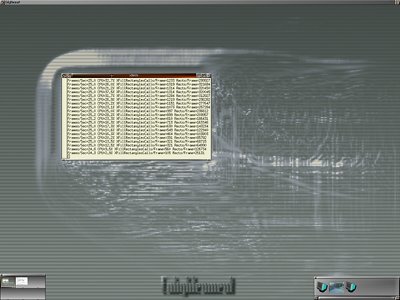


xdesktopwaves Screenshot Simulation of water waves on the X Windows desktop

xdesktopwaves is a cellular automata setting the background of your X Windows desktop under water. Windows and mouse are like ships on the sea. Each movement of these ends up in moving water waves. You can even have rain and/or storm stirring up the water.

License: free

Sound:Play in X:Play in Console:Multiplayer:Network Play:3D Acceleration:Source Available:
noyesnonononoyes
Suggest an update

Comments

This does look really cool, but it's not a game. This is the wrong place for it.
Re: Wrong place posted by Chaosspawn23 on Nov 18 2004 8:18 AM
Well, there is a category for toys, and this thingy obviously falls into it.
Honestly, I don't see any problem with it - various game libraries are also no games in themselves, but they too have a place on this site, as they are game-related. :)
Re: Wrong place posted by tuppe666 on Nov 18 2004 12:24 PM
This is definately the right place :)
Re: Wrong place posted by jacius on Nov 18 2004 3:16 PM
If it makes a penguin happy... :)
Re: Wight place posted by anonymous on Nov 18 2004 3:22 PM
And fellow enlightenment users all love the waveys... yay!
Re: Wight place posted by anonymous on Nov 19 2004 9:33 AM
Snow makes a penguin even happier.
Re: Wight place posted by jacius on Nov 19 2004 10:46 AM
Au contraire, penguins are most happy and joyous creatures when flying about under the water. Snow is nice, but it's snow substitute for liquid water ;)
The waves look really cool, but the program should definitely use renderaccel instead of cpu. And add more options, like wave opacity level and rain drop frequency.
Re: More widgets for this! posted by jacius on Nov 18 2004 3:50 PM
This is a very cool misuse of resources! More options would definitely be nice, especially opacity, but also to turn off bounces at the edges of the screen (waves would drift off into oblivion, if this wouldn't mess up the algorithm). Deformation of the background texture, while extremely cool, is probably too much to ask...

I'd really like to see some sort of scripting language support, to define new behaviors. Ideally there would be pre-defined functions like raindrop(x,y), or wind(strength) which could be used. For example, I'd make it so a slight breeze would come by every 3-5 minutes... maybe a sprinkle of rain. Imagine if this could be tied into an internet weather service...!

Re: More widgets for this! posted by anonymous on Nov 19 2004 1:18 AM
I agreed with the point about the frequency of raindrops being adjustable, so added the option. I have sent this diff to the author:

71a72
> int xdwRainFreq;
147a149
> 	xdwRainFreq          =10;
190c192
< 				"  -mc|-maxcolors \n"
---
> 				"  -mc|-maxcolors         -rf|-rainfreq <1-10>\n"
249a252,256
> 		else if (!strcmp(nm,"rf") || !strcmp(nm,"rainfreq")) {
> 			if (i>=argc) goto L_MISSING_OPT_ARG;
> 			j=atoi(argv[i++]); if (j<1 || j>10) goto L_BAD_OPT_ARG;
> 			xdwRainFreq=j;
> 		}
778c785
< 		rem-=500000;
---
> 		rem-=5000000/xdwRainFreq;

This is so awesome <3
It's fun and cool ;)
And it can be used all day time =)
That's good work.
Re: nice! posted by Tof on Nov 18 2004 2:17 PM
As always, forgot to vote
Re: nice! posted by anonymous on Nov 19 2004 9:15 AM
Uh...no you didn't. Look again.
Re: nice! posted by jacius on Nov 19 2004 10:35 AM
It retroactively applied his vote to all his other comments.
Indeed, it's really funny and doesn't take too much CPU Time i think.
You can also set the nice Level and it is and default in idle Mode, that's great.
And it's good, that you can choose custom Colors. ;)
It takes about 17-20% of one of my CPU's, that ok i think.

So it's very good Work!!
Thanx!
Simply that.
omg....so useless....it's great! :P
Looks pretty cool.

Could someone describe his CPU power and speed of this program?
I'm asking cause I have Celeron 600 and don't know if it even works on such processor ;)

regards
fEnIo

Re: hardware requirenments posted by anonymous on Nov 18 2004 11:49 PM
It worked fairly well on my 450 MHz PIII, with occasional slowdowns, though it ate all available CPU time so it's not something I'd leave running if I wanted to actually wanted to do anything *useful* with my computer at the same time. :-)
Seems to run fine on a 650 Duron, programs don't seem to run any slower. Course I do have 512 mg of ram but if it was cpu intensive I'd see it soon enough. This looks really cool, I have a desktop picture of a coral reef and with the program running it looks like ur looking down on the water and the coral is just below the surface.
Re: Not too cpu intensive posted by jounihat on Nov 19 2004 11:46 PM
The speed depends on the quality setting you're using. -q 9 makes my Athlon 2600+ cry. The default quality is 5. If you're noticing slowdowns, use lower quality.
Imagine if this could take advantage of the Composite extension in Xorg ...
It was nice, however somewhat slow on my dual head and a virtual resolution of 2560x1024. Appart from that, looking at all that water trickling in Xinerama made me want to go pee... but nice nevertheless.
this is really cool keep up the great work
This is a lovely effect to have on one of your secondary monitors if you're running multiple independant heads (wouldn't recommend it with Xinerama tho! ;) )

Also, for fellow AMD users, invoking xdesktopwaves with "-quality 9" is a great way to keep warm in winter :D
gcc -I/usr/X11R6/include -O2 -DXDW_MAX_OPTIMIZATION=2 -c xdesktopwaves.c -o xdesktopwaves.o gcc -L/usr/X11R6/lib xdesktopwaves.o -lm -lX11 -lXext -o xdesktopwaves /usr/lib64/gcc-lib/x86_64-suse-linux/3.3.4/../../../../x86_64-suse-linux/bin/ld: skipping incompatible /usr/X11R6/lib/libX11.so when searching for -lX11 /usr/lib64/gcc-lib/x86_64-suse-linux/3.3.4/../../../../x86_64-suse-linux/bin/ld: skipping incompatible /usr/X11R6/lib/libX11.a when searching for -lX11 /usr/lib64/gcc-lib/x86_64-suse-linux/3.3.4/../../../../x86_64-suse-linux/bin/ld: cannot find -lX11 collect2: ld returned 1 exit status make: *** [xdesktopwaves] Error 1
Re: Doesn't compile on x86-64 :( posted by anonymous on Dec 8 2004 7:50 AM
Never mind. I got it figured out. In the Makefile you have to replace LFLAGS = -L/usr/X11R6/lib with LFLAGS = -L/usr/X11R6/lib64.
Re: Doesn't compile on x86-64 :( posted by ronybeck on Dec 18 2004 12:17 PM
Thanks for posting the answer. I would not have worked out the answer. :-)
Very cool idea. Unfortunately, the way that my KDE moves the windows freaks it out. I always thought that was one of the most overlooked features of X is the ability to run programs in the root window.
Good, but the scanlines get in the way of the desktop icon's caption (gnome + nautilus)
Re: good, but the scanlines get in the w posted by Zardus on Dec 18 2004 5:01 PM
Those scanlines are quite annoying. Anyone know if there's a way to remove them?
Re: good, but the scanlines get in the w posted by anonymous on Dec 18 2004 10:50 PM
Try -wmopaque 50, but it requires the composite extension, a composite manager and a window manager supporting these. Unfortunately the composite stuff is still not very stable...
Re: good, but the scanlines get in the w posted by anonymous on Dec 18 2004 11:07 PM
Sorry, there was a mistake. The option is named -wmopacity 50.
I might gloat this toy to Macintosh users. They love eye candy.
Neato effects.
This is the perfect thing to spice up the default (ugly as hell) xdm login screen! However, due to the heavy CPU requirements I wouldn't recommend using this in the regular desktop.
looks like you scrape LCD screen witch screwdriver ;)

or trow bunch of sand in it :D

nice toy

hi everyone ... tryin this nice looking thing , but I just can't compile it....

looks like it can't find some .h .... do i need any extensions for that xshape ??

I try it in my gentoo and it looks amazing (sorry for my english)
i'm late seeing this ... it's sweet
Here is an article about xdesktopwaves from the Linux Magazine: http://www.linux-magazine.com/issue/56/xdesktopwaves.pdf

Log in or register to rate this game or post a comment.